Recipe - Smart Staff Out-of-Office Routing
Skill level: Intermediate
Organization: The Well Community Church
Requires Rock: 1.16.0
{# strip images & classes from the HTML but otherwise leave structure #}
Description
We place a high priority on reaching out and responding to incoming connection requests as quickly as possible.
Rock's ability to automatically assign connectors based on a person's campus is great, but when that connector
is on vacation, the request can sit untouched for far too long.
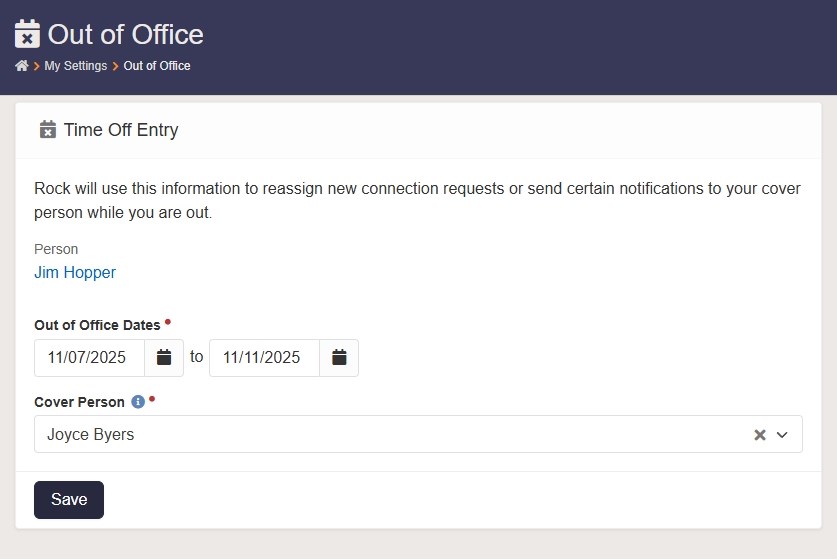
To solve this, I created a system that allows a staff member to enter their out-of-office dates and select another
staff member to cover for them while they're away. That information is then used to automatically reassign
connection requests and redirect certain contact forms and notifications to the designated cover person.

This recipe includes a Lava shortcode that accepts a person alias GUID and returns either a person alias GUID or
an email address for the individual who should be assigned or notified, based on whether the specified person is
currently out of the office.
Prerequisites
This recipe uses some of our own Rock customizations that may not match your environment. You may need to adjust
your Rock instance or modify the code in this recipe for it to work in your situation.
Staff Person Tag
We identify staff with a person tag:
- Name:
Staff
- Scope:
Organizational
- Entity Type:
Person
Make a note of your Staff tag ID for use later in this recipe
How-To
-
Create Person Attributes
Out of Office Dates
- Key:
StaffOutofOfficeDates
- Field Type:
Date Range
Out of Office Cover Person
- Key:
StaffOutofOfficeCoverPerson
- Field Type:
Single-Select
-
Values:
DECLARE @StaffTagID AS int = 1
------------------------------------------------------------------
SELECT A.GUID AS Value, P.NickName + ' ' + P.LastName AS Text
FROM TaggedItem AS T
    INNER JOIN Person AS P ON P.Guid = T.EntityGuid
    INNER JOIN PersonAlias A ON A.AliasPersonID = P.ID
WHERE T.TagID = @StaffTagID
    AND P.RecordStatusValueID = 3 -- Active status
ORDER BY P.LastName, P.FirstName
Make sure to change the @StaffTagID value to match your system.
- Control Type:
Drop Down List (Enhanced for Long Lists)
-
Create "Out of Office Check" Lava Shortcode
- Name:
Out of Office Check
- Tag Name:
outofofficecheck
- Tag Type:
Inline
-
Description:
Checks if the specified person is currently out of the office and if so, returns the
                person alias GUID or email address of their selected cover person.
Documentation:
<p><strong>Usage:</strong></p>
<pre>{[ outofofficecheck workeraliasguid:'01234567-89ab-cdef-0123-456789abcdef' return:'guid' ]}</pre>
<ul>
<li><strong>workeraliasguid</strong> (string, required) – The person alias GUID of the worker to check the out-of-office status for</li>
<li><strong>return</strong> (string, optional, default: <code>guid</code>) – Should the returned value be a person alias GUID or email address? (valid options:<code>guid</code> or <code>email</code>)</li>
</ul>
<p><strong>Output:</strong></p>
<p>Returns the person alias GUID or email address of the worker that should be assigned. If the worker is currently out of the office, their selected cover person is returned.</p>
Shortcode Markup:
{%- assign worker = workeraliasguid | PersonByAliasGuid %}
{%- assign assignToGUID = workeraliasguid %}

//- Check if the default worker is currently out of the office
{%- assign dateRange = worker | Attribute:'StaffOutofOfficeDates','RawValue' | Default:'' %}
{%- if dateRange != '' %}
    {%- assign dates = dateRange | Split:',', false %}
    {%- assign startDateKey = dates[0] | Default:'1/1/1900' | Date:'yyyyMMdd' | AsInteger %}
    {%- assign endDateKey = dates[1] | Default:'12/31/2900' | Date:'yyyyMMdd' | AsInteger %}
    {%- assign todayKey = 'Now' | Date:'yyyyMMdd' | AsInteger %}
    {%- if todayKey >= startDateKey and todayKey <= endDateKey %}
        {%- assign isOut = true %}
    {%- else %}
        {%- assign isOut = false %}
    {%- endif %}
{%- else %}
    {%- assign isOut = false %}
{%- endif %}
{%- if isOut == true %}
    //- Get the out-of-office cover person
    {%- assign assignToGUID = worker | Attribute:'StaffOutofOfficeCoverPerson','RawValue' | Default:'' %}
{%- endif %}
{%- if assignToGUID == '' %}
    //- Assign to the worker if not out of the office or no cover person was selected
    {%- assign assignToGUID = workeraliasguid %}
{%- endif %}
{%- if return == 'email' %}
    {%- assign worker = assignToGUID | PersonByAliasGuid %}
    {{- worker.Email }}
{%- else %}
    {{- assignToGUID }}
{%- endif %}
Parameters:
workeraliasguid (blank)return guid
-
Import "Set Out of Office" Workflow Type
Use the workflow importer to import the Set Out of Office_xxxxxxxx.json file
located in the zip file attached to this recipe.
After importing the workflow, you will need to modify it for your situation:
-
Open the workflow type and edit the Cover Person workflow attribute. Change
the
@StaffTagID value in the SQL to match the Staff tag ID in your system.
-
Create "Set Out of Office" Page
Create a new page as a child under the internal My Settings page (rock.example.org/my):
- Page Title:
Out of Office
- Site:
Rock RMS
- Layout:
Full Width
- Icon CSS Class:
fa fa-calendar-times
- Page Routes:
my/out-of-office
Add a new Workflow Entry block to the page's main zone. Edit the block properties:
- Name:
Out of Office Settings
- Workflow Type:
Set Out of Office (the workflow type you just imported)
- Log Interaction when Form is Viewed:
No
- Log Interaction when Form is Completed:
No
-
OPTIONAL: Import "Out of Office Check" Workflow Type
This step is only necessary if you want to automatically reassign connection requests.
Use the workflow importer to import the Out of Office Check_xxxxxxxx.json file
located in the zip file attached to this recipe.
After importing the workflow, you may need to modify it for your situation:
-
Open the workflow type and edit the Activity Type workflow attribute. Change the
Connection Type and Default Value to select the type of activity that you would
like the workflow to add to the connection request. Ours is "System: Other", but yours might be
different.
-
OPTIONAL: Add Connection Request Workflow Trigger
This step is also only necessary for automatically reassigning connection requests.
For all Connection Types that you want to add the out of office check to, edit the type and in the
Workflows area, add a new trigger:
- Launch Workflow When:
Request Assigned
- Workflow Type:
Out of Office Check (the workflow type you just imported)
-
Enable Out of Office Checks Elsewhere
Decide where else in Rock you might want to check a staff member's out-of-office status. Anywhere
you have a person alias ID and Lava is supported, you can use the Out of Office Check shortcode
to make sure you're assigning or notifying the correct person.
For example, in a workflow that sends an email notification to a staff member using an
Email Send action, you can update the Send To Email Addresses field to something like this:
{[ outofofficecheck workeraliasguid:'{{ Workflow | Attribute:'StaffMember','RawValue' }}' return:'email' ]}
Now it will automatically send the email to the correct person, based on the staff member's
current out-of-office status.
- Now just train your staff on how to update their out-of-office status and you're good to go!
Follow Up
Please don't hesitate to leave a comment below or hit me up on Rock Chat (@JeffRichmond) if you have questions or find any issues with this recipe.
If you come up with better or more efficient ways of doing anything in this recipe, please let me know. Thanks!
Change Log
- 2025-11-14 - Removed irrelevant notes from the output section of the shortcode documentation
- 2025-11-07 - Initial Version
Download related file (Out_of_Office_Workflow_Types.zip)
Screenshots
- /GetImage.ashx?guid=7676e388-625f-4a4b-ada5-b1934b8e5447
- /GetImage.ashx?guid=bb5e4d33-8981-4055-a05e-cd7a54a820a3