Recipe - Countdown Timer - Shortcode
Skill level: Beginner
Organization: Houston's First Baptist Church
Requires Rock: 1.6.0
{# strip images & classes from the HTML but otherwise leave structure #}
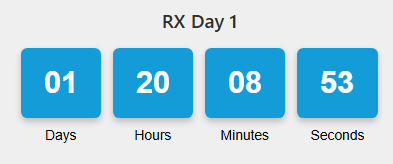
Want a live, countdown without needing a schedule? This recipe drops a customizable timer anywhere. Set your date, time, tweak the colors, and watch it tick down to 0.
What you get
Setup
- Add a new shortcode (CMS Configuration > LAVA Shorcodes)
- Name: Countdown Timer
- Tag Name: countdowntimer
- Tag Type: Inline
- Description: Countdown timer to specified date and time. Customizable color.
- Documentation: Paste code below
- Shortcode Markup: Paste code below (adjust the defaults as needed)
- Parameters: date, time, color-background, color-font, color-number
- Enable Lava Commands: none
Documentation
    <p>This control displays a timer based on time left to goal date and time.</p>
    <h5>Example Usage</h5>
    <pre>{[ countdown timer date:'12/25/2030' time:'16:30' ]}</pre>
    <h5>Parameter List</h5>
    <p>This control supports the following parameters:</p>
    <ul>
        <li><b>date </b> - Target date. Formatted like this: 'mm/dd/yyyy'</li>
        <li><b>time </b> - Target time. Formatted in 24hr  military time: 'hh:mm'</li>
        <li><b>color-background </b>(hexcode)<b> </b>- Background color of the cards. Default is #149cd8.</li>
        <li><b>color-font </b> (hexcode) - Date/Time text color. Default is #000000.</li>
        <li><b>color-number</b> (hexcode) - Background color of the cards. Default is #ffffff.</li>
    </ul>
Markup
{%- assign targetStr = date | Append:' ' | Append:time -%}
{%- assign target = targetStr | Date:'MM/dd/yyyy HH:mm' | AsDateTime -%}
{%- if target == null -%}
    <span>Invalid date/time format.</span>
{%- else -%}
    {%- assign now = 'Now' | Date | AsDateTime -%}
    {%- assign seconds = now | DateDiff:target,'s' -%}
    {%- if seconds < 0 -%}{%- assign seconds = 0 -%}{%- endif -%}
    {%- assign days = seconds | DividedBy:86400 | Floor -%}
    {%- assign hours = seconds | Modulo:86400 | DividedBy:3600 | Floor -%}
    {%- assign minutes = seconds | Modulo:3600 | DividedBy:60 | Floor -%}
    {%- assign seconds = seconds | Modulo:60 | Floor -%}
    {%- assign colorBackground = color-background | Default:'#149cd8' -%}
    {%- assign colorFont = color-font | Default:'black' -%}
    {%- assign colorNumber = color-number | Default:'white' -%}
<div class="countdown-timer" data-target="{{ target | Date:'yyyy-MM-ddTHH:mm:ss' }}"
     style="display: flex; justify-content: center; gap: 15px;
            font-family: Arial, sans-serif; max-width: 100%;
            flex-wrap: wrap;">
    <div class="countdown-unit days">
        <div class="digit-box" style="background-color: {{ colorBackground }};
                color: {{ colorNumber }}; padding: 15px;
                border-radius: 8px; text-align: center;
                min-width: 80px; box-shadow: 0 4px 8px rgba(0,0,0,0.2);">
            <span class="value animated-value">{{ days | Format:'00' }}</span>
        </div>
        <div class="label" style="color: {{ colorFont }}; text-align: center;
                font-size: 0.9em; margin-top: 5px;">Days</div>
    </div>
    <div class="countdown-unit hours">
        <div class="digit-box" style="background-color: {{ colorBackground }};
                color: {{ colorNumber }}; padding: 15px;
                border-radius: 8px; text-align: center;
                min-width: 80px; box-shadow: 0 4px 8px rgba(0,0,0,0.2);">
            <span class="value animated-value">{{ hours | Format:'00' }}</span>
        </div>
        <div class="label" style="color: {{ colorFont }}; text-align: center;
                font-size: 0.9em; margin-top: 5px;">Hours</div>
    </div>
    <div class="countdown-unit minutes">
        <div class="digit-box" style="background-color: {{ colorBackground }};
                color: {{ colorNumber }}; padding: 15px;
                border-radius: 8px; text-align: center;
                min-width: 80px; box-shadow: 0 4px 8px rgba(0,0,0,0.2);">
            <span class="value animated-value">{{ minutes | Format:'00' }}</span>
        </div>
        <div class="label" style="color: {{ colorFont }}; text-align: center;
                font-size: 0.9em; margin-top: 5px;">Minutes</div>
    </div>
    <div class="countdown-unit seconds">
        <div class="digit-box" style="background-color: {{ colorBackground }};
                color: {{ colorNumber }}; padding: 15px;
                border-radius: 8px; text-align: center;
                min-width: 80px; box-shadow: 0 4px 8px rgba(0,0,0,0.2);">
            <span class="value animated-value">{{ seconds | Format:'00' }}</span>
        </div>
        <div class="label" style="color: {{ colorFont }}; text-align: center;
                font-size: 0.9em; margin-top: 5px;">Seconds</div>
    </div>
</div>
{%- stylesheet id:'countdown-timer-style' -%}
    .countdown-timer { font-size: 1.2em; padding: 10px; }
    .countdown-unit { text-align: center; min-width: 100px; }
    .digit-box { font-size: 2em; font-weight: bold; position: relative;
                 overflow: hidden; perspective: 1000px; }
    .animated-value { display: inline-block; transition: transform 0.6s;
                      transform-style: preserve-3d; }
    .digit-box.flip .animated-value {
        animation: flip 0.6s ease-in-out forwards;
    }
    @keyframes flip {
        0% { transform: rotateX(0deg); }
        50% { transform: rotateX(-90deg); }
        100% { transform: rotateX(0deg); }
    }
    @media (max-width: 768px) {
        .digit-box { font-size: 1.5em; padding: 10px; min-width: 60px; }
        .countdown-unit { min-width: 80px; }
    }
{%- endstylesheet -%}
{%- javascript id:'countdown-timer-script' disableanonymousfunction:'true' -%}
    class CountdownUtils {
        static getTimeDiff(targetDate) {
            const now = new Date();
            let diff = (new Date(targetDate) - now) / 1000;
            if (diff < 0) diff = 0;
            const days = Math.floor(diff / 86400);
            const hours = Math.floor((diff % 86400) / 3600);
            const minutes = Math.floor((diff % 3600) / 60);
            const seconds = Math.floor(diff % 60);
            return { days, hours, minutes, seconds };
        }
        static padNumber(num) {
            return num.toString().padStart(2, '0');
        }
    }
    class CountdownTimer {
        constructor(element) {
            this.element = element;
            this.target = this.element.dataset.target;
            this.units = {
                days: this.element.querySelector('.days .digit-box'),
                hours: this.element.querySelector('.hours .digit-box'),
                minutes: this.element.querySelector('.minutes .digit-box'),
                seconds: this.element.querySelector('.seconds .digit-box')
            };
            this.values = {
                days: this.units.days.querySelector('.value'),
                hours: this.units.hours.querySelector('.value'),
                minutes: this.units.minutes.querySelector('.value'),
                seconds: this.units.seconds.querySelector('.value')
            };
            this.update();
            this.interval = setInterval(() => this.update(), 1000);
        }
        update() {
            const { days, hours, minutes, seconds } =
                CountdownUtils.getTimeDiff(this.target);
            const newValues = {
                days: CountdownUtils.padNumber(days),
                hours: CountdownUtils.padNumber(hours),
                minutes: CountdownUtils.padNumber(minutes),
                seconds: CountdownUtils.padNumber(seconds)
            };
            Object.keys(newValues).forEach((key) => {
                if (this.values[key].textContent !== newValues[key]) {
                    const box = this.units[key];
                    const value = this.values[key];
                    box.classList.add('flip');
                    setTimeout(() => {
                        value.textContent = newValues[key];
                    }, 300); // Update text at halfway point of 0.6s animation
                    setTimeout(() => {
                        box.classList.remove('flip');
                    }, 600); // Remove class after animation
                }
            });
        }
    }
    window.addEventListener('load', () => {
        document.querySelectorAll('.countdown-timer')
            .forEach(el => new CountdownTimer(el));
    });
{%- endjavascript -%}
{%- endif -%}
Version 2 with animation options
If you want to choose how your countdown works you can use the document attached for your shortcode and get the following animation styles using the parameter: animation-type.
- default - Simple fade transition (no parameter needed)
- elastic - Bouncy scaling effect with elastic easing
- particle - Particle explosion when numbers change
- wave - Staggered wave animation across all digits
- cube - 3D cube rotation effect
- gradient - Background color shifts based on background color.
- scramble - Numbers scramble randomly before settling on correct value
- pulse - Glowing pulse effect (intensifies when less than 1 minute remains)
- slot - Slot machine rolling effect
- liquid - Fills up like a liquid container based on time elapsed
- morph - Smooth morphing transition between numbers
- matrix - You're faster than this. Don't think you are, know you are.
Download related file (countdown.lava)