Recipe - Calculate Time Duration (Helpful on event occurrence page) - QoL
Skill level: Beginner
Organization: Houston's First Baptist Church
Requires Rock: 1.6.0
{# strip images & classes from the HTML but otherwise leave structure #}
Inspired by Elaine Lohroff's recipe for "Add a calculator for length of event".
Need a quick way to calculate how long an event runs without pulling out a calculator?
This recipe adds a simple time duration calculator.
It’s a lightweight HTML/JS file that you can drop onto an event occurrence page (or really anywhere) in the pre-html or its own html bock.
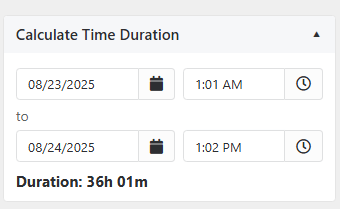
Users pick a start date/time and an end date/time, and will instantly get the duration in hours and minutes.
If they try to get clever and enter an end time before the start, they’ll get a playful reminder to use the future unless they’re a time traveler.
How to Add
- Go to the page where you’d like the calculator to appear (for example: Event Occurrence Detail).
- Add a new HTML Content block or slap it in the pre-html
- Paste in the code from the file.
- Save the block and refresh the page and you’ll see a collapsible panel labeled Calculate Time Duration.
Features
- Clean accordion.
- Works on both desktop and mobile
- Displays the result live as you set values.
This is meant to be a simple utility that blends into your theme.
It doesn’t store anything or require configuration, just drop it in and it’s ready.
Download related file (durationCalculator.lava)