Recipe - Recurring Donor Contribution Email Notification
Skill level: Beginner
Organization: Liquid Church
Requires Rock: 1.14.0
{# strip images & classes from the HTML but otherwise leave structure #}
Summary
When we switched from Pushpay to My Well, we noticed that Rock does not automatically send an email confirmation to our donors when they set up a recurring contribution, so we created a workflow to generate this. The workflow is triggered on each new Financial Scheduled Transaction.
Setup
- Download and install the attached workflow in your environment (Admin Tools > Power Tools > Workflow Import/Export).
- Edit the workflow and update the Send Email action to meet your needs. Note that the branding and the link to the recurring gifts page will need to be adjusted.
- Set up a new workflow trigger to launch the workflow for each recurring gift (Admin Tools > General Settings > Workflow Triggers) - see below:
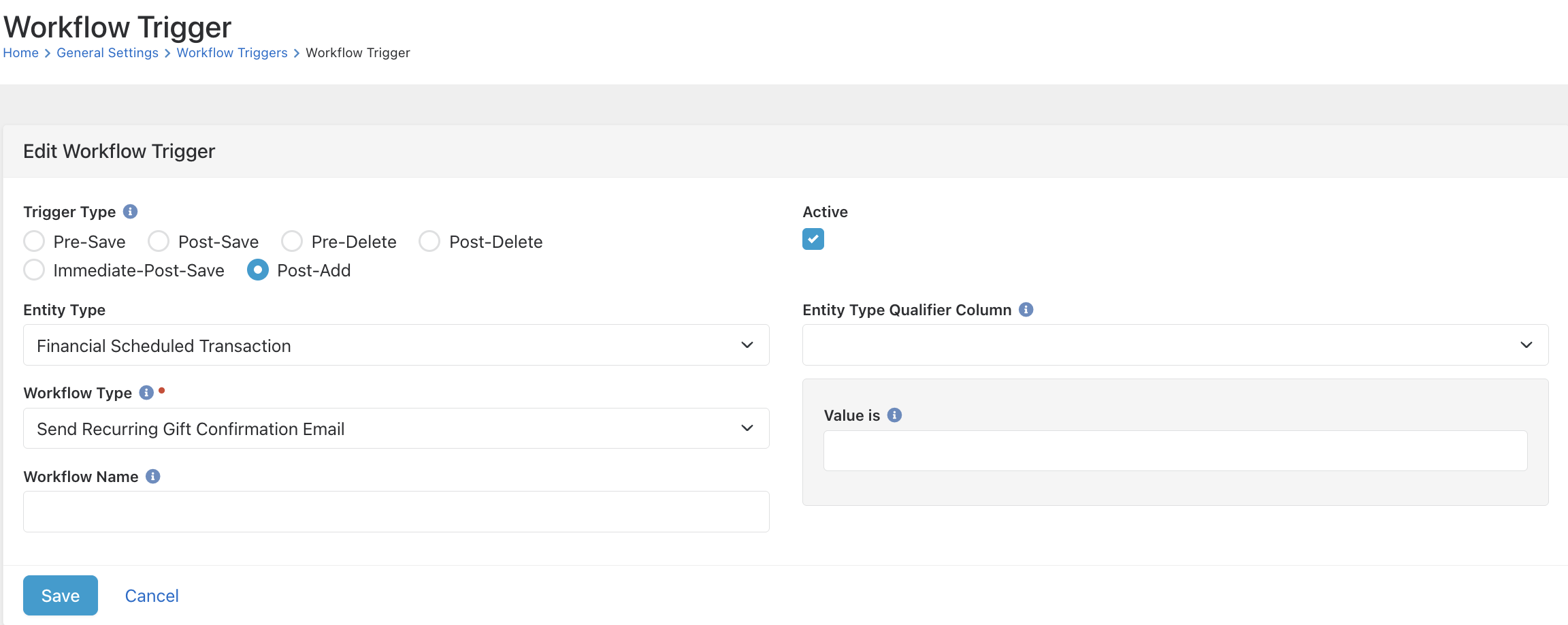
That's it! Make sure you test it yourself and double check everything. Reach out on Rocket Chat @steve.klein to let me know how it worked for you or if you have any questions!
Download related file (Send_Recurring_Gift_Confirmation_Email_202410291112.json)
Screenshots
- /GetImage.ashx?guid=4c5b5532-eeee-4f88-8551-d3f8e5adb72d