Recipe - Setting up reminders for some other common entity types
Skill level: Beginner
Organization: College Church (Wheaton)
Requires Rock: 1.16.6
{# strip images & classes from the HTML but otherwise leave structure #}
Did you know that you can add reminders to any entity in Rock? We have found it helpful to set reminders on things like dataviews, registration templates, schedules...etc.
Steps
1) Add a reminder corresponding to the entity of interest
Home > General Settings > Reminder Types
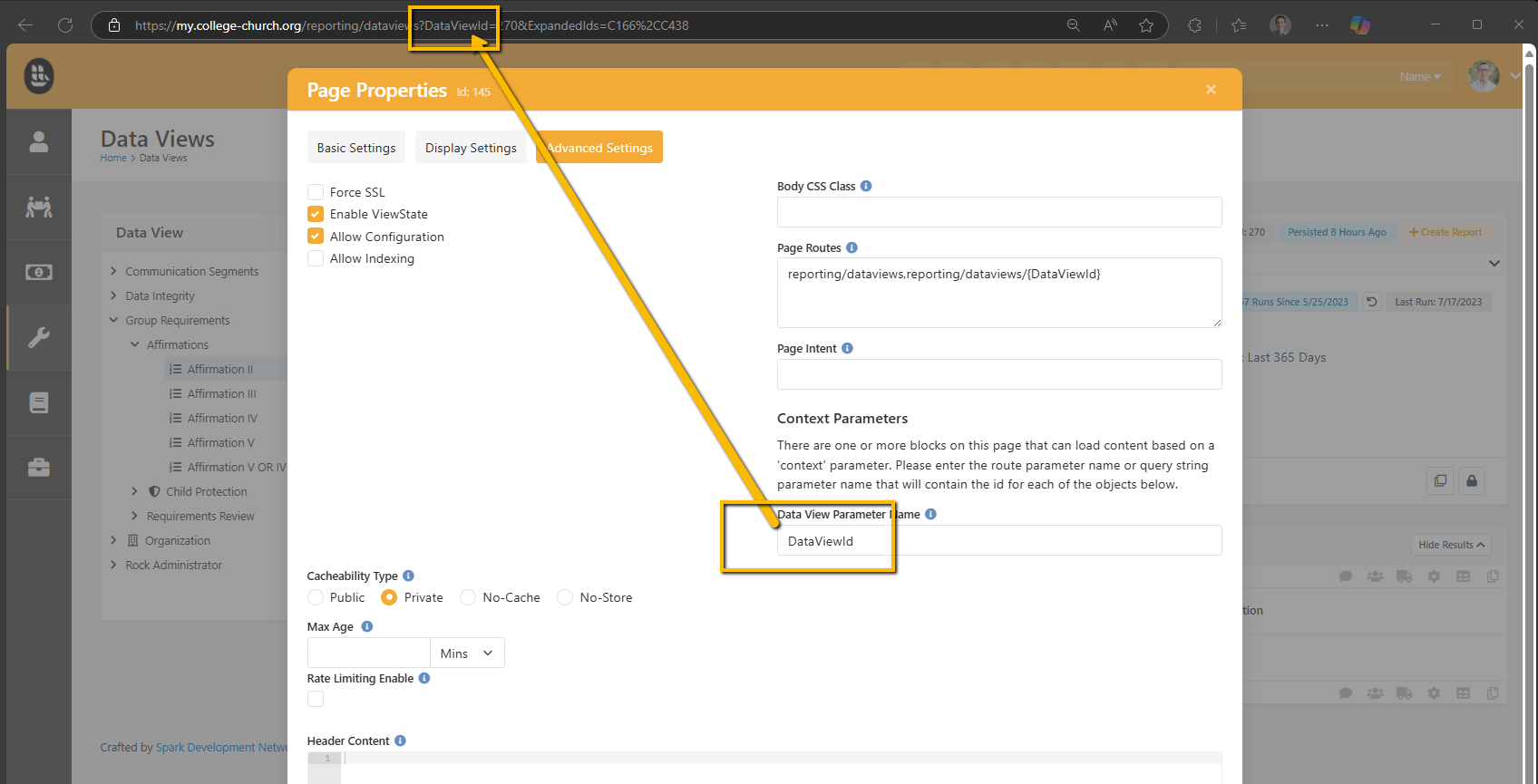
2) Navigate to the page where you want to be able to add a reminder from. Check Page Properties > Advanced Settings. Here you can check if the page has context for the entity of interest.
3) If it do not see "Context Parameters" on this page you will need to add a block that leverages context. This can be accomplished by adding a HTML Content anywhere on the page and then setting the Context Entity Type Parameter in the block settings. After this Context Parameters will show up in the Page Properties and can be set accordingly.
4) Finally add the URL parameter to set the entity from.
Download related file (image.png)
Screenshots
- /GetImage.ashx?guid=edd51e6c-547b-4372-9c8a-64fa18265424