Recipe - Volunteer Capacity Indicator (VCI)
Skill level: Advanced
Organization: Community Bible Church-San Antonio
Requires Rock: 1.14.3
{# strip images & classes from the HTML but otherwise leave structure #}
Presented at RX2024 on 8/15.
Problem
Having too many badges showing a persons completion of volunteer related Eligibility/Safety tasks can be difficult to know a volunteers true eligibility and can add safety and security vulnerabilities for your church. Each church evaluates the safety and security of their volunteers differently. Hopefully you can use the framework below to process your VCI. If you will not be using the Bonus Content, the Evaluation dates will be set manually to dates when you would like to notify ministries of potential safety/security issues. The Bonus content adds a job/workflow that helps remove around 80% of the manual changes that occur during normal processing of expired requirements.
What is a VCI?
Beyond qualifications of age and skill-set and background checks, this indicator will give an opportunity for Ministries and Leaders to further indicate a more specific level of eligibility/Safety for various volunteer opportunities:
- Black-Unauthorized to Volunteer
- Red-Unauthorized to Volunteer at this Time
- Orange-All Star Requires Updated Authorizations
- Blue-Authorized All Star for Adults Only
- Yellow-Authorized All Star Minor and Conditional
- Green-Authorized All Star for All
- Grey-All Star Status Under Evaluation
- Purple-High Capacity All Star
Things you need to accomplish this recipe:
This was written using v14.3 and Fluid Lava
Blue Box Moon: Workflow StimPack plugin. /Package/68
This gives you "For Each" as a new workflow action that gives an easy way to cycle through many like items without having to create the complicated tracking attributes.
For Bonus Content:
Workflow Launcher by Southeast Christian Church /Package/85
This gives you a new Job: "Workflow Launcher (Plugin)" that allows you to use SQL to start a workflow and populate Workflow attributes
Details
In it's simplist form, the VCI is a Person Attribute Matrix manually entered to show the person's eligibility to serve. The reason there is a manual process to start the VCI is there is a manual review of the person's Background check to determine the initial VCI Level.
The automation involved give notifications when a volunteer's VCI change or expires and also automates the Level at expiration then also kicking off notifications.
All the code below plus images can be found at https://github.com/Community-Bible-Church/VCI
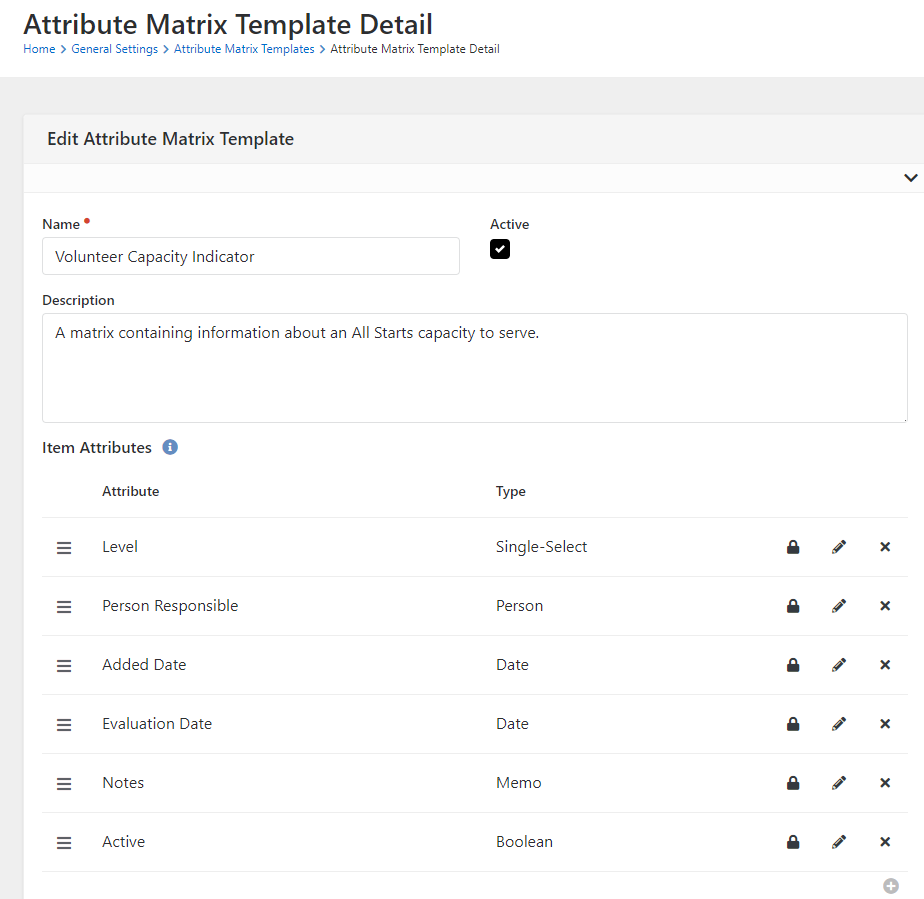
Attribute Matrix: /admin/general/attribute-matrix
Name: Volunteer Capacity Indicator
Description: A matrix containing information about an Volunteers capacity to serve.
Item Attributes:
- Level (Save the Attribute Id for the Workflow Trigger)
- Key: Level
- Field Type: Single Select
- Values:
Black^Blk-Unauthorized to Volunteer,
Red^Red-Unauthorized to Volunteer at this Time,
Orange^Org-All Star Requires Updated Authorizations,
Blue^Blu-Authorized All Star for Adults Only,
Yellow^Yel-Authorized All Star Minor and Conditional,
Green^Grn-Authorized All Star for All,
Grey^Gry-All Star Status Under Evaluation,
Purple^Pur-High Capacity All Star
- Control Type: Radio Buttons
- Person Responsible
- Key: Responsible
- Field Type; Person
- Added Date
- Key: AddedDate
- Field Type: Date
- Evaluation Date
- Key: EvaluationDate
- Field Type: Date
- Notes
- Key: Notes
- Field Type: Memo
Person Attriubte:
- Name: VCI
- Key: VCI
- Field Type: Matrix
- Attribute Matrix Template: Volunteer Capacity Indicator
Place this Person Attribute on a block that is secure so only your safey/security team can see and edit.
Badge: /admin/general/badges
- Name: Volunteer Capacity Indicator
- Entity Type: Person
- Badge Type: Lava Badge
- Display Text:
{% assign vci = Person | Attribute:'VCI','Object' %}
{% attributematrixitem where:'AttributeMatrixId == "{{ vci.Id }}"' sort:'EvaluationDate desc' iterator:'items' limit:'1' securityenabled:'false' %}
    {% for item in items %}
        {% assign length = item | Attribute:'Level' | Size | Minus:4 %}


    {% endfor %}
{% endattributematrixitem %}
Workflow: VCI Change - VCI Change_202408011359.json
Purpose: When the Level is changed or a new VCI row is added, this workflow triggers (see Workflow Trigger below).
- Gets all connectors that the person has a Active Connection Request for in the Serving Connection Type.
- Gets all Connection Requests the person is still Active in the Serving Connection Type.
- Gets all leaders of our "All Star" (volunteer) groups where the person is a group member.
- Gets all groups where the person is a group member.
- Send Email to the VCI Responsible Person (pulled from the VCI Matrix Attribute)
- If the level is Black, also email the Safety and Security Team
- Send Emails to all Connectors giving them links directly to the Connection Request
- Send Emails to Group Leaders of Volunteer Groups with links to the groups the person is a part of and they are a leader of.
Things to Change:
- Attribute: Admin - Set to a Rock Administrator account that lets you properly Read the Attribute Matrix Item
- Attribute: Safety Team - Person who is responsible for your safety and security of your campuses
- Activity: Process Changes
- Action:
Get Connectors
Modify the cr.ConnectionTypeId = 4 line to the connection type id of your serving connections
- Action: Get Connection Request
Modify the cr.ConnectionTypeId = 4 line to the connection type id of your serving connections
- Action: Get All Star Group Leaders and Groups
Modify "WHERE g.GroupTypeId IN (112, 113)"
to the group types of your volunteer groups and
Modify "AND gtr.Id IN (215, 219)" to the Group Role Ids of your leaders
of those types
- Action: Get Groups
Modify "WHERE g.GroupTypeId IN (112, 113)" to the group types of your volunteer groups
Workflow Trigger
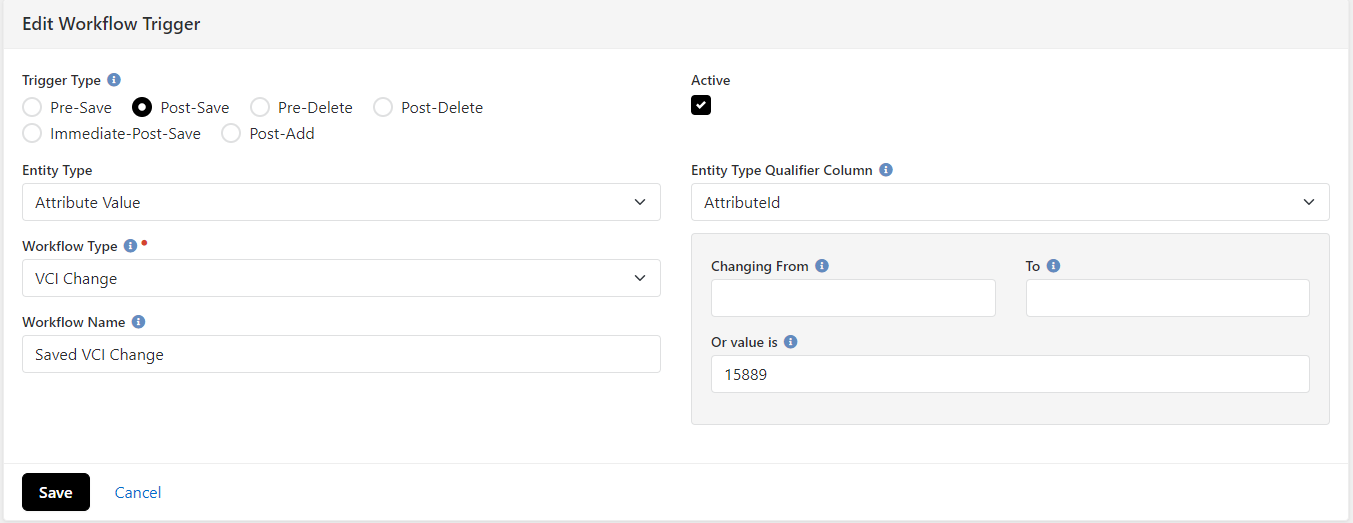
- Create a Workflow Trigger: /admin/general/workflow-triggers
- Trigger Type: Post-Save
- Active
- Entity Type: Attribute Value
- Entity Type Qualifier Column: AttributeId
- Or value is: Attribute Id of Level in the Attribute Matrix Template: Volunteer Capacity Indicator created above.
Reports
VCI Report
Shows all People with a VCI set. Allows Filtering/Sorting
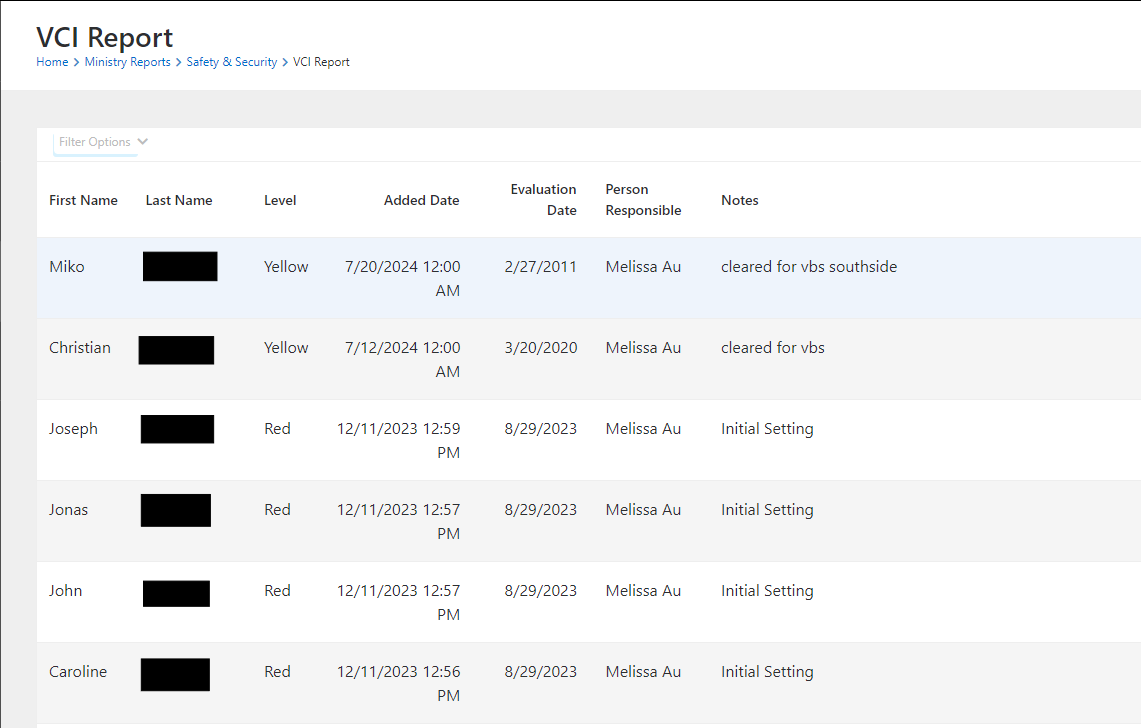
Create a page with a Dynamic Data Block
Query:
DECLARE @VCIAttributeId INT = 15892; -- VCI Person Attribute ID
DECLARE @LevelAttributeId INT = 15889; -- Level Attribute ID of VCI Matrix
DECLARE @ResponsibleAttributeId INT = 15888; -- Responsible Attribute ID of VCI Matrix
DECLARE @AddedAttributeId INT = 15905; -- Added Date Attribute ID of VCI Matrix
DECLARE @EvalAttributeId INT = 15890; -- Evaluation Date Attrivute ID of VCI Matrix
DECLARE @NotesAttributeId INT = 15891; -- Notes Attribute ID of VCI Matrix

SELECT vcip.*
FROM Person p2
INNER JOIN AttributeValue vciav
    ON vciav.EntityId = p2.Id
        AND vciav.AttributeId = @VCIAttributeId
CROSS APPLY (
    SELECT TOP 1 p.Id
        , p.FirstName
        , p.LastName
        , levelav.[Value] as [Level]
        , addedav.ValueAsDateTime as [Added Date]
        , evalav.ValueAsDateTime as [Evaluation Date]
        , concat(rp.NickName,' ',rp.LastName) as [Person Responsible]
        , notesav.Value as Notes
    FROM Person p
    INNER JOIN AttributeValue vciav
        ON vciav.EntityId = p.Id
            AND vciav.AttributeId = @VCIAttributeId
    INNER JOIN AttributeMatrix am
        ON vciav.[Value] = am.Guid
    INNER JOIN AttributeMatrixItem ami
        ON ami.AttributeMatrixId = am.Id
    LEFT JOIN AttributeValue levelav
        ON levelav.EntityId = ami.Id
            AND levelav.AttributeId = @LevelAttributeId
    LEFT JOIN AttributeValue responsibleav
        ON responsibleav.EntityId = ami.Id
            AND responsibleav.AttributeId = @ResponsibleAttributeId
    LEFT JOIN Person rp
        ON rp.Id = responsibleav.ValueAsPersonId
    LEFT JOIN AttributeValue addedav
        ON addedav.EntityId = ami.Id
            AND addedav.AttributeId = @AddedAttributeId
    LEFT JOIN AttributeValue evalav
        ON evalav.EntityId = ami.Id
            AND evalav.AttributeId = @EvalAttributeId
    LEFT JOIN AttributeValue notesav
        ON notesav.EntityId = ami.Id
            AND notesav.AttributeId = @NotesAttributeId
    where p.Id = p2.Id
    ORDER BY p.Id, evalav.ValueAsDateTime Desc
    ) vcip
ORDER BY vcip.[Evaluation Date] ASC
Hide Columns: Id
Selection URL: (page where your VCI attribute is displayed)
VCI Evaluation Date Reached
Shows all people who have an expired Evaluation Date
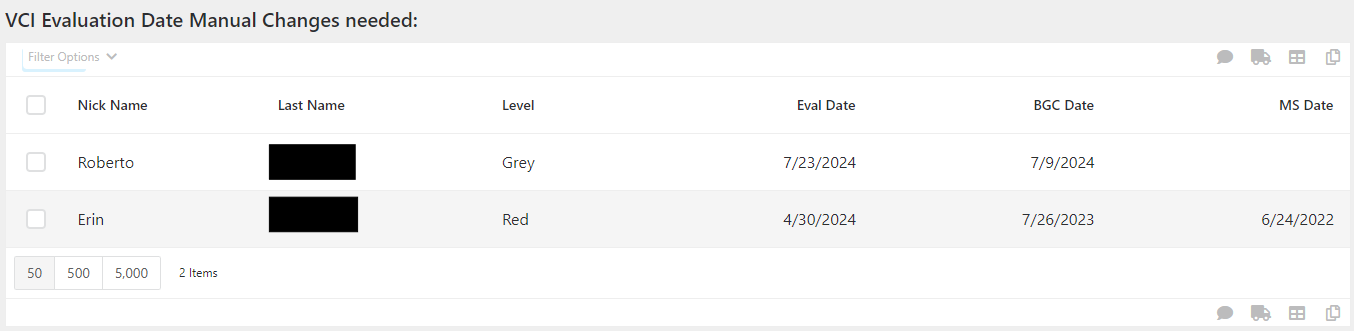
Create a page with a Dynamic Data Block:
Query:
DECLARE @VCIAttributeId INT = 15892; -- VCI Person AttributeId
DECLARE @EvalAttributeId INT = 15890; -- Evaluation Date AttributeId from VCI Matrix
DECLARE @LevelAttributeId INT = 15889; -- Level AttributeId from VCI Matrix
DECLARE @bgcAttributeId INT = 1298; -- Background Check date Attribute Id
DECLARE @msAttributeId INT = 8524; -- Safety Awareness Training Date Attribute Id

SELECT topvci.*
FROM PersonAlias pa
INNER JOIN AttributeValue avvci
    ON avvci.EntityId = pa.AliasPersonId
        AND avvci.AttributeId = @VCIAttributeId
CROSS APPLY (
    SELECT TOP 1 p.Id
    , p.NickName
    , p.LastName
        , avlevel.Value AS [Level]
        , aveval.ValueAsDateTime AS EvalDate
        , avbgc.ValueAsDateTime as BGCDate
        , avms.ValueAsDateTime as MSDate
    FROM Person p
    INNER JOIN PersonAlias vpa
        ON vpa.AliasPersonId = p.Id
    INNER JOIN AttributeValue av
        ON av.EntityId = p.Id
            AND av.AttributeId = @VCIAttributeId
    INNER JOIN AttributeMatrix am
        ON am.Guid = av.Value
    INNER JOIN AttributeMatrixItem ami
        ON ami.AttributeMatrixId = am.Id
    INNER JOIN AttributeValue aveval
        ON aveval.EntityId = ami.Id
            AND aveval.AttributeId = @EvalAttributeId
    INNER JOIN AttributeValue avlevel
        ON avlevel.EntityId = ami.Id
            AND avlevel.AttributeId = @LevelAttributeId
    INNER JOIN AttributeValue avbgc
        ON avbgc.EntityId = p.Id
            AND avbgc.AttributeId = @bgcAttributeId
    LEFT JOIN AttributeValue avms
        ON avms.EntityId = p.Id
            AND avms.AttributeId = @msAttributeId
    WHERE vpa.Guid = pa.Guid
    ORDER BY aveval.ValueAsDateTime Desc
    ) topvci
--    ON topvci.Person = pa.Guid
WHERE topvci.EvalDate between '1/1/2024' and getdate()
order by topvci.EvalDate desc
Hide Columns: Id
Selection URL: /person/{Id}
Bonus Content
Beyond the ability to notify all the need to know people about a VCI change, you can also use a Job and Workflow to Automate some changes based on important safety expirations like Background Check and Safety Training. At CBC we evaluate all of our Background checks once a year and ask our volunteers who work with kids to take our Safety Awareness Training every 2 years. You will need to adjust the workflow to your needs for re-evaluating your safety items.
Understanding the automation in the workflow:
Green
When a volunteer is allowed to work with minors they are level Green. When their Safety Awareness Training is expired (2 years), they are moved to level Blue. When their background check is expired (1 year), they are moved to level Orange.
Yellow
When a volunteer is under 18, their background check is not informative. We place them as a yellow until they are 18. When they turn 18, they are moved to level Orange.
Blue
Every volunteer 18 and older must be a level Blue in order to volunteer. When their background check is expired (1 year), they are moved to level Orange
Orange
After an expired background check, or the volunteer turns 18, they are given 3 months to have their background check re-evaluated. After 3 months, they are moved to Red.
Workflow: VCI Evaluation - VCI Evaluation_202408050827.json
Download:
https://github.com/Community-Bible-Church/VCI/blob/main/Workflows/VCI%20Evaluation_202408050827.json
Things to Change:
Based on the 4 levels above, evaluate your process and determine which Automation needs changed. Each activity sets the new Level and the new Evaluation Date based on the above criteria.
Job
Name: Evaluate VCI
Job Type: Workflow Launcher (Plugin)
SQL Query:
DECLARE @VCIAttributeId INT = 15892; -- VCI Person AttributeId
DECLARE @bgcAttributeId INT = 1298; -- Person Attribute of Background Check Date
DECLARE @LevelAttributeId INT = 15889; -- Level Attribute of VCI Matrix
DECLARE @ResponsibleAttributeId INT = 15888; -- Responsible Attribute of VCI Matrix
DECLARE @AddedAttributeId INT = 15905; -- Added Date Attribute of VCI Matrix
DECLARE @EvalAttributeId INT = 15890; -- Evaluation Date Attribute of VCI Matrix
DECLARE @NotesAttributeId INT = 15891; -- Notes Attribute of VCI Matrix

SELECT vcip.*
FROM Person p2
CROSS APPLY (
    SELECT TOP 1 pa.Guid as Person
        , levelav.[Value] as [Level]
        , addedav.ValueAsDateTime as [AddedDate]
        , evalav.ValueAsDateTime as [EvalDate]
        , responsibleav.[Value] as [Responsible]
        , vciav.[Value] as VCI
    FROM Person p
    INNER JOIN PersonAlias pa
        ON pa.PersonId = p.Id
    INNER JOIN AttributeValue vciav
        ON vciav.EntityId = p.Id
            AND vciav.AttributeId = @VCIAttributeId
    LEFT JOIN AttributeValue bgcav
        ON bgcav.EntityId = p.Id
            AND bgcav.AttributeId = @bgcAttributeId
    INNER JOIN AttributeMatrix am
        ON vciav.[Value] = am.Guid
    INNER JOIN AttributeMatrixItem ami
        ON ami.AttributeMatrixId = am.Id
    LEFT JOIN AttributeValue levelav
        ON levelav.EntityId = ami.Id
            AND levelav.AttributeId = @LevelAttributeId
    LEFT JOIN AttributeValue responsibleav
        ON responsibleav.EntityId = ami.Id
            AND responsibleav.AttributeId = @ResponsibleAttributeId
    LEFT JOIN AttributeValue addedav
        ON addedav.EntityId = ami.Id
            AND addedav.AttributeId = @AddedAttributeId
    LEFT JOIN AttributeValue evalav
        ON evalav.EntityId = ami.Id
            AND evalav.AttributeId = @EvalAttributeId
    LEFT JOIN AttributeValue notesav
        ON notesav.EntityId = ami.Id
            AND notesav.AttributeId = @NotesAttributeId
    WHERE p.Guid = p2.Guid
    ORDER BY p.Id, evalav.ValueAsDateTime Desc
    ) vcip
WHERE cast(vcip.EvalDate as DATE) = CAST(getdate() AS DATE)
Workflow: VCI Evaluation
Report: VCI Evaluation Date Automated Changes Made
Add a Dynamic Dta Block to the report: VCI Evaluation Date Reached
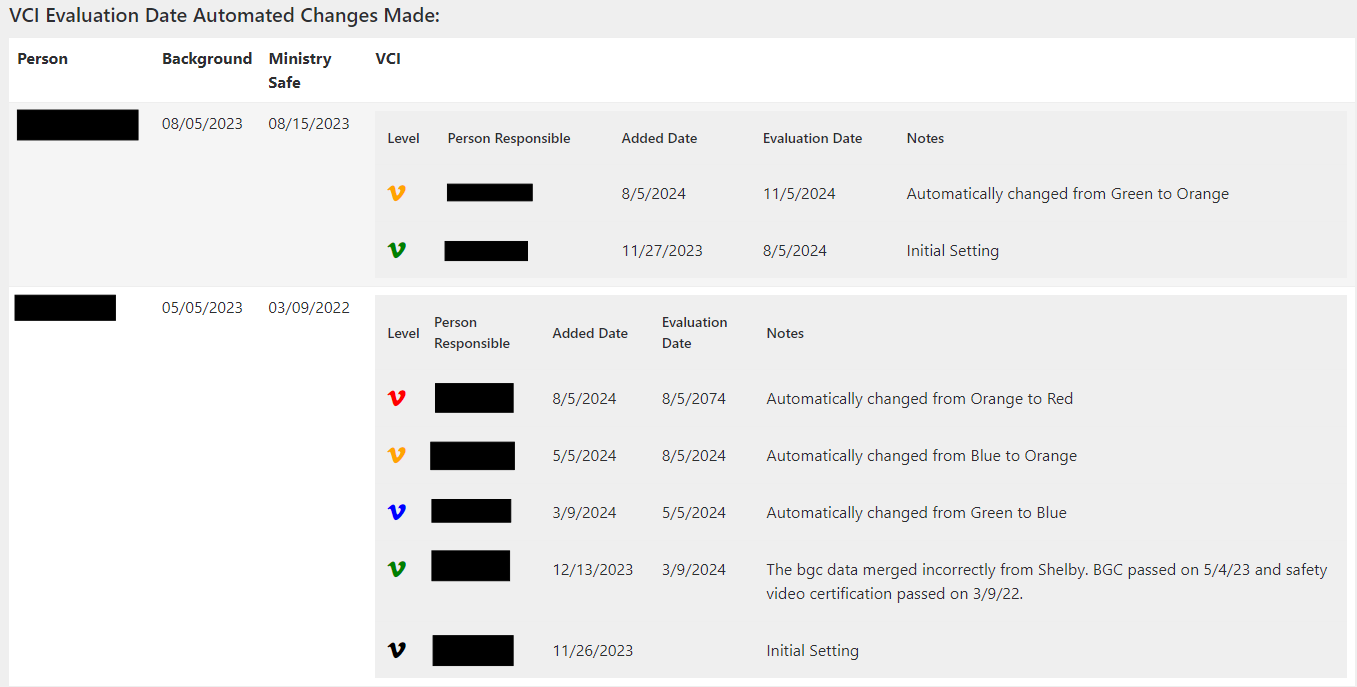
Query:
DECLARE @PersonAttributeId INT = 16966; -- Person Attribute of Workflow
DECLARE @WorkflowTypeId INT = 195; -- Workflow Type ID from VCI Evaluation

select av.ValueAsPersonId as PersonId
from Workflow w
INNER JOIN AttributeValue av
    ON w.Id = av.EntityId and av.AttributeId = @PersonAttributeId
INNER JOIN Person p
    ON av.ValueAsPersonId = p.Id
where w.WorkflowTypeId = @WorkflowTypeId
    AND CAST(w.ActivatedDateTime as DATE) BETWEEN dateadd(d,-3,CAST(getdate() as DATE)) AND CAST(getdate() as DATE)
order by w.ActivatedDateTime Desc
Customize Results With Lava: Yes
Formatted Output:
| Person |
Background |
Ministry Safe |
VCI |
{% for row in rows %}
{% assign Person = row.PersonId | PersonById %}
| {{ Person }} |
{{ Person | Attribute:'BackgroundCheckDate' | Date:'MM/dd/yyyy' }} |
{{ Person | Attribute:'TrainingDate' | Date:'MM/dd/yyyy' }} |
{{ Person | Attribute:'VCI' }} |
{% endfor %}
The <a> tag in the above code needs to reflect where you have the VCI person attribute visible to the staff person in charge of safety and security.
All the code above plus images can be found at https://github.com/Community-Bible-Church/VCI
Download related file (VCI_Change_202408011359.json)
Screenshots
- /GetImage.ashx?guid=2dc8bd11-edd5-41b6-b647-7af17d63d0b4
- /GetImage.ashx?guid=45972233-fc0d-4915-97ba-eaf707bdcfb5
- /GetImage.ashx?guid=8c5a6b80-1256-44ec-bbce-c2070a796afb
- /GetImage.ashx?guid=c92b2cf3-a9f2-459a-ba1d-46307e9c91fd
- /GetImage.ashx?guid=792cc7ad-475a-427d-9031-7fc4c9767df6