Recipe - Finding People from Workflows
Skill level: Intermediate
Organization: Simple
Requires Rock: 1.7.0
{# strip images & classes from the HTML but otherwise leave structure #}
Workflow Person Report
TL;DR
Here's a quick loom video link if you don't want to read:
Background
Rock's Form Builder is a great way to allow staff members to create their own basic forms and gather
information.
However, it's not as easy to use the form builder pages available to staff to communicate with the
people who have submitted workflow forms as it is to communicate with group members, event registrars and
registrants, etc.
This simple report allows Rock workers to see people who are attached to workflows as
attributes, and from there, view their profiles or communicate with them.
In order to install this, you would need to have the ability to add pages and blocks to the pages.
When you add
pages and blocks, it's a good idea to keep in mind that any blocks you add will have any explicit permissions that
the page has. If you build it somewhere like Admin Tools > Power Tools; you'll want to
edit the security on all three blocks and clear out the explicit permissions leaving only inherited permissions on the blocks.
Structure
The report consists of a page with three blocks:
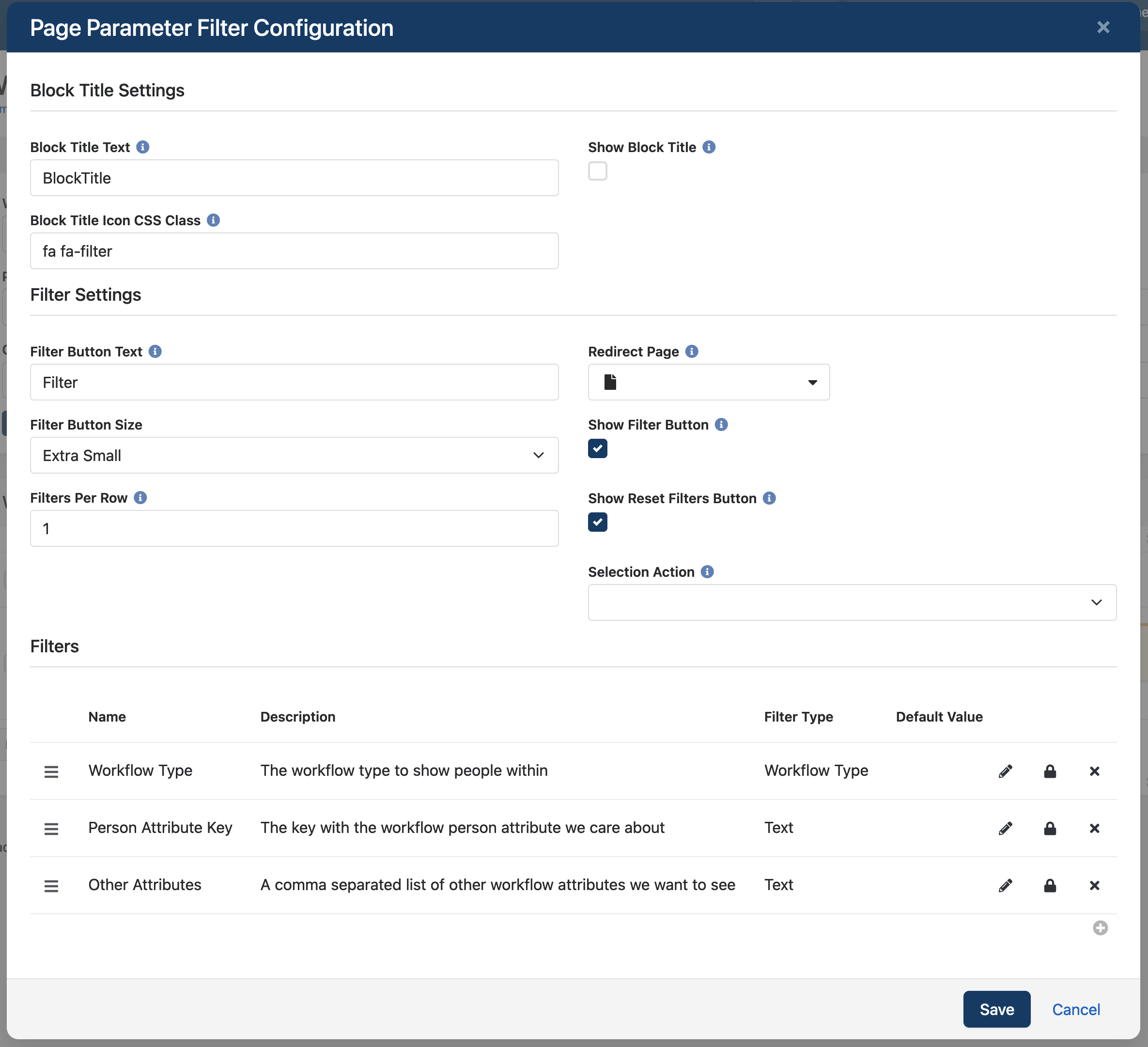
- a Page Parameter Filters block
- Workflow Type (Field Type: Workflow Type)
- Person Attribute Key (Field Type: Text)
- Other Attributes (Field Type: Text)
- an HTML Content Block
- and a Dynamic Data block
The Page Parameter Filters Block
Aside from adding the attributes described above, I have hidden the block title, and set the block to show one column
of fields.
The Workflow Attributes HTML Content Block
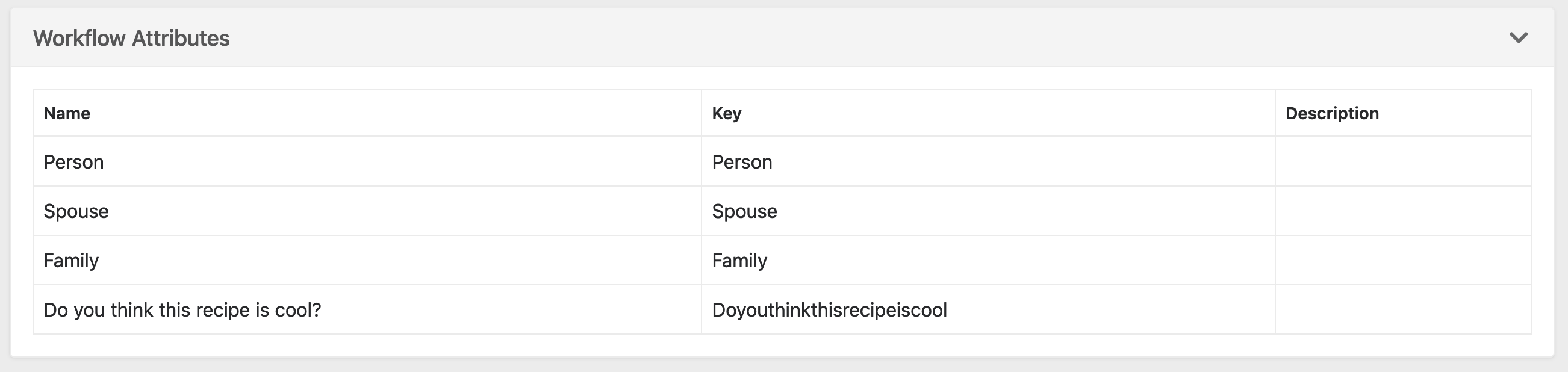
This block will show an accordion with all of the workflow attributes for the chosen workflow type.
The block
needs to have SQL turned on in the advanced settings.
The following code must be added to the block in order to show the attributes:
Code
{% assign workflowType = PageParameter.WorkflowType | SanitizeSql %}
    {% if workflowType != empty and workflowType != null %}
        {% sql return:'attributes' %}
            SELECT
                a.[Name]
                , a.[Key]
                , a.[Description]
                FROM
                    [Attribute] a
                    INNER JOIN [WorkflowType] wt ON wt.[Id] = a.[EntityTypeQualifierValue]
                WHERE
                    a.[EntityTypeId] = 113
                    AND a.[EntityTypeQualifierColumn] = 'WorkflowTypeId'
                    AND wt.[Guid] = '{{ workflowType }}'
        {% endsql %}
    {% if attributes != empty and attributes != null %}
        {[ accordion firstopen:'false' ]}
            [[ item title:'Workflow Attributes <span class="pull-right"><i class="fa fa-chevron-down"></i></span>' ]]
                <div class="table-responsive">
                    <table class="grid-table table table-bordered table-striped table-hover">
                        <thead>
                            <tr>
                                <th>Name</th>
                                <th>Key</th>
                                <th>Description</th>
                            </tr>
                        </thead>
                        <tbody>
                        {% for attribute in attributes %}
                            <tr>
                                <td>{{ attribute.Name }}</td>
                                <td>{{ attribute.Key }}</td>
                                <td>{{ attribute.Description }}</td>
                            </tr>
                        {% endfor %}
                        </tbody>
                    </table>
                </div>
            [[ enditem ]]
        {[ endaccordion ]}
    {% endif %}
{% endif %}
The Dynamic Data Block
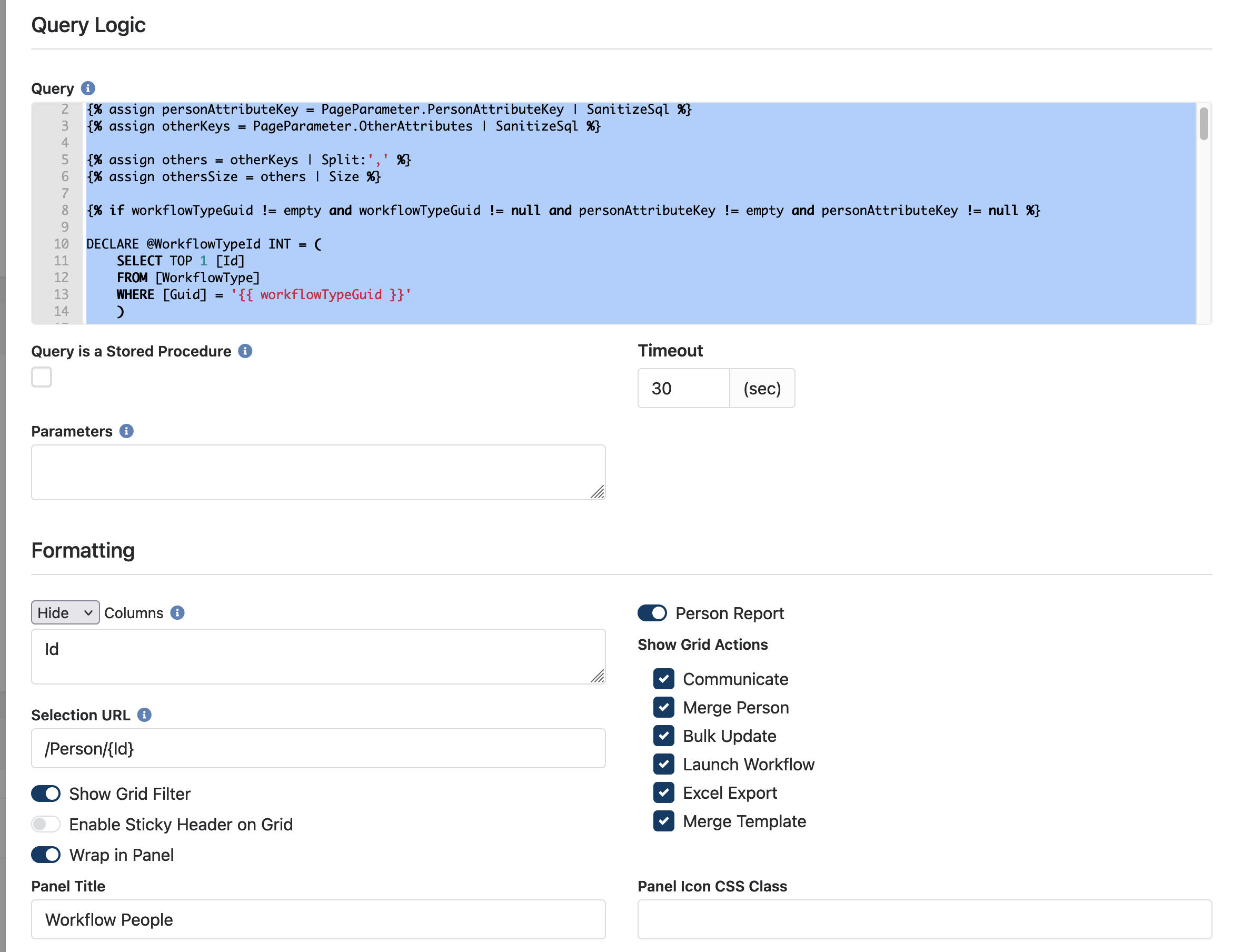
The dynamic data block shows the report, once a workflow type and a person attribute key are selected.
You'll want to toggle the settting that tells the block that this is a person report, selecting any relevant grid actions.
Hide: the Id column - it won't mean anything to actual humans
Selection Url: /Person/{Id}
Wrap in Panel should be on, and give it a name of "Workflow People"
Query
{% assign workflowTypeGuid = PageParameter.WorkflowType | SanitizeSql %}
{% assign personAttributeKey = PageParameter.PersonAttributeKey | SanitizeSql %}
{% assign otherKeys = PageParameter.OtherAttributes | SanitizeSql %}

{% assign others = otherKeys | Split:',' %}
{% assign othersSize = others | Size %}

{% if workflowTypeGuid != empty and workflowTypeGuid != null and personAttributeKey != empty and personAttributeKey != null %}

DECLARE @WorkflowTypeId INT = (
    SELECT TOP 1 [Id]
    FROM [WorkflowType]
    WHERE [Guid] = '{{ workflowTypeGuid }}'
    )

DECLARE @PersonAttributeId INT = (
    SELECT TOP 1 [Id]
    FROM [Attribute]
    WHERE [EntityTypeId] = 113
    AND [EntityTypeQualifierColumn] = 'WorkflowTypeId'
    AND [EntityTypeQualifierValue] = @WorkflowTypeId
    AND [Key] = '{{ personAttributeKey }}'
    )

{% if othersSize > 1 %}
    {% for other in others %}
    DECLARE @{{ other }}AttributeId INT = (
        SELECT TOP 1 [Id]
        FROM [Attribute]
        WHERE [EntityTypeId] = 113
        AND [EntityTypeQualifierColumn] = 'WorkflowTypeId'
        AND [EntityTypeQualifierValue] = @WorkflowTypeId
        AND [Key] = '{{ other }}'
        )
    {% endfor %}
{% endif %}

SELECT
    p.[Id]
    , p.[NickName]
    , p.[LastName]
    , p.[Email]
    , mp.[NumberFormatted] AS [MobileNumber]
    , c.[Name] AS [Campus]
    , w.[CreatedDateTime] AS [WorkflowSubmitted]
    , CONCAT('<a class="btn btn-default btn-xs" href="/Workflow/',w.[Id],'" target="_blank"><i class="fa fa-cog"></a>') AS [Workflow]
    {% if othersSize > 1 %}
        {% for other in others %}
        , {{ other }}av.[PersistedTextValue] AS [{{ other }}]
        {% endfor %}
    {% endif %}
FROM
    [Workflow] w
    INNER JOIN [AttributeValue] av ON av.[EntityId] = w.[Id] AND av.[AttributeId] = @PersonAttributeId
    INNER JOIN [Person] p ON p.[Id] = av.[ValueAsPersonId]
    LEFT OUTER JOIN [PhoneNumber] mp ON mp.[PersonId] = p.[Id] AND mp.[NumberTypeValueId] = 13
    LEFT OUTER JOIN [Campus] c ON c.[Id] = p.[PrimaryCampusId]
    {% if othersSize > 1 %}
        {% for other in others %}
        LEFT OUTER JOIN [AttributeValue] {{ other }}av ON {{ other }}av.[EntityId] = w.[Id] AND {{ other }}av.[AttributeId] = @{{ other }}AttributeId
        {% endfor %}
    {% endif %}
WHERE
    w.[WorkflowTypeId] = @WorkflowTypeId

{% else %}
SELECT '<div class="alert alert-warning">Provide a Workflow Type and a Person Attribute Key to continue</div>' AS [RequiredInformation]
{% endif %}
Conclusion
This report started because of a conversation in the #workflows channel in the community chat, because of a question by Melissa Drexler at itown church.
If you have any questions or want help getting it configured for your Rock instance, reach out!
Email happy@simpledonation.com
Download related file (workflow_person_report.png)
Screenshots
- /GetImage.ashx?guid=d81ee804-e21a-408f-b477-8906d46ff0dc