Recipe - Room Mangement Drafts
Skill level: Intermediate
Organization: The Compass Church
Requires Rock: 1.14.4
{# strip images & classes from the HTML but otherwise leave structure #}
The Problem
Bema's Room management plug-in has been very helpful. One issue we have found is that on the review page when submitting a new reservation, the submit button is off the page. As a result our users often haven't submitted items they thought were submitted
The Solution
Instead of trying to skip that page, since I want users to review their reservation first. I added an HTML block on the main room reservation page, and one to the reservation detail page.
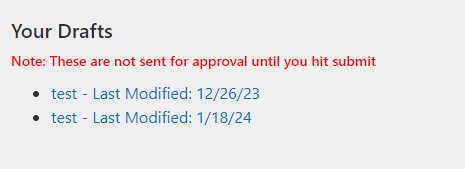
- The block on the main page is a list of drafts for the current person. I chose to use the Admin Contact but the Event Contact also works.
- The block on the detail page has large red warning stating that the reservation is still a draft, until they hit submit.
Main Page HTML Block
- Add an HTML block to the main section above the Reservation Lava block
- make sure to select Rock Entity on the enable lava commands under settings
- Add the code below:
"<div id="drafts"> {% reservation where:'ApprovalState == 0 && AdministrativeContactPersonAliasId == {{Person.PrimaryAliasId}}' %} {% assign size = reservationItems | Size %}
        {% if size > 0 %}
            <h3>Your Drafts</h3>
            <h6 style="color:red">Note: These are not sent for approval until you hit submit</h6>
            <ul>
                {% for item in reservationItems %}
                    <li><a href="https://rock.thecompass.net/ReservationDetail?ReservationId={{item.Id}}">{{item.Name}} - Last Modified: {{item.ModifiedDateTime | Date:'M/d/yy'}}</a><br></li>
                {% endfor %}<br><br>
            </ul>
        {% endif %}
    {% endreservation %}
</div>"
To Change to Event Contact change "AdministrativeContactPersonAliasId" with "EventContactPersonAliasId"
Detail Page HTML Block
- Add an HTML block to the main section above the Reservation Lava block
- make sure to select Rock Entity on the enable lava commands under settings
- Add the Code Below
" {% assign id = 'Global' | PageParameter:'ReservationId' %}

    {% if id != '' %}

        {% reservation id:'{{id}}' %}
            {% if reservation.ApprovalState == 0 %}
                <h1 style="color:red;text-align:center;">NOTE: This Reservation may still be a draft and not yet submitted.</h1>
            {% endif %}
        {% endreservation %}
    {% endif %}"

- One Issue is that when the hit submit the page doesn't refresh so the message won't go away until the page refreshes
- Add this script to the pre-HTML of the Reservation Detail Block
<script>
    $(function(){
        $(document).ready(function() {
            $('a[id*="_btnSubmit"]').on('click',function()
            {
                setTimeout(() => {location.reload(true);},1000);
            });
    });
</script>
- You have to refresh the page before the script will work.