Recipe - Copy Item Counts to the Top
Skill level: Beginner
Organization: The Well Community Church
Requires Rock: 1.10.0
{# strip images & classes from the HTML but otherwise leave structure #}
Description
Do you suffer from scroll fatigue? Are you tired of contstantly scrolling all the way to the bottom of data grids just to find the total item count? Do you wish there was a better way? This recipe will change your life!
…ok, not really, but it will make it a lot easier to find total item counts when you're less concerned about the actual items in the grid.
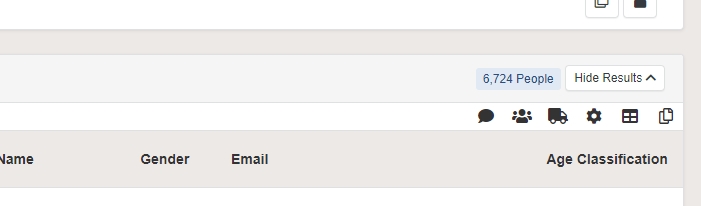
This recipe consists of just a single JavaScript function. When a page loads, the script will attempt to locate the total item counts that appear at the bottom of most data grids in Rock, and will copy the count to a label at the top of the grid, preventing the need to scroll to the bottom, and making you a fraction of a second more efficient.
How-To
This one's pretty simple:
- Go to your internal Rock home page
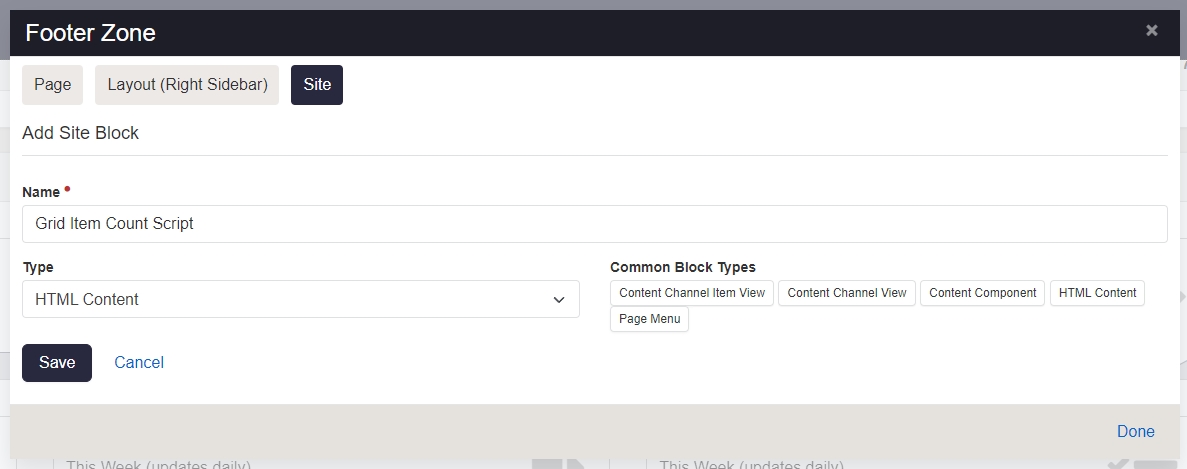
- Add a new HTML block to the Footer zone of the Site. Be sure to select Site so that the script will run on every page.
-
Edit the content of your new HTML block and paste in this script:
{% javascript id:'CopyItemCounts' %}
$(document).ready(function ()
{
    function CopyItemCounts()
    {
        // find each grid on the page
        $('.grid table, .grid-table').each(function()
        {
            var $grid = $(this);

            // look for the item count element generated by Rock
            var $itemCount = $grid.find('.grid-itemcount');

            if ($itemCount.length)
            {
                var count = $itemCount.text();
                if (count == '') count = '0 Results';

                // attempt to find the heading of a parent panel for the grid
                var $panelHead = $grid.closest('.panel').find('.panel-heading').first();
                if ($panelHead.length)
                {
                    // add an item count label copy to the top if it doesn't already exist
                    if (!$panelHead.find('.grid-itemcount-top').length)
                    {
                        // add a panel labels area if it doesn't already exist
                        var $labels = $panelHead.find('.panel-labels').first();
                        if (!$labels.length)
                        {
                            // create a new panel labels area and add it to the panel heading
                            $labels = $('<div class="panel-labels"></div>');
                            $panelHead.append($labels);
                        }
                        // add a new item count label to the panel labels area
                        $labels.prepend('<span class="label label-info grid-itemcount-top">' + count + '</span>');
                    }
                }
                else
                {
                    // panel heading not found
                    // find the grid actions row in the grid header instead
                    var $headerActions = $grid.find('thead .grid-actions').first();

                    // add an item count label copy to the top if it doesn't already exist
                    if (!$headerActions.find('.grid-itemcount-top').length)
                    {
                        $headerActions.prepend('<div class="px-3 py-1 pull-left"><span class="label label-info grid-itemcount-top">' + count + '</span></div>');
                    }
                }
            }
        });
    }

    // run the copy function now and on each partial postback
    CopyItemCounts();
    Sys.WebForms.PageRequestManager.getInstance().add_endRequest(CopyItemCounts);
});
{% endjavascript %}
That's it! Save the content and you're done. Now the item count of nearly every grid of data in Rock should be copied to the top where it's much easier to find.
Follow Up
Please don't hesitate to leave a comment below or hit me up on Rock Chat (@JeffRichmond) if you have questions or find any issues with this recipe.
If you come up with better or more efficient ways of doing anything in this recipe, please let me know. Thanks!
Change Log
- 2023-05-22 - Modified to work with Attendance Analytics blocks
- 2023-05-19 - Initial Version
Screenshots
- /GetImage.ashx?guid=c079ad91-7621-4692-b4b6-1fb7742c4384
- /GetImage.ashx?guid=d80ae019-0206-40ab-b53f-819faf9f1777