Recipe - Report on Giving by Age Bands
Skill level: Intermediate
Organization: Simple
Requires Rock: 1.12.0
{# strip images & classes from the HTML but otherwise leave structure #}
Sometimes, leadership wants reports that are challenging to get with a data view. This would be one of those. The request from leadership was a report that showed data about giving based on age bands so that they could have information that helped them to know which age groups needed specific teaching related to generosity. Here's the resulting screen shot:
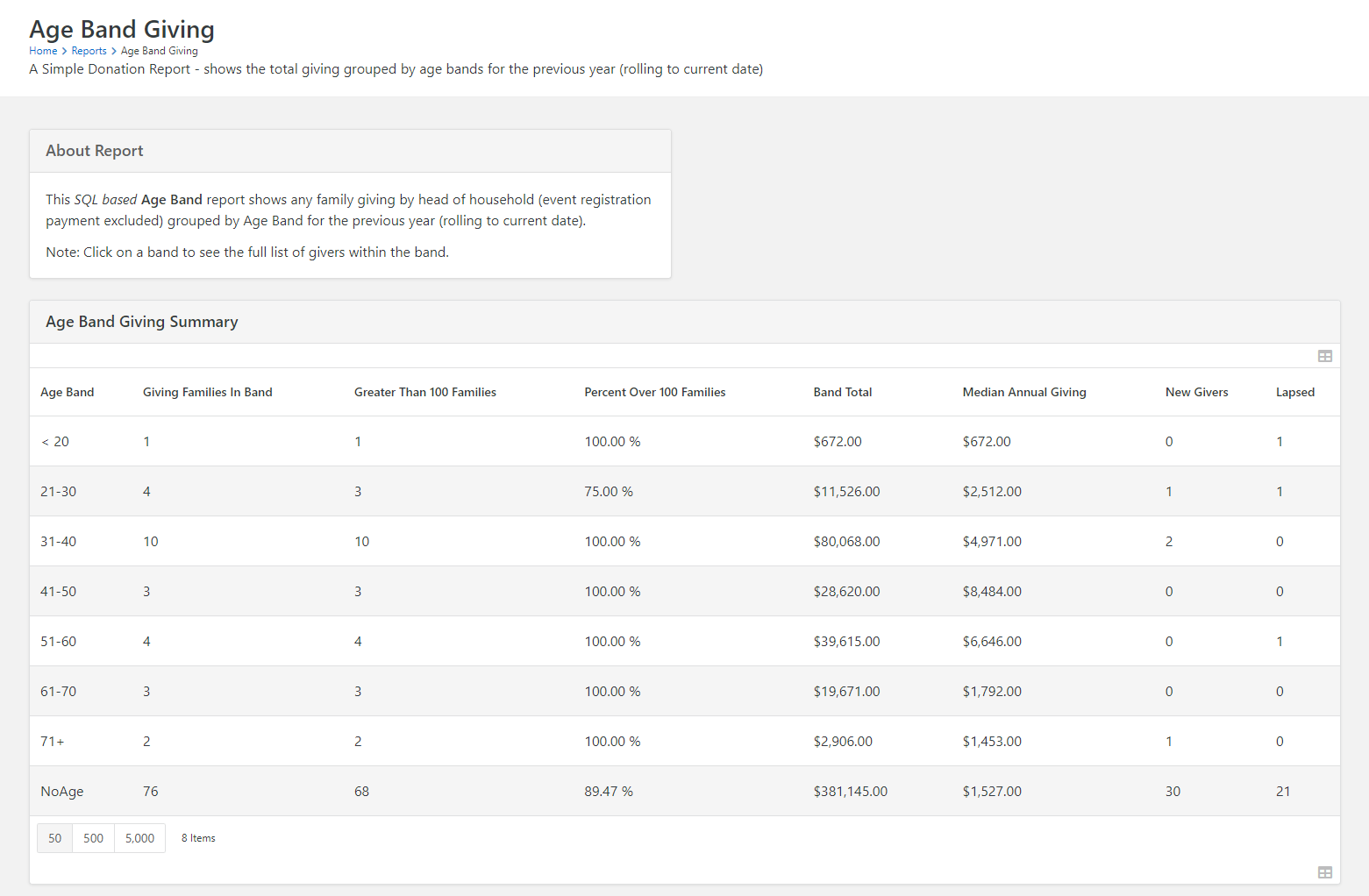
In order to create this report, go to the page you want to put it on, add a Dynamic Data block and paste this SQL into the query section of the block settings:
    /*
Author: Simple Donation
Created Date: 11/4/2022
Description: This SQL is designed to show giving information (registration payments are excluded) of families based on the head of household.
	The original intent of this was to have information around the giving of different age segments so that teaching could be tailored as needed
	to the age groups that needed it.  It returns age bands, the # of families giving in those age bands, the number of those families giving
	over $100 per year, the percentage of giving families who give over $100 per year, the total giving per year of that age band, the median annual gift,
	the number of new givers (in the year) in that age band, and the number of givers who used to be in that age band, but aren't any more.
*/
DROP TABLE IF EXISTS #GIVERS
DROP TABLE IF EXISTS #MEDIANGIVING

SELECT PersonId, AgeBand,
	CASE WHEN IsAnnualGiver = 0 AND IsPriorGiver = 1 THEN NULL ELSE ROUND(TotalAmount,0) END AS TotalAmount,
	IsAnnualGiver, IsPriorGiver,
    CASE WHEN IsAnnualGiver = 1 AND IsPriorGiver = 0 THEN 1 ELSE 0 END AS IsNew,
    CASE WHEN IsAnnualGiver = 0 AND IsPriorGiver = 1 THEN 1 ELSE 0 END AS IsLapsed
INTO #GIVERS
FROM (
	SELECT x1.PersonId, x1.[AgeBand],
    	SUM(CASE WHEN x2.IsRecent = 1 THEN t.Amount ELSE 0 END) AS [TotalAmount],
    	MAX(x2.IsRecent) AS IsAnnualGiver,
    	MAX(x2.IsPrior) AS IsPriorGiver
    FROM [AnalyticsFactFinancialTransaction] t
        CROSS APPLY (
            SELECT hoh.PersonId,
            	CASE
            		WHEN dp.Age <= 20 THEN '< 20'
            		WHEN dp.Age BETWEEN 21 AND 30 THEN '21-30'
            		WHEN dp.Age BETWEEN 31 AND 40 THEN '31-40'
            		WHEN dp.Age BETWEEN 41 AND 50 THEN '41-50'
            		WHEN dp.Age BETWEEN 51 AND 60 THEN '51-60'
            		WHEN dp.Age BETWEEN 61 AND 70 THEN '61-70'
            		WHEN dp.Age BETWEEN 71 AND 200 THEN '71+'
            		WHEN dp.Age IS NULL THEN 'NoAge'
            	END AS [AgeBand]
            FROM AnalyticsDimFamilyHeadOfHousehold hoh
                JOIN [AnalyticsDimPersonCurrent] dp ON hoh.PersonId = dp.PersonId
            WHERE hoh.GivingGroupId = t.GivingGroupId
        	    AND dp.RecordTypeValueId = 1 --Person
                AND hoh.GivingLeaderId = hoh.PersonId) x1
        CROSS APPLY (
            SELECT CASE WHEN t.TransactionDateTime > DATEADD(year, - 1, GETDATE()) THEN 1 ELSE 0 END AS IsRecent,
                CASE WHEN t.TransactionDateTime <= DATEADD(year, - 1, GETDATE()) AND t.TransactionDateTime > DATEADD(year, - 2, GETDATE()) THEN 1 ELSE 0 END AS IsPrior) x2
    WHERE t.TransactionTypeValueId = 53 --Contribution
     	AND t.TransactionDateTime > DATEADD(year, - 2, GETDATE())
    GROUP BY x1.PersonId,
    	x1.AgeBand) a

SELECT DISTINCT ag.AgeBand,
	PERCENTILE_CONT(0.5) WITHIN
GROUP (
	ORDER BY ag.TotalAmount
	) OVER (PARTITION BY ag.AgeBand) [MedianAnnualGiving]
INTO #MEDIANGIVING
FROM #GIVERS ag
WHERE IsAnnualGiver = 1;

SELECT a.AgeBand,
	GivingFamiliesInBand,
	GreaterThan100Families,
	PercentOver100Families,
	BandTotal,
	FORMAT(mg.MedianAnnualGiving, 'C') AS [MedianAnnualGiving],
	NewGivers,
	Lapsed
FROM (
	SELECT gtnl.AgeBand,
		COUNT(gtnl.TotalAmount) AS [GivingFamiliesInBand],
		SUM(CASE
				WHEN gtnl.TotalAmount > 100
					THEN 1
				ELSE 0
				END) AS [GreaterThan100Families],
		FORMAT((
				SUM(CASE
						WHEN gtnl.TotalAmount > 100
							THEN 1
						ELSE 0
						END)
				) / (COUNT(gtnl.TotalAmount) * 1.00), 'P') AS [PercentOver100Families],
		FORMAT(SUM(gtnl.TotalAmount), 'C') AS [BandTotal],
		SUM(CASE
				WHEN gtnl.IsNew = 1
					THEN 1
				ELSE 0
				END) AS [NewGivers],
		SUM(CASE
				WHEN gtnl.IsLapsed = 1
					THEN 1
				ELSE 0
				END) AS [Lapsed]
	FROM #GIVERS gtnl
	GROUP BY gtnl.AgeBand
	) a
INNER JOIN #MEDIANGIVING mg ON a.AgeBand = mg.AgeBand

DROP TABLE IF EXISTS #GIVERS
DROP TABLE IF EXISTS #MEDIANGIVING
This query may take more than 30 seconds to run. I recommend setting your Timeout setting to 120 like this:
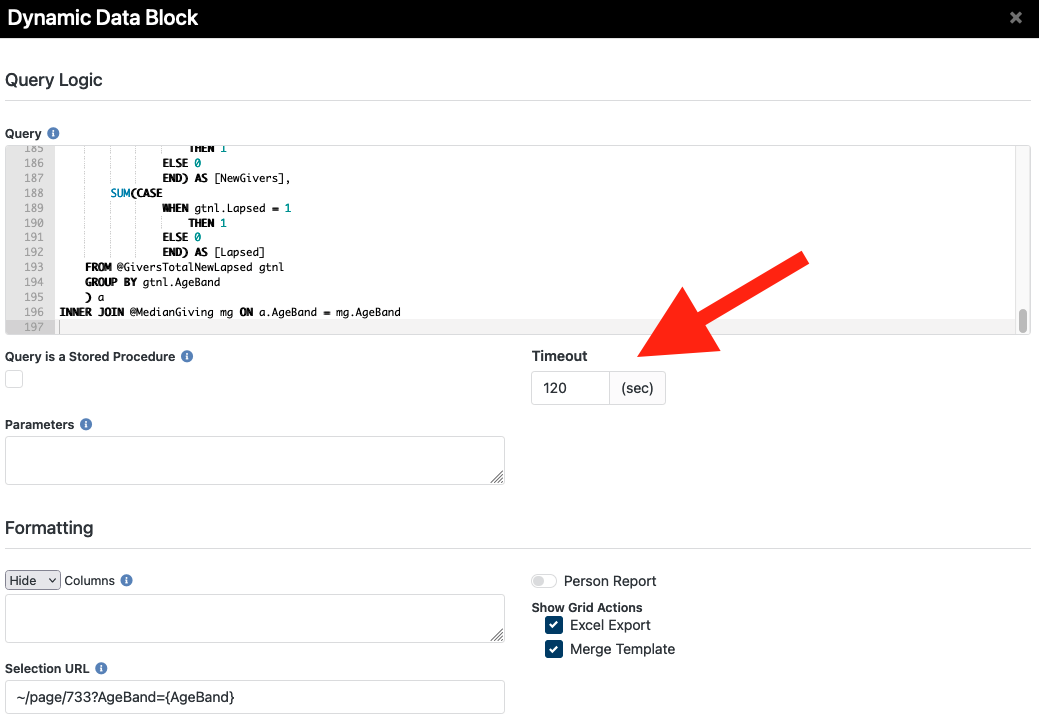
You might notice in that screenshot above that there's a selection URL. This is a little bonus. Basically, we give the ability to drill down and see the families within that Age Band that gave in the past year. To do that, you're going to add another page, and insert a Dynamic Data Block. In that Dynamic Data Block you'll insert the following SQL into the Query section of the block settings.
   DECLARE @AnnualGiving TABLE (
	PersonId INT,
	AgeBand NVARCHAR(50),
	TotalAmount DECIMAL
	)
DECLARE @MedianGiving TABLE (
	AgeBand NVARCHAR(50),
	MedianAnnualGiving DECIMAL
	)
DECLARE @PriorGivers TABLE (
	PersonId INT,
	AgeBand NVARCHAR(50)
	)
DECLARE @AllGivers TABLE (PersonId INT)
DECLARE @HeadsOfHousehold TABLE (
	PersonId INT,
	GivingGroupId INT,
	LastName NVARCHAR(150),
	Name NVARCHAR(150),
	FamilyId INT,
	IsEra BIT
	)
DECLARE @GiversTotalNewLapsed TABLE (
	IsEra BIT,
	TotalAmount DECIMAL,
	AgeBand NVARCHAR(50),
	Lapsed BIT,
	IsNew BIT
	)

{% assign ageBand = 'Global' | PageParameter: 'AgeBand' %}

INSERT INTO @HeadsOfHousehold
SELECT hoh.PersonId,
	hoh.GivingGroupId,
	hoh.LastName,
	fc.Name,
	fc.FamilyId,
	fc.IsEra
FROM AnalyticsDimFamilyHeadOfHousehold hoh
JOIN AnalyticsDimFamilyCurrent fc ON fc.HeadofHouseholdPersonKey = hoh.Id
WHERE hoh.GivingLeaderId = hoh.PersonId
	AND GivingGroupId IS NOT NULL;

INSERT INTO @AnnualGiving
SELECT dp.PersonId,
	CASE
		WHEN dp.Age <= 20
			THEN '< 20'
		WHEN dp.Age BETWEEN 21
				AND 30
			THEN '21-30'
		WHEN dp.Age BETWEEN 31
				AND 40
			THEN '31-40'
		WHEN dp.Age BETWEEN 41
				AND 50
			THEN '41-50'
		WHEN dp.Age BETWEEN 51
				AND 60
			THEN '51-60'
		WHEN dp.Age BETWEEN 61
				AND 70
			THEN '61-70'
		WHEN dp.Age BETWEEN 71
				AND 200
			THEN '71 >'
		WHEN dp.Age IS NULL
			THEN 'NoAge'
		END AS [AgeBand],
	SUM(t.Amount) AS [TotalAmount]
FROM [AnalyticsFactFinancialTransaction] t
INNER JOIN @HeadsOfHousehold hoh ON hoh.FamilyId = t.AuthorizedFamilyId
INNER JOIN [AnalyticsDimPersonCurrent] dp ON hoh.PersonId = dp.PersonId
WHERE t.TransactionDateTime > DATEADD(year, - 1, GETDATE())
	AND t.TransactionTypeValueId = 53 --Contribution
	AND dp.RecordTypeValueId = 1 --Person
GROUP BY dp.PersonId,
	dp.Age

;

SELECT ag.PersonId,
	hoh.Name,
	hoh.IsEra
        ,FORMAT(ag.TotalAmount, 'C') AS [FamilyGiving]
FROM @AnnualGiving ag
INNER JOIN @HeadsOfHousehold hoh ON hoh.PersonId = ag.PersonId

    {% if ageBand != empty %}
        WHERE ag.AgeBand = '{{ ageBand }}'
    {% else %}
    {% endif %}
ORDER BY ag.AgeBand, hoh.LastName
For Block Settings:
- In the Parameters area, enter "@AgeBand=
- I also enter "AgeBand, PersonId, PersonId1, IsEra" in the Hide Columns area
- It is a Person Report, so you can leave that checked if you want
- If you leave it as Person Report, then you have the option to launch Workflows, Communicate, etc.
If you do the drill down, make sure you grab the page Id for the new page and add it to the Selection URL with "?AgeBand={AgeBand}" appended to it. In the example above, you see it says, "/page/733?AgeBand={AgeBand}". Just change out the "733" with the page you're putting the drill down SQL on.
Screenshots
- /GetImage.ashx?guid=530e69d5-9ca9-4911-b1f2-57aa7abbc143
- /GetImage.ashx?guid=3ba7b966-49d4-4360-933b-3340a9d48dea