Recipe - Connection Request Dynamic Data Dashboard for Team Leaders
Skill level: Advanced
Organization: Grace Church of Overland Park
Requires Rock: 1.11.0
{# strip images & classes from the HTML but otherwise leave structure #}
Keeping up with your team’s connection requests can be challenging, especially as you increase your team size or the number of connection opportunities your team oversees. Having one place where supervisors can see how well their team members are keeping up with their ministry or administrative tasks can help ensure that everyone stays on the same page and provides support where it's needed most. One way to get insights into your team’s connection requests is by leveraging a group structure, a Dynamic Data report, and some fancy code to bring all the pieces together.
Please Note: This recipe was created after giving a short presentation at the Rock Conference 2022. Follow the hyperlink for a high-level overview of what is being documented here.
The First Piece:
Using groups to support a hierarchy of direct reports within a team and between teams.
We decided to create a new group type to accommodate this report. But depending on how you are already using your Organization Unit group type, you may opt to build this out within that group type.
To support direct reports within a team, you will need to build out the roles in your group type's settings. You will likely want at least these three basic roles:
- Supervisor (Leader)
- Staff
- Volunteer
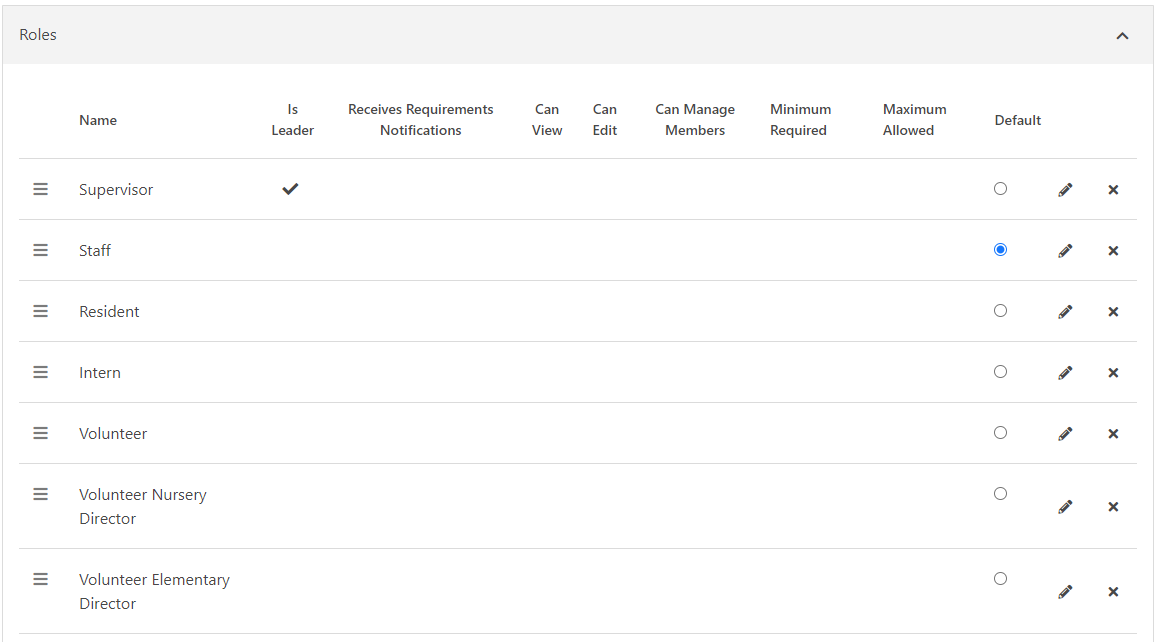
We have opted to include actual volunteer positions within our group type roles so we are expanding the potential roles we can select from for other projects not related to this report.
- Within the report’s code there is logic looking for “Supervisors” (Leaders) and it will allow “Supervisors” to see all other group member’s Connection Requests.
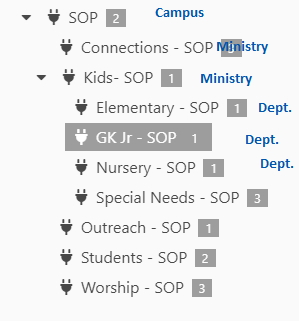
To support our hierarchy of teams in relation to other teams we simply used the parent/child group structure to our advantage.
- Within the report’s code there is logic looking at the hierarchy of groups. If a person is a supervisor of a team and there are child groups (sub-teams) underneath the team they supervise, then they will also be able to see all of the connection requests assigned to their team and all sub-team members.
The Second Piece:
Using group type attributes to link groups together outside of the direct hierarchy to support indirect overseers.
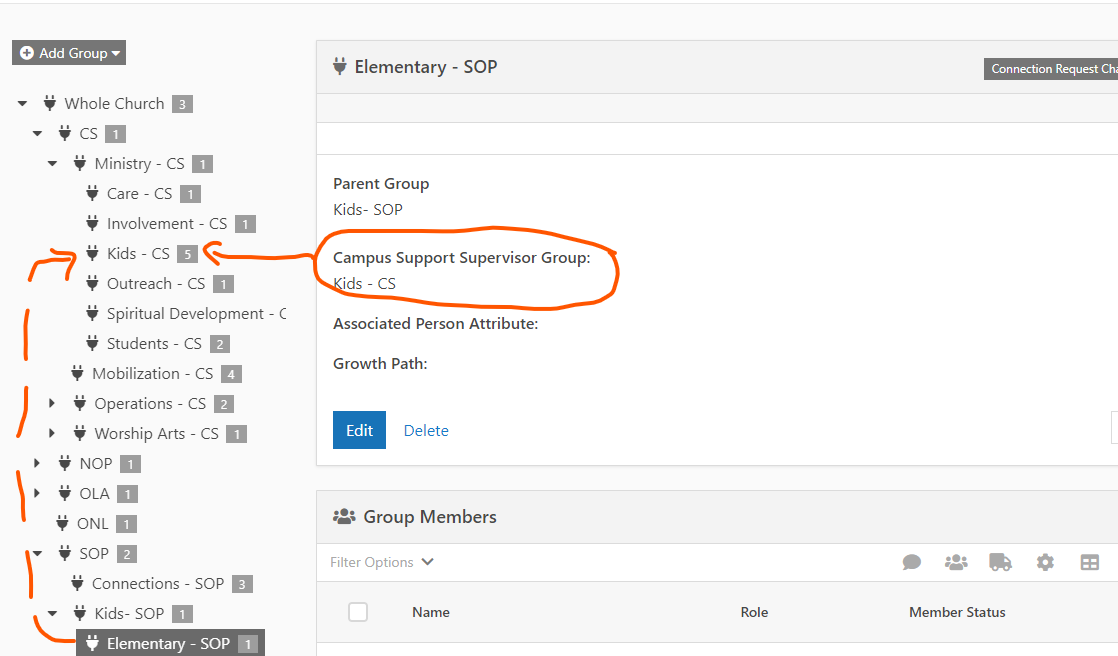
We have a Campus Support office that does not directly oversee our teams but may need to see how connection requests are spread across their teams across multiple campuses.
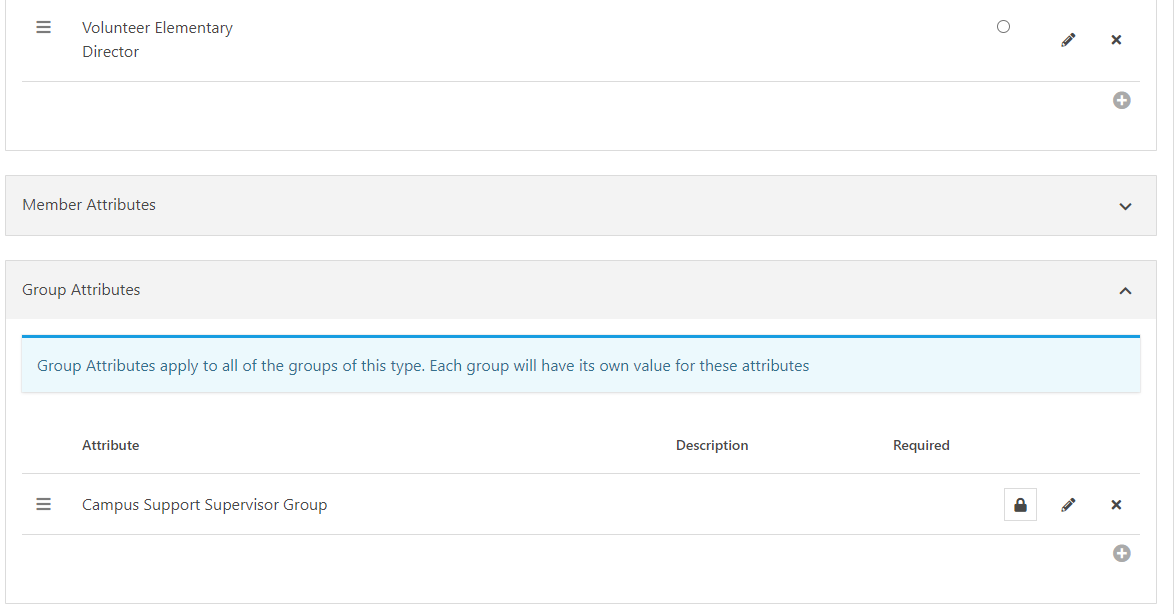
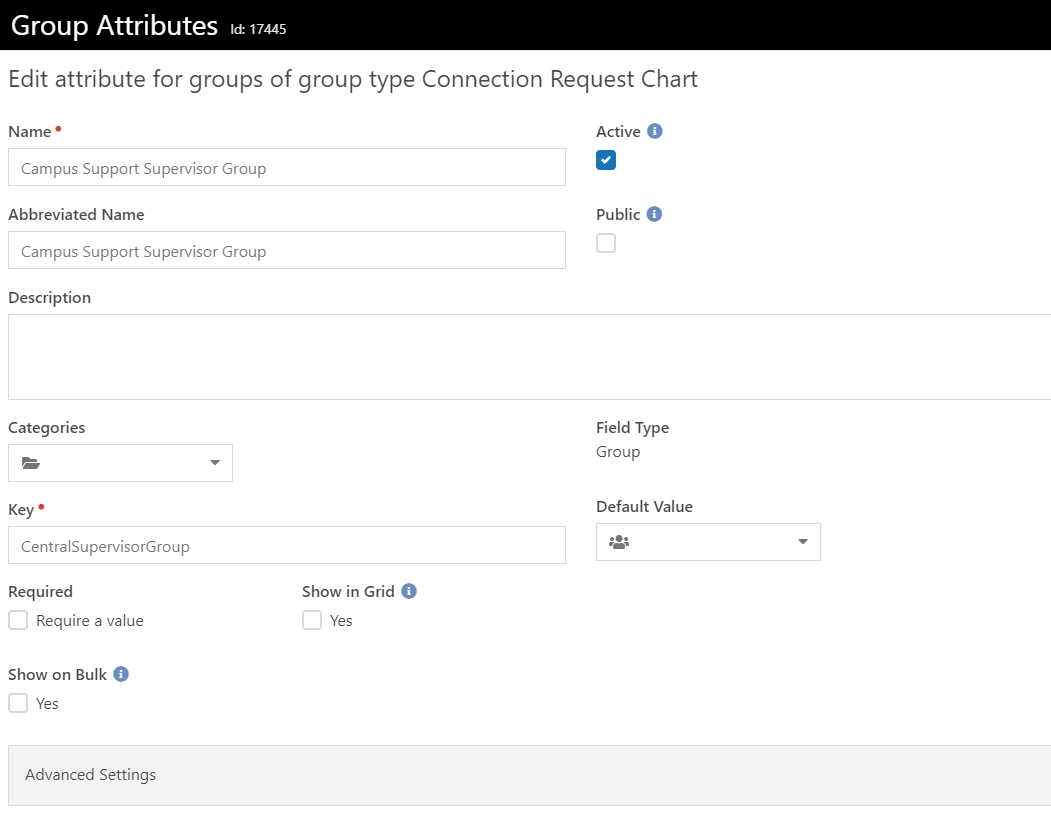
To support our indirect hierarchy of teams, we created a Group Attribute (at the group type level) called “Campus Support Supervisor Group” that allows us to select another group as “above” the group we are setting the attribute for.
- Within the report’s code there is logic looking for the group placed in this attribute. If there is a group in this attribute, whoever is a Supervisor (Leader) of the group in the attribute will be able to see all the connection requests associated with the members in that group.
The Third Piece:
Building the report.
With those things set up, you can then build the report. We worked with our partner BEMA to get this code right. Also, I am not a programmer. So, I am going to drop the code below, but I am not sure what all needs to be adjusted to work properly in your context. There are some obvious things like attribute IDs, root group IDs, etc.
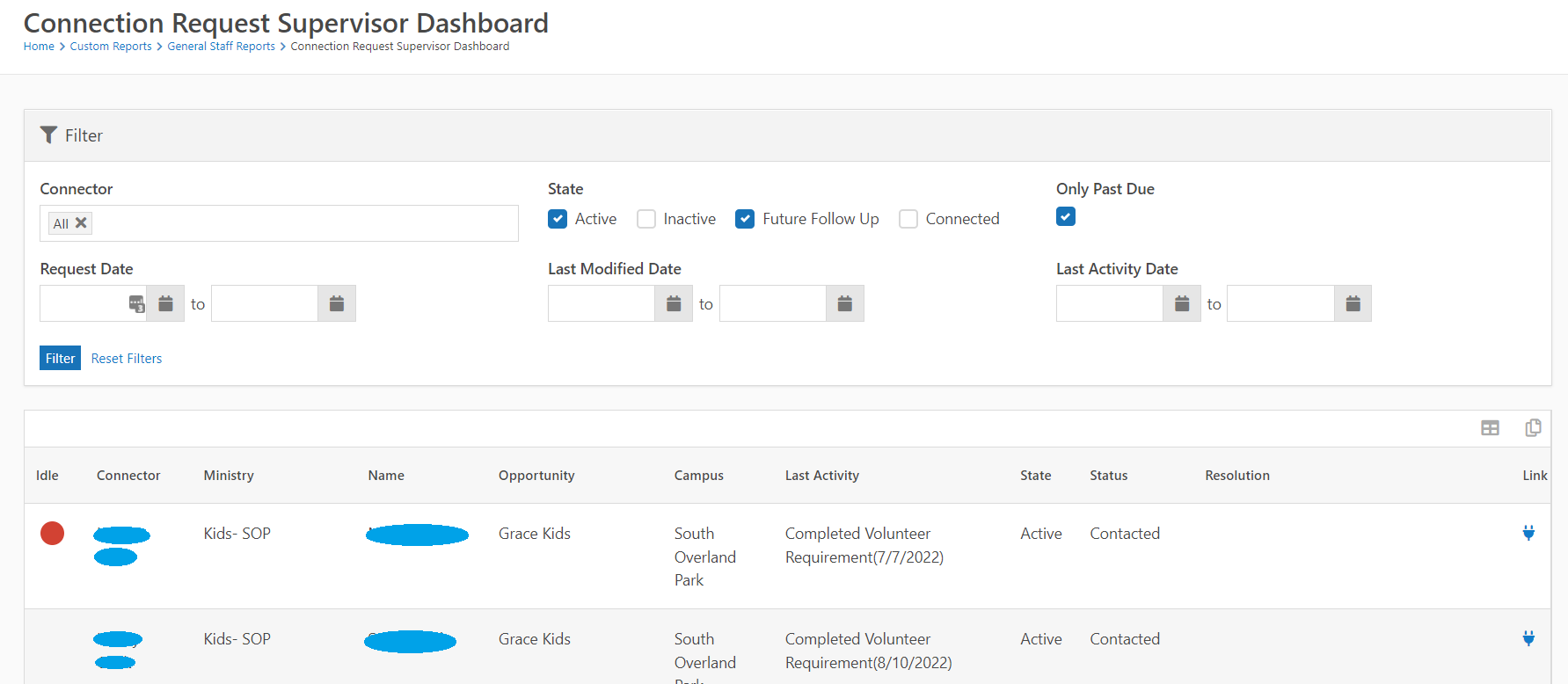
Here is a picture of what the report looks like:
Below is a picture of the Page Parameters and how we set them up to work with the report:
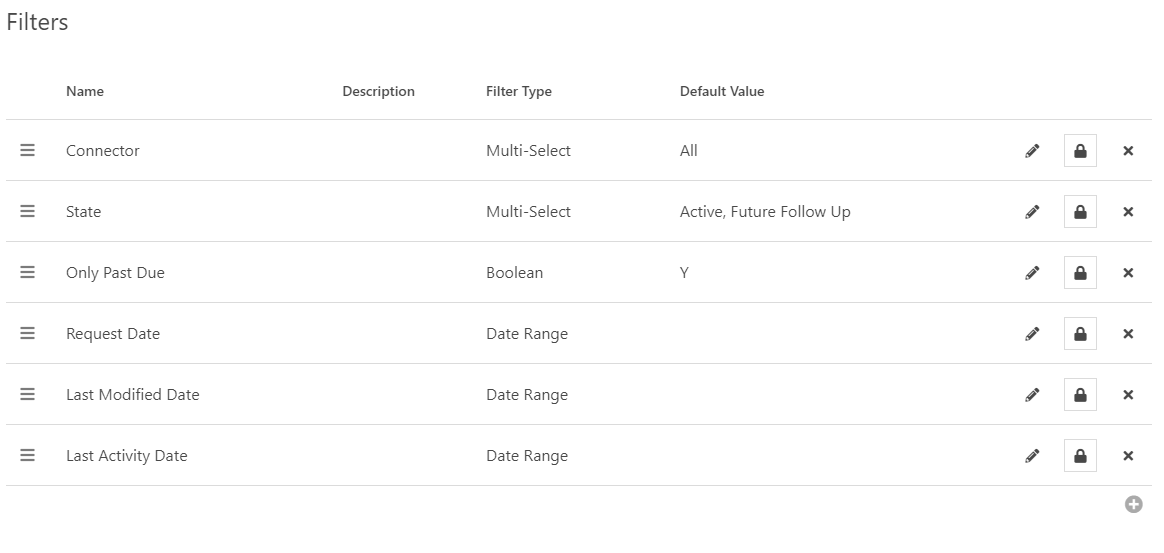
Connector: Multi-Select, Enhanced for Long Lists, Default Value is All
DECLARE @CurrentPersonId int = {{ CurrentPerson.Id | ToString | Default:'0' }}

DECLARE @CentralGroupAttributeId int = 17445

DECLARE @RootGroupId int = 159244

;WITH AllGroups as (

 SELECT

  *

 FROM

  [Group] g

 Where

  g.Id = @RootGroupId

 UNION ALL

 SELECT

  g.*

 FROM [Group] g

  JOIN AllGroups ag

   ON ag.Id = g.ParentGroupId

), GroupMembers as (

 -- Current Person

 SELECT

  r.IsLeader

  , m.*

 FROM AllGroups g

  JOIN GroupMember m

   ON m.GroupId = g.Id

  JOIN GroupTypeRole r

   ON r.Id = m.GroupRoleId

 WHERE

  m.PersonId = @CurrentPersonId

  AND m.GroupMemberStatus = 1

  AND m.IsArchived = 0

 UNION All

 -- Central Group

 SELECT

  gm.IsLeader

  , m.*

 FROM GroupMembers gm

  Join [Group] g

   ON g.Id = gm.GroupId

  JOIN AttributeValue av

   ON g.[Guid] = Try_Cast( av.[Value] as uniqueidentifier )

   And av.AttributeId = @CentralGroupAttributeId

  JOIN GroupMember m

   ON m.GroupId = av.EntityId

 WHERE

  m.GroupMemberStatus = 1

  AND m.IsArchived = 0

  AND gm.IsLeader = 1

 -- Children Group Members

 UNION ALL

 SELECT

  gm.IsLeader

  , m.*

 FROM GroupMembers gm

  JOIN [Group] g

   ON g.ParentGroupId = gm.GroupId

  JOIN GroupMember m

   ON m.GroupId = g.Id

 WHERE

  m.GroupMemberStatus = 1

  AND m.IsArchived = 0

  AND gm.IsLeader = 1

 UNION ALL

 -- Group Members

 SELECT

  gm.IsLeader

  , m.*

 FROM GroupMembers gm

  JOIN GroupMember m

   ON m.GroupId = gm.GroupId

   AND gm.PersonId != m.PersonId

 WHERE

  m.GroupMemberStatus = 1

  AND m.IsArchived = 0

  AND gm.IsLeader = 1

  AND gm.PersonId = @CurrentPersonId

)

SELECT DISTINCT

 [Value] = p.Id

 , [Text] = p.FirstName + ' ' + p.LastName

FROM

 GroupMembers m

 Join Person p

  ON p.Id = m.PersonId

UNION

SELECT

 0

 , 'All'

Order by

 [Text]
State: Multi-Select, Values -
0^Active,
1^Inactive,
2^Future Follow Up,
3^Connected
Only Past Due: Boolean, True Text = Yes, Falso Text = No, Control Type = Checkbox, Default Value = checked
Request Date, Last Modified Date, Last Activity Date: Thes dates are all basic date ranges.
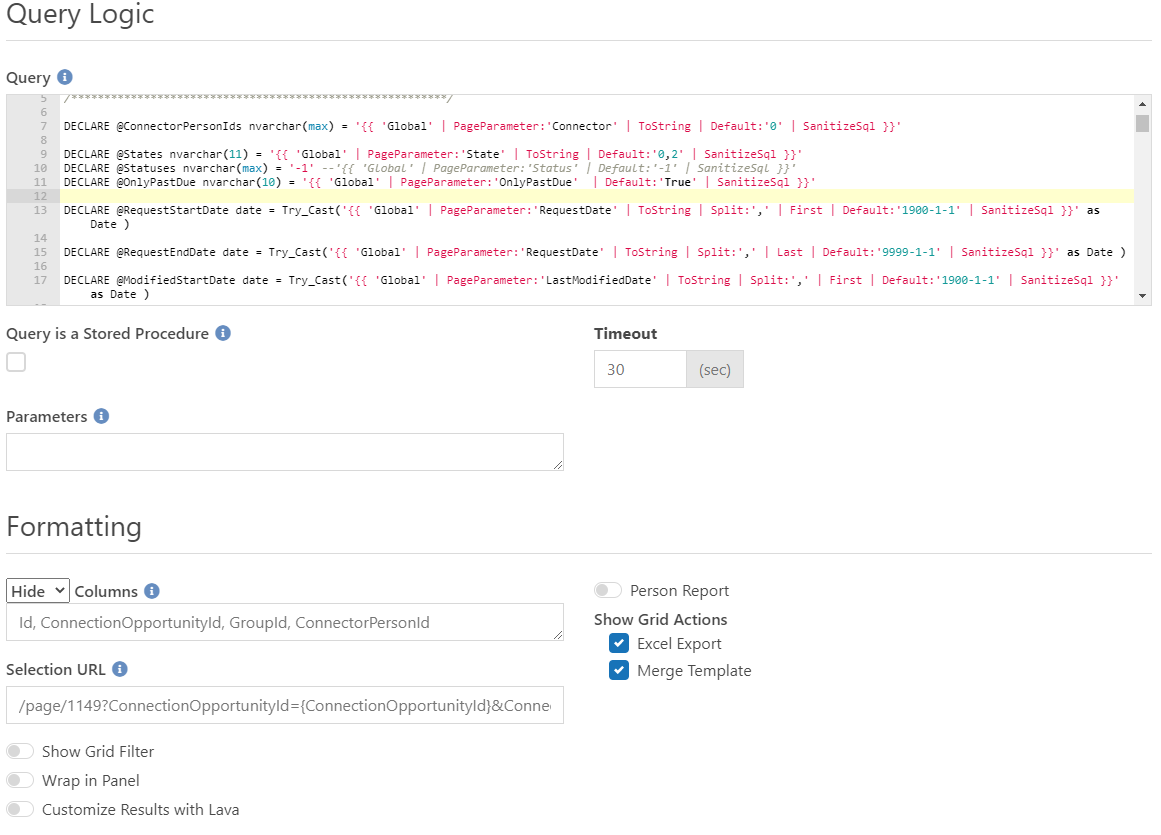
Below is the code we used on the report. Also, there are the settings used for the Dynamic Data Block:
DECLARE @CurrentPersonId int = {{ CurrentPerson.Id | Default:'0' }}
/*********************************************************/
-- Lava Filters
/*********************************************************/
DECLARE @ConnectorPersonIds nvarchar(max) = '{{ 'Global' | PageParameter:'Connector' | ToString | Default:'0' | SanitizeSql }}'
DECLARE @States nvarchar(11) = '{{ 'Global' | PageParameter:'State' | ToString | Default:'0,2' | SanitizeSql }}'
DECLARE @Statuses nvarchar(max) = '-1' --'{{ 'Global' | PageParameter:'Status' | Default:'-1' | SanitizeSql }}'
DECLARE @OnlyPastDue nvarchar(10) = '{{ 'Global' | PageParameter:'OnlyPastDue'  | Default:'True' | SanitizeSql }}'
DECLARE @RequestStartDate date = Try_Cast('{{ 'Global' | PageParameter:'RequestDate' | ToString | Split:',' | First | Default:'1900-1-1' | SanitizeSql }}' as Date )
DECLARE @RequestEndDate date = Try_Cast('{{ 'Global' | PageParameter:'RequestDate' | ToString | Split:',' | Last | Default:'9999-1-1' | SanitizeSql }}' as Date )
DECLARE @ModifiedStartDate date = Try_Cast('{{ 'Global' | PageParameter:'LastModifiedDate' | ToString | Split:',' | First | Default:'1900-1-1' | SanitizeSql }}' as Date )
DECLARE @ModifiedEndDate date = Try_Cast('{{ 'Global' | PageParameter:'LastModifiedDate' | ToString | Split:',' | Last | Default:'9999-1-1' | SanitizeSql }}' as Date )
DECLARE @LastActivityStartDate date = Try_Cast('{{ 'Global' | PageParameter:'LastActivityDate' | ToString | Split:',' | First | Default:'1900-1-1' | SanitizeSql }}' as Date )
DECLARE @LastActivityEndDate date = Try_Cast('{{ 'Global' | PageParameter:'LastActivityDate' | ToString | Split:',' | Last | Default:'9999-1-1' | SanitizeSql }}' as Date )
/*********************************************************/
DECLARE @RootGroupId int = 159244
DECLARE @CentralGroupAttributeId int = 17445
DECLARE @Today Date = GetDate()
;WITH AllGroups as (
 SELECT
  *
 FROM
  [Group] g
 Where
  g.Id = @RootGroupId
 UNION ALL
 SELECT
  g.*
 FROM [Group] g
  JOIN AllGroups ag
   ON ag.Id = g.ParentGroupId
), GroupMembers as (
 -- Current Person
 SELECT
  r.IsLeader
  , m.*
 FROM AllGroups g
  JOIN GroupMember m
   ON m.GroupId = g.Id
  JOIN GroupTypeRole r
   ON r.Id = m.GroupRoleId
 WHERE
  m.PersonId = @CurrentPersonId
  AND m.GroupMemberStatus = 1
  AND m.IsArchived = 0
 UNION All
 -- Central Group
 SELECT
  gm.IsLeader
  , m.*
 FROM GroupMembers gm
  Join [Group] g
   ON g.Id = gm.GroupId
  JOIN AttributeValue av
   ON g.[Guid] = Try_Cast( av.[Value] as uniqueidentifier )
   And av.AttributeId = @CentralGroupAttributeId
  JOIN GroupMember m
   ON m.GroupId = av.EntityId
 WHERE
  m.GroupMemberStatus = 1
  AND m.IsArchived = 0
  AND gm.IsLeader = 1
 -- Children Group Members
 UNION ALL
 SELECT
  gm.IsLeader
  , m.*
 FROM GroupMembers gm
  JOIN [Group] g
   ON g.ParentGroupId = gm.GroupId
  JOIN GroupMember m
   ON m.GroupId = g.Id
 WHERE
  m.GroupMemberStatus = 1
  AND m.IsArchived = 0
  AND gm.IsLeader = 1
 UNION ALL
 -- Group Members
 SELECT
  gm.IsLeader
  , m.*
 FROM GroupMembers gm
  JOIN GroupMember m
   ON m.GroupId = gm.GroupId
   AND gm.PersonId != m.PersonId
 WHERE
  m.GroupMemberStatus = 1
  AND m.IsArchived = 0
  AND gm.IsLeader = 1
  AND gm.PersonId = @CurrentPersonId
), LatestActivities as (
 Select
  ConnectionRequestId
  , cra.CreatedDateTime
  , Activity = cat.[Name]
  , Note = cra.Note
  , rn = Row_Number() Over ( Partition by ConnectionRequestId Order by cra.CreatedDateTime Desc )
 From
  ConnectionRequestActivity cra
  Join ConnectionActivityType cat
   ON cat.Id = cra.ConnectionActivityTypeId
)
SELECT Distinct
 cr.Id
 , cr.ConnectionOpportunityId
 , Idle = CASE WHEN DateDiff(Day, la.CreatedDateTime, @Today ) > ct.DaysUntilRequestIdle
    THEN N'
<div class="board-card-pills">
 <span class="board-card-pill badge-danger js-legend-badge" data-toggle="tooltip" data-original-title="Idle (no activity in '
 + Format( ct.DaysUntilRequestIdle, '#' )
 + ' days)">
  <span class="sr-only">Idle (no activity in '
 + Format( ct.DaysUntilRequestIdle, '#' )
 + ' days)</span>
 </span>
</div>'
    ELSE '' END
 , [Connector] = cp.FirstName + ' ' + cp.LastName
 , [Ministry] = g.[Name]
 , [Name] = p.NickName + ' ' + p.LastName
 , [Opportunity] = co.[Name]
 , [Campus] = c.[Name]
 , [LastActivity] = la.Activity + '(' + Format( la.CreatedDateTime, 'M/d/yyyy' ) + ')'
 , [State] =
  CASE cr.[ConnectionState]
   WHEN 0 THEN 'Active'
   WHEN 1 THEN 'Inactive'
   WHEN 2 THEN 'Future Follow Up (' + Format( cr.FollowUpDate, 'M/d/yyyy' ) + ')'
   WHEN 3 THEN 'Connected'
  END
 , [Status] = cs.[Name]
 , [Resolution] = av.[Value]
 , g.Id as GroupId
    , cp.Id as ConnectorPersonId
    , [Link] = '<a href="https://rock.visitgracechurch.com/page/1149?ConnectionOpportunityId=' + Cast( co.Id as varchar(11)) + '&ConnectionRequestId=' + Cast( cr.Id as varchar(11)) + '" target="_blank"><i class="fa fa-plug"></i></a>'
FROM
 ConnectionRequest cr
 JOIN ConnectionOpportunity co
  ON co.Id = cr.ConnectionOpportunityId
 JOIN ConnectionType ct
  ON ct.Id = co.ConnectionTypeId
 Left Join Attribute A
     ON a.EntityTypeQualifierColumn = 'ConnectionTypeId' and a.[Key] = 'Resolution' and Try_Cast( a.EntityTypeQualifierValue as int ) = ct.Id
 Left JOIN AttributeValue av
     ON av.EntityId = cr.Id and av.AttributeId = a.Id
 JOIN PersonAlias cpa
  ON cpa.Id = cr.ConnectorPersonAliasId
 JOIN GroupMembers m
  ON m.PersonId = cpa.PersonId
 JOIN PersonAlias pa
  ON pa.Id = cr.PersonAliasId
 JOIN  Person p
  ON p.Id = pa.PersonId
 LEFT JOIN Campus c
  ON c.Id = cr.CampusId
 JOIN Person cp
  ON cp.Id = cpa.PersonId
 JOIN ConnectionStatus cs
  ON cs.Id = cr.ConnectionStatusId
 Join [Group] g
  ON g.Id = m.GroupId
 LEFT JOIN LatestActivities la
  ON la.ConnectionRequestId = cr.Id
  AND la.rn = 1
 JOIN String_Split( @States, ',' ) s1f
  ON s1f.[Value] = '-1'
  OR Try_Cast( s1f.[Value] as int ) = cr.ConnectionState
  AND (
   cr.ConnectionState != 2
   OR ( cr.ConnectionState = 2
    AND ( @OnlyPastDue = 'False'
     OR ( @OnlyPastDue = 'True'
      AND cr.FollowUpDate <= @Today ) ) ) )
 JOIN String_Split ( @Statuses,',' ) s2f
  ON s2f.[Value] = '-1'
  OR s2f.[Value] = cs.[Name]
 JOIN String_Split( @ConnectorPersonIds,',') cf
  ON cf.[Value] = '0'
  OR Try_Cast( cf.[Value] as int ) = cp.Id
WHERE
    Cast( cr.CreatedDateTime as date ) >= @RequestStartDate
    AND Cast( cr.CreatedDateTime as date ) <= @RequestEndDate
    AND Cast( cr.ModifiedDateTime as date ) >= @ModifiedStartDate
    AND Cast( cr.ModifiedDateTime as date ) <= @ModifiedEndDate
    AND ( la.CreatedDateTime is null
        OR (
            Cast( la.CreatedDateTime as date ) >= @LastActivityStartDate
            AND Cast( la.CreatedDateTime as date ) <= @LastActivityEndDate ) )
Order By
    g.Id
    , cp.Id
    , cr.ConnectionOpportunityId
That should be everything you need to to jumpstart your own report. The other part of the presentation focused on the email we sent out to make the report more useful for Team Leaders.
The Email:
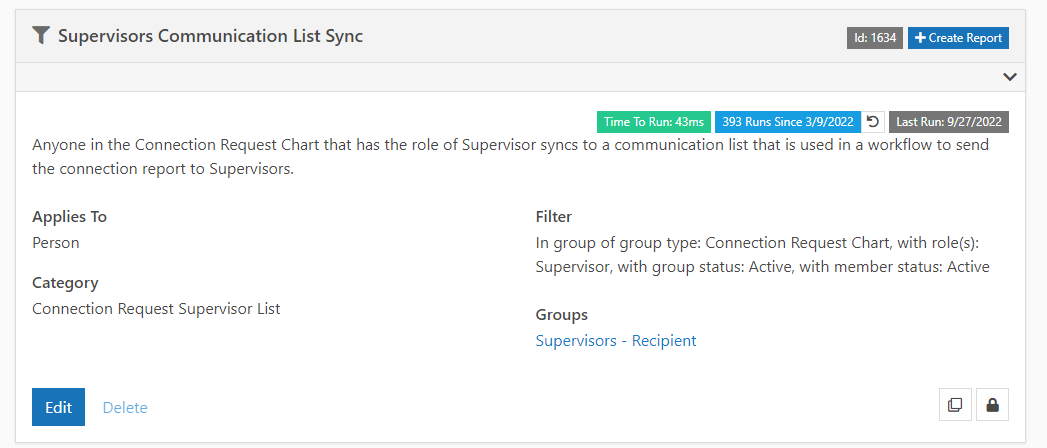
Part 1: Group Sync
We created a Data View that would pull all Supervisors into one group.
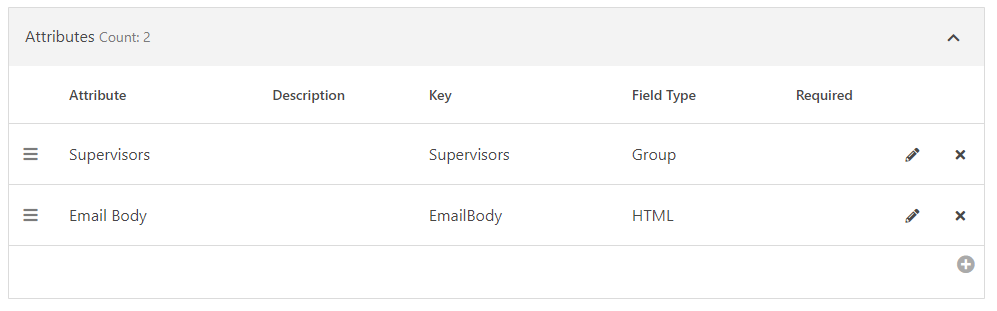
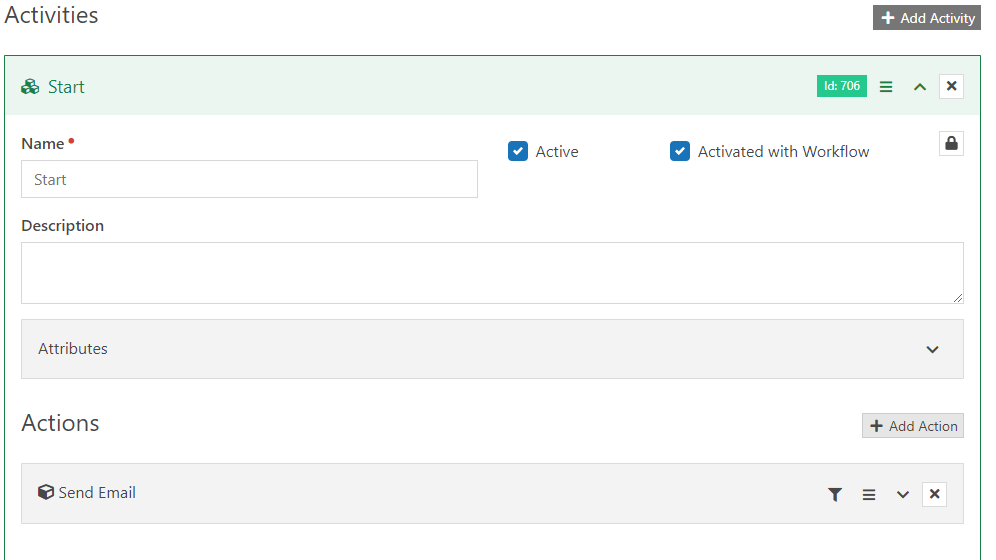
Part 2: Workflow
We created a Workflow to send an email to that group. It piggybacks off the code we used in the report to show how many Connection Requests the Team is currently holding.
Here is the code used in the email:
{% sql %}
DECLARE @CurrentPersonId int = {{ Person.Id | Default:'0' }};
DECLARE @ConnectorPersonIds nvarchar(max) = '0'
DECLARE @States nvarchar(11) = '0,2'
DECLARE @Statuses nvarchar(max) = '-1'
DECLARE @OnlyPastDue nvarchar(10) = 'true'
DECLARE @RequestStartDate date = Try_Cast('1900-01-01' as Date )
DECLARE @RequestEndDate date = Try_Cast('9999-01-01' as Date )
DECLARE @ModifiedStartDate date = Try_Cast('1900-01-01' as Date )
DECLARE @ModifiedEndDate date = Try_Cast('9999-01-01' as Date )
DECLARE @LastActivityStartDate date = Try_Cast('1900-01-01' as Date )
DECLARE @LastActivityEndDate date = Try_Cast('9999-01-01' as Date )
/*********************************************************/
DECLARE @RootGroupId int = 159244
DECLARE @CentralGroupAttributeId int = 17445
DECLARE @Today Date = GetDate()
;WITH AllGroups as (
SELECT
*
FROM
[Group] g
Where
g.Id = @RootGroupId
UNION ALL
SELECT
g.*
FROM [Group] g
JOIN AllGroups ag
ON ag.Id = g.ParentGroupId
), GroupMembers as (
-- Current Person
SELECT
r.IsLeader
, m.*
FROM AllGroups g
JOIN GroupMember m
ON m.GroupId = g.Id
JOIN GroupTypeRole r
ON r.Id = m.GroupRoleId
WHERE
m.PersonId = @CurrentPersonId
AND m.GroupMemberStatus = 1
AND m.IsArchived = 0
UNION All
-- Central Group
SELECT
gm.IsLeader
, m.*
FROM GroupMembers gm
Join [Group] g
ON g.Id = gm.GroupId
JOIN AttributeValue av
ON g.[Guid] = Try_Cast( av.[Value] as uniqueidentifier )
And av.AttributeId = @CentralGroupAttributeId
JOIN GroupMember m
ON m.GroupId = av.EntityId
WHERE
m.GroupMemberStatus = 1
AND m.IsArchived = 0
AND gm.IsLeader = 1
-- Children Group Members
UNION ALL
SELECT
gm.IsLeader
, m.*
FROM GroupMembers gm
JOIN [Group] g
ON g.ParentGroupId = gm.GroupId
JOIN GroupMember m
ON m.GroupId = g.Id
WHERE
m.GroupMemberStatus = 1
AND m.IsArchived = 0
AND gm.IsLeader = 1
UNION ALL
-- Group Members
SELECT
gm.IsLeader
, m.*
FROM GroupMembers gm
JOIN GroupMember m
ON m.GroupId = gm.GroupId
AND gm.PersonId != m.PersonId
WHERE
m.GroupMemberStatus = 1
AND m.IsArchived = 0
AND gm.IsLeader = 1
AND gm.PersonId = @CurrentPersonId
), LatestActivities as (
Select
ConnectionRequestId
, cra.CreatedDateTime
, Activity = cat.[Name]
, Note = cra.Note
, rn = Row_Number() Over ( Partition by ConnectionRequestId Order by cra.CreatedDateTime Desc )
From
ConnectionRequestActivity cra
Join ConnectionActivityType cat
ON cat.Id = cra.ConnectionActivityTypeId
)
SELECT Distinct
[Status] = Case When cs.IsCritical = 1 then 'Critical'
When cr.[ConnectionState] = 0 and DateDiff(Day, cr.CreatedDateTime, @Today) <= 7 then 'New'
When ( (cr.[ConnectionState] = 0 or (cr.[ConnectionState] = 2 and cr.FollowupDate < @Today) )
and ( ( la.CreatedDateTime is not null and DateDiff(Day, la.CreatedDateTime, @Today ) > ct.DaysUntilRequestIdle )
or ( la.CreatedDateTime is null and DateDiff(Day, cr.CreatedDateTime, @Today) > ct.DaysUntilRequestIdle ) ) ) then 'Idle'
When cr.[ConnectionState] = 0 or cr.[ConnectionState] = 2 Then 'Active'
End
, Count(cr.Id) as [Count]
FROM
ConnectionRequest cr
JOIN ConnectionOpportunity co
ON co.Id = cr.ConnectionOpportunityId
JOIN ConnectionType ct
ON ct.Id = co.ConnectionTypeId
JOIN PersonAlias cpa
ON cpa.Id = cr.ConnectorPersonAliasId
JOIN GroupMembers m
ON m.PersonId = cpa.PersonId
JOIN PersonAlias pa
ON pa.Id = cr.PersonAliasId
JOIN Person p
ON p.Id = pa.PersonId
LEFT JOIN Campus c
ON c.Id = cr.CampusId
JOIN Person cp
ON cp.Id = cpa.PersonId
JOIN ConnectionStatus cs
ON cs.Id = cr.ConnectionStatusId
Join [Group] g
ON g.Id = m.GroupId
LEFT JOIN LatestActivities la
ON la.ConnectionRequestId = cr.Id
AND la.rn = 1
JOIN String_Split( @States, ',' ) s1f
ON s1f.[Value] = '-1'
OR Try_Cast( s1f.[Value] as int ) = cr.ConnectionState
AND (
cr.ConnectionState != 2
OR ( cr.ConnectionState = 2
AND ( @OnlyPastDue = 'False'
OR ( @OnlyPastDue = 'True'
AND cr.FollowUpDate <= @Today ) ) ) )
JOIN String_Split ( @Statuses,',' ) s2f
ON s2f.[Value] = '-1'
OR s2f.[Value] = cs.[Name]
JOIN String_Split( @ConnectorPersonIds,',') cf
ON cf.[Value] = '0'
OR Try_Cast( cf.[Value] as int ) = cp.Id
Group by Case When cs.IsCritical = 1 then 'Critical'
When cr.[ConnectionState] = 0 and DateDiff(Day, cr.CreatedDateTime, @Today) <= 7 then 'New'
When ( (cr.[ConnectionState] = 0 or (cr.[ConnectionState] = 2 and cr.FollowupDate < @Today) )
and ( ( la.CreatedDateTime is not null and DateDiff(Day, la.CreatedDateTime, @Today ) > ct.DaysUntilRequestIdle )
or ( la.CreatedDateTime is null and DateDiff(Day, cr.CreatedDateTime, @Today) > ct.DaysUntilRequestIdle ) ) ) then 'Idle'
When cr.[ConnectionState] = 0 or cr.[ConnectionState] = 2 Then 'Active'
End
{% endsql %}
{% assign totalNewRequests = results | Where:'Status','New' | First | Property:'Count' | Default:'0' | AsInteger %}
{% assign totalActiveRequests = results | Where:'Status','Active' | First | Property:'Count' | Default:'0' | AsInteger %}
{% assign totalCriticalRequests = results | Where:'Status','Critical' | First | Property:'Count' | Default:'0' | AsInteger %}
{% assign totalIdleRequests = results | Where:'Status','Idle' | First | Property:'Count' | Default:'0' | AsInteger %}
{% assign totalRequests = totalActiveRequests | Plus:totalCriticalRequests | Plus:totalIdleRequests | Plus:totalNewRequests %}
{{ 'Global' | Attribute:'EmailHeader' }}
<br/><br/>
Hello {{ Person.NickName }},
<br/><br/>
You are receiving this email because you supervise someone other than yourself.
<br/><br/>
Please! Click on the link below so you can utilize this report to see all connection requests for folks you supervise.
<br/><br/>
<center>
<a class="button-link" title="Connection Report" href="https://rock.visitgracechurch.com/page/1231" target="_blank" style="display: inline-block; font-weight: bold; letter-spacing: normal; line-height: 100%; text-align: center; text-decoration: none; color: rgb(255, 255, 255); background-color: rgb(14, 114, 186); padding: 15px; border: 1px solid rgb(14, 114, 186); border-radius: 3px;">
Connection Report
</a>
</center>
<br/><br/>
<h3>Your Team's Active Connection Requests</h3>
<br/><br/>
<table width='100%'>
<tr>
<td align='center' width='25%' style='border-right: 3px solid #FFF;background: #88bb54; text-align:center; color: #fff; font-family: sans-serif; padding-top:20px;'>
<h1 style='color: #fff; margin-top: 20px; font-family: sans-serif;'>
{{totalNewRequests}}
</h1>
New
</td>
<td align='center' width='25%' style='border-right: 3px solid #FFF;background: #4099ad; text-align:center; color: #fff; font-family: sans-serif; padding-top:20px;'>
<h1 style='color: #fff; margin-top: 20px; font-family: sans-serif;'>
{{totalRequests}}
</h1>
Active
</td>
<td align='center' width='25%' style='border-right: 3px solid #FFF;background: #ee7624; text-align:center; color: #fff; font-family: sans-serif; padding-top:20px;'>
<h1 style='color: #fff; margin-top: 20px; font-family: sans-serif;'>
{{totalCriticalRequests}}
</h1>
Critical
</td>
<td align='center' width='25%' style='background: #bb5454; text-align:center; color: #fff; font-family: sans-serif; padding-top:20px;'>
<h1 style='color: #fff; margin-top: 20px; font-family: sans-serif;'>
{{totalIdleRequests}}
</h1>
Idle
</td>
</tr>
</table>
<br/><br/>
Have a wonderful day.
<br/><br/>
{{ 'Global' | Attribute:'EmailFooter' }}
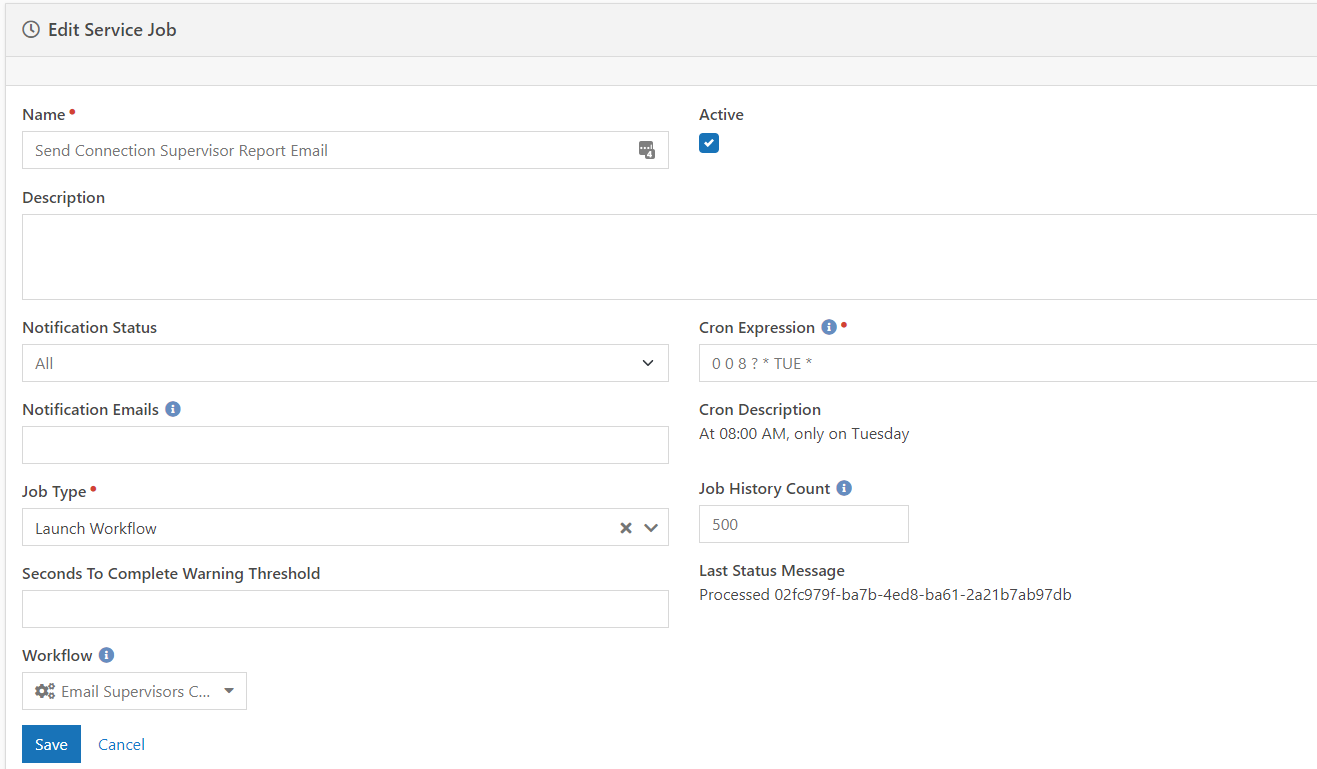
Part 3: The Job
Lastly we set up a Job to launch the workflow.
That should cover everything mentioned in the presentation. Please make sure you look over all the code and customize it suit your instance.
Screenshots
- /GetImage.ashx?guid=dcc2eea1-86ec-4397-bfc4-d0c4f487170d
- /GetImage.ashx?guid=c88d91fc-aceb-4525-b4f1-dc1dd775156d
- /GetImage.ashx?guid=35e142f8-6c5f-4d25-8b60-0e3fd6fa68d5
- /GetImage.ashx?guid=b1aac684-e6e0-4e89-94cd-440ba6113c09
- /GetImage.ashx?guid=80412cb7-30b3-4ea2-b9cc-97ec0dd468b0
- /GetImage.ashx?guid=ef871c44-56b9-47ea-a761-4d15aebeb08d
- /GetImage.ashx?guid=43f6383a-ba94-4bd7-b4ce-462315167f3b
- /GetImage.ashx?guid=a3b382eb-bbf0-479b-beba-7f5f6876fc4e
- /GetImage.ashx?guid=f5bbd4e6-b4b9-42b4-95bc-43735647a8f4
- /GetImage.ashx?guid=dd6d2fa8-a1bd-4106-a0e3-5db04b42942f