Recipe - Get Notified of ACME SSL Certificate Renewal
Skill level: Beginner
Organization: Pillars
Requires Rock: 1.11.0
{# strip images & classes from the HTML but otherwise leave structure #}
If you are using Protect My Ministry or Active Screening, this will be a helpful tool in automatically notifying them when your SSL certificate gets renewed!
Get set up to receive a notification whenever an SSL certificate is automatically renewed with these few steps:
1. First, run the following SQL to create/set a new 'Last Notified' attribute on SSL Certificate groups
-- Create Last Notified attribute
DECLARE @LastNotifiedAttrGuid uniqueidentifier = '4E805393-FEBB-43CA-96E6-DA0EC255585D'
;MERGE INTO [Attribute] AS NV
USING
 (
  SELECT
   A2.[Id],
   A1.[FieldTypeId],
   A1.[EntityTypeId],
   A1.[EntityTypeQualifierColumn],
   A1.[EntityTypeQualifierValue]
  FROM [Attribute] A1
  LEFT OUTER JOIN [Attribute] A2
   ON A2.[EntityTypeId] = A1.[EntityTypeId]
   AND A2.[EntityTypeQualifierColumn] = A1.[EntityTypeQualifierColumn]
   AND A2.[EntityTypeQualifierValue] = A1.[EntityTypeQualifierValue]
   AND A2.[Key] = 'LastNotified'
  WHERE A1.[Guid] = 'C3A28E09-E8A3-4CF9-8255-1645F3C21AFB' -- Renewal Date
 ) AS OV
 ON NV.[Id] = OV.[Id]
WHEN MATCHED THEN
 UPDATE SET [Guid] = @LastNotifiedAttrGuid
WHEN NOT MATCHED BY TARGET THEN
 INSERT ( [IsSystem], [FieldTypeId], [EntityTypeId], [EntityTypeQualifierColumn], [EntityTypeQualifierValue], [Key], [Name],
  [Description], [Order], [IsGridColumn], [IsMultiValue], [IsRequired], [Guid] )
 VALUES ( 0, OV.[FieldTypeId], OV.[EntityTypeId], OV.[EntityTypeQualifierColumn], OV.[EntityTypeQualifierValue], 'LastNotified', 'Last Notified',
  'Date that PMM was last notified of certificate renewal', 1, 0, 0, 0, NEWID() )
-- Create default Last Notified values equal to existing renewal dates
;MERGE INTO [AttributeValue] AS NV
USING
 (
  SELECT
   A2.[Id] AS [AttributeId],
   AV.[EntityId],
   AV.[Value],
   AV.[ValueAsDateTime]
  FROM [Attribute] A1
  INNER JOIN [Attribute] A2
   ON A2.[EntityTypeId] = A1.[EntityTypeId]
   AND A2.[EntityTypeQualifierColumn] = A1.[EntityTypeQualifierColumn]
   AND A2.[EntityTypeQualifierValue] = A1.[EntityTypeQualifierValue]
   AND A2.[Key] = 'LastNotified'
  INNER JOIN [AttributeValue] AV
   ON AV.[AttributeId] = A1.[Id]
   AND AV.[ValueAsDateTime] IS NOT NULL
  WHERE A1.[Guid] = 'C3A28E09-E8A3-4CF9-8255-1645F3C21AFB' -- Renewal Date
 ) AS OV
 ON NV.[AttributeId] = OV.[AttributeId]
 AND NV.[EntityId] = OV.[EntityId]
WHEN MATCHED THEN
 UPDATE SET
  [Value] = OV.[Value],
  [ValueAsDateTime] = OV.[ValueAsDateTime]
WHEN NOT MATCHED BY TARGET THEN
 INSERT ( [IsSystem],[AttributeId],[EntityId],[Value],[ValueAsDateTime],[Guid]	)
 VALUES (0 ,OV.[AttributeId] ,OV.[EntityId] ,OV.[Value], OV.[ValueAsDateTime], NEWID() )
;
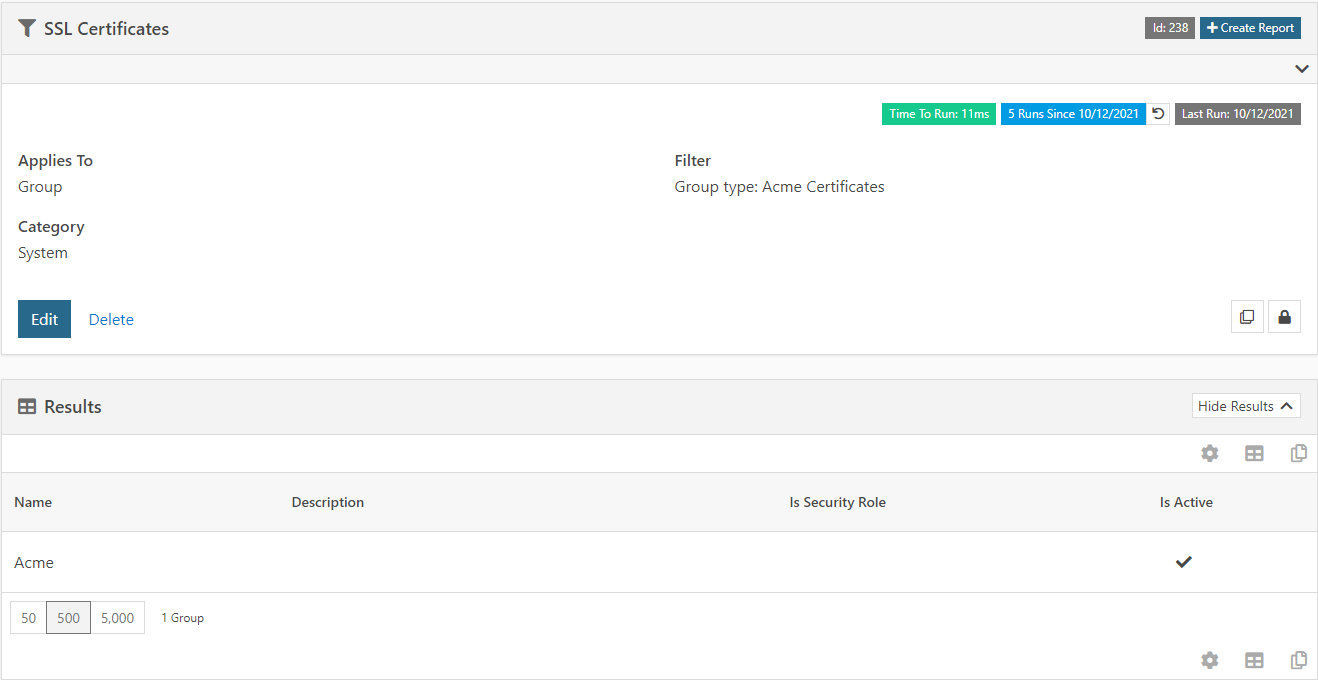
2. Create a Data View like this:
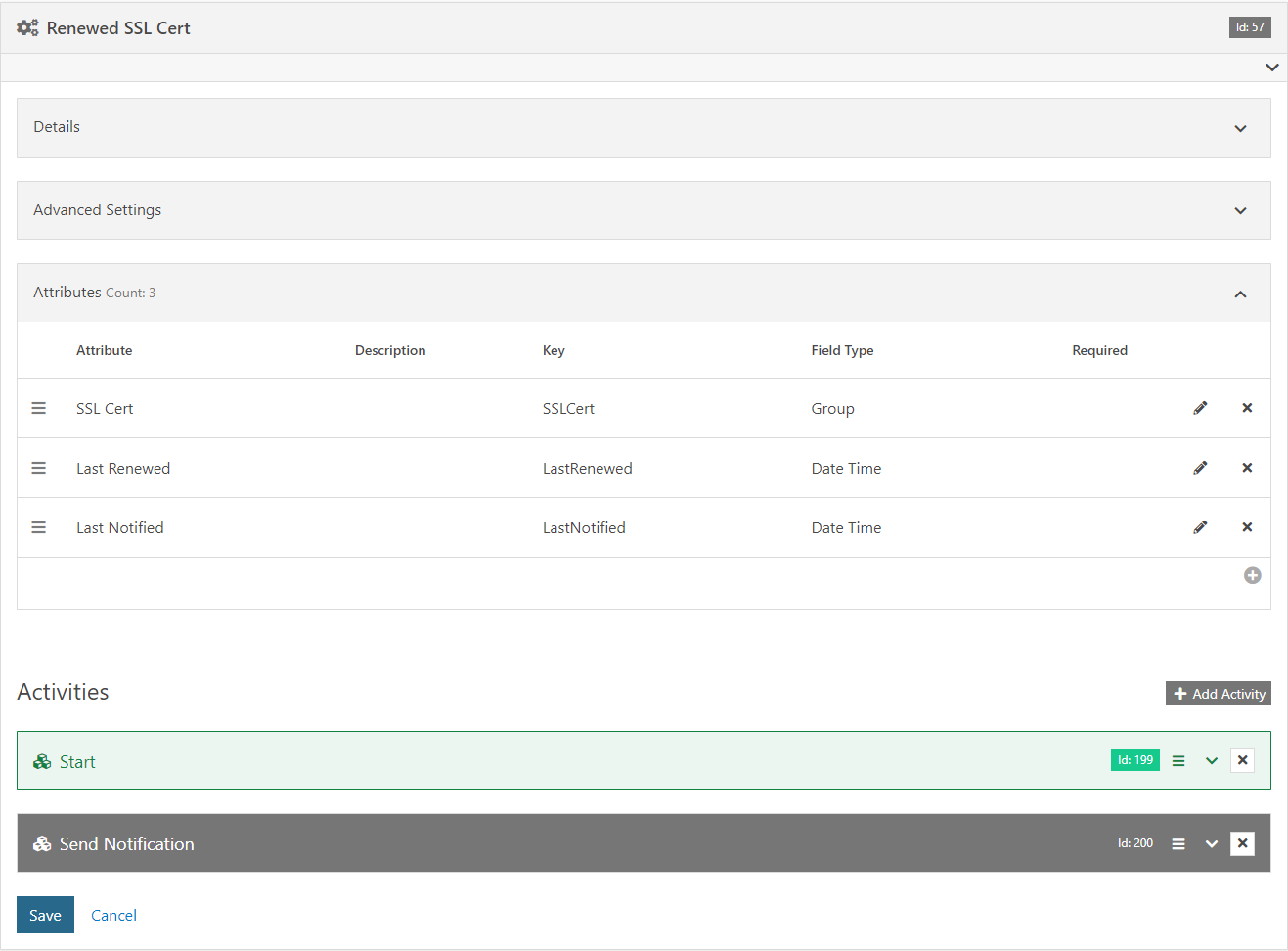
3. Import the attached workflow export to create a notification workflow
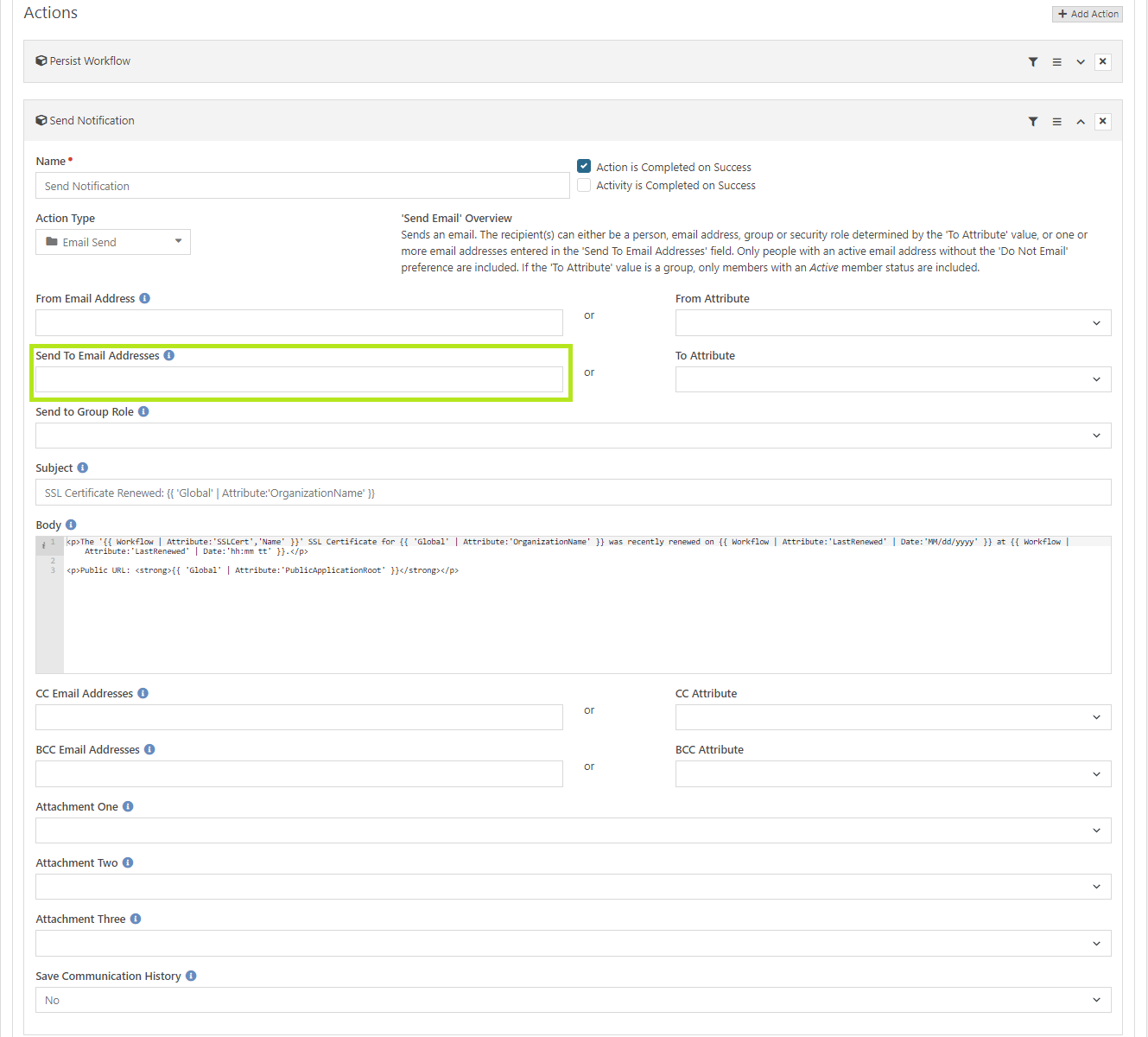
4. Edit the imported workflow and configure the "Send Notification" action under the "Send Notification" activity to specify who should receive the notification
If you're notifying Protect My Ministry of the renewal, use this email: support@protectmyministry.com
If you're notifying Active Screening Faith, use this email: cs@activescreeningfaith.com
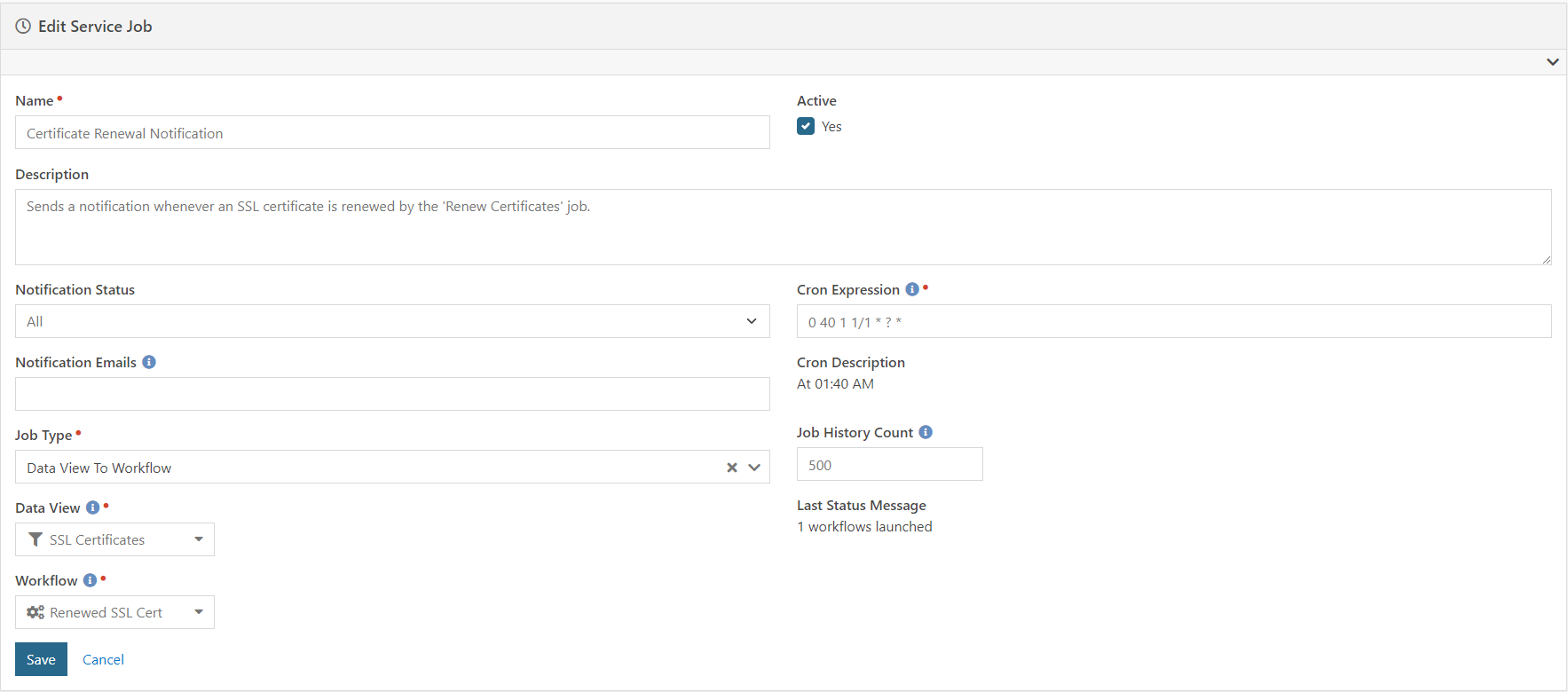
5. Create a job like this that runs about 30 minutes after the Certificate Renewal job:
Download related file (Renewed_SSL_Cert_202110121306.json)
Screenshots
- /GetImage.ashx?guid=6c8efcbb-21b5-4f44-8a0a-b06b2045a90d