Recipe - Custom Financial Transaction Attributes
Skill level: Beginner
Organization: Simple
{# strip images & classes from the HTML but otherwise leave structure #}
INTRO
Do you have a ballooning list of Financial Accounts due to various fundraisers or events?
Did you know that the core Transaction Block has a sneaky little extra feature built into it that enables you to set an attribute on each transaction based on a URL parameter? Why would this be useful to you? By presetting a Financial Transaction Attribute with a value of your choosing, you can reduce the need to create new Accounts for each special snowflake reason under the sun. This enables you to report on the account that these transactions are part of later including the attributes attributed to them.
Custom Financial Transaction Attributes from Harvest Bible Chapel Pittsburgh North on Vimeo.
Table of Contents
Click on the topics below to jump to that section:
PREREQUISITES
Ensure that your entire finance team and leadership is aligned with the way you are creating RockRMS Accounts and any additional Transaction Attributes for reporting purposes prior to implementing this process.
DOCUMENTATION
Before we dive into it, let's familiarize ourselves with some of the prerequisite items and the documentation on their use:
LET'S DIVE IN!
FINANCIAL TRANSACTION ATTRIBUTE SETUP
- Go to Admin Tools - System Settings - Entity Attributes
- Filter on the Financial Transaction entity type:
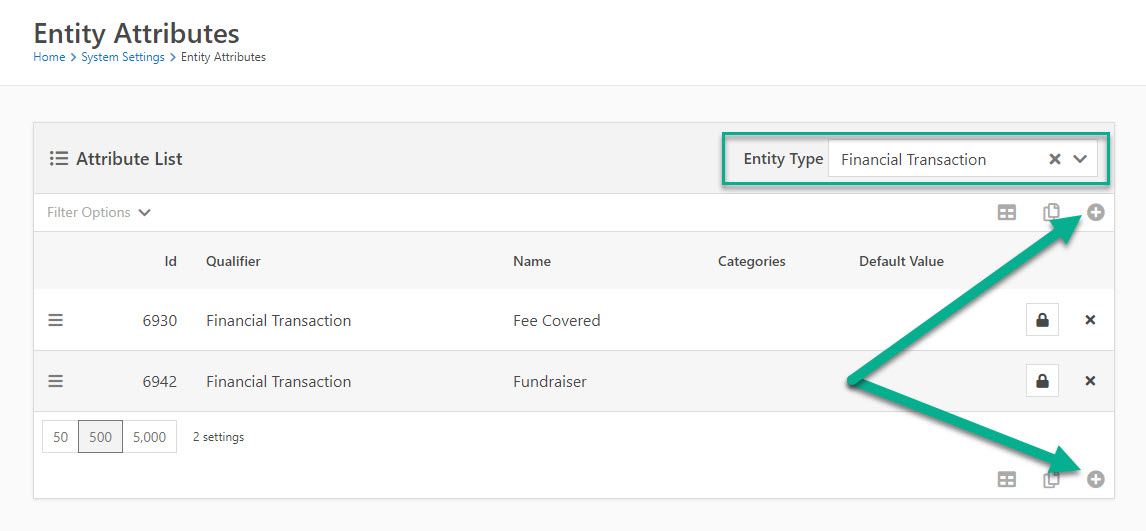
- Add a new attribute of your choosing by clicking on the " + " icon on the top or bottom of the grid of attribute list.
For this example we will be adding an Attribute called Fundraiser:
- Entity Type: Financial Transaction
Name: Fundraiser
Description: make this very descriptive so that you know what the purpose of this attribute is for in the future.
Key: Fundraiser
Field Type: Text (this is so that the text you put in the URL is what is set as the value of the attribute tied to each transaction).
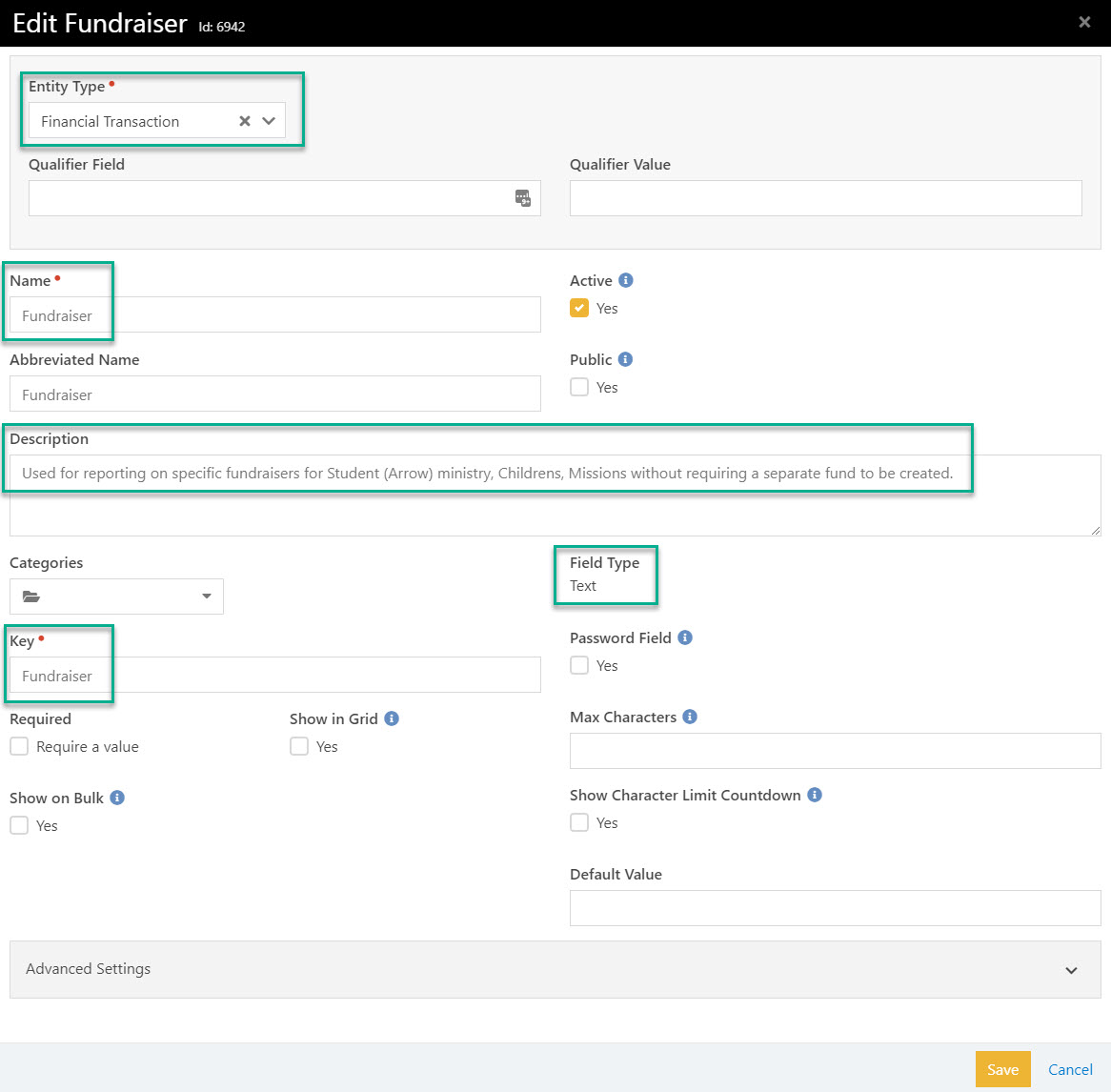
- Click Save
TRANSACTION ENTRY BLOCK SETUP
Now that you have a new entity attribute type for a Financial Transaction we can now wire it up to a new transaction entry block.
- Go to Admin Tools - CMS Configuration - Pages
- Create a new give page with a new Transaction Entry block on it
- Edit the block properties accordingly for your Basic Setting needs regarding Gateway, Accounts, etc.
- Edit the Advanced Settings of the block properties and scroll down to the bottom in order to set the Allowed Transaction Attributes From URL field:
- Set the new financial transaction attribute that you previously created into this field:
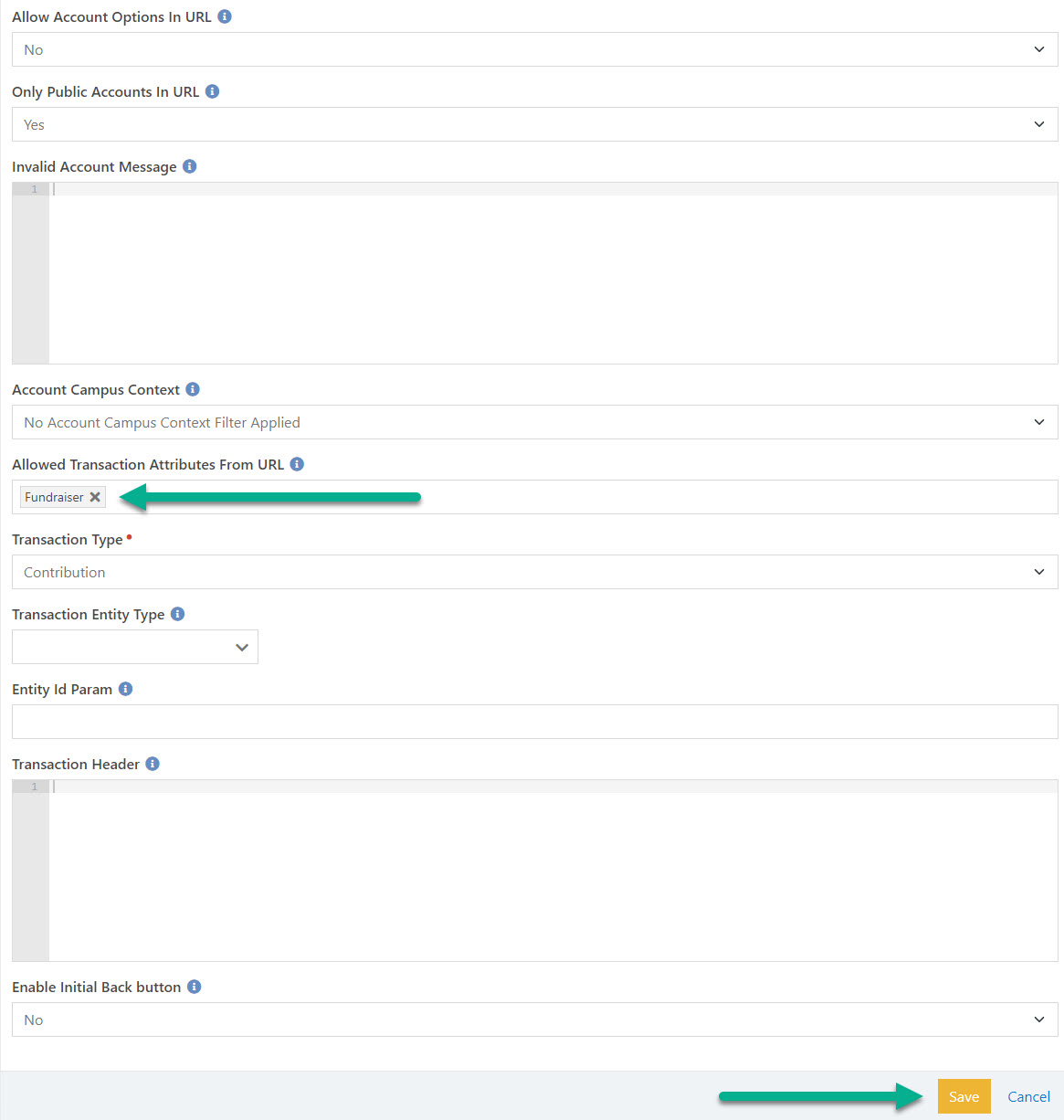
- Finally, create a link directly to this new page that has this special transaction entry block setting applied with a modified URL that includes the attribute parameter:
Example URL: https://rock.xxxxx.org/page/4027?Attribute_Fundraiser=MadCow
Example in the wild: https://www.harvestpittsburghnorth.org/madcow
Reminder: This feature is covered in the Rock Solid Finances documentation - Additional Transaction Entry Block Functionality section, but likely gets overlooked due to it’s amazingness! You’ll want to look at the "Attribute" paragraph within that documentation section for details
Note: You cannot use spaces in the url parameter for the attribute
REPORTING SETUP
Reducing the need for child-accounts in this simple way can save your finance team a massive headache on reconciliation and bookkeeping. However if you want to see the various attributes tied to the financial transaction using this method you may need a little bit of SQL in order to report on them.
Here is an example of that to get you started for individual transactions that have an attribute set:
SELECT
    FORMAT(ftd.Amount,'C') [Amount],
    ftd.CreatedDateTime,
    ftd.Summary,
    att.Name [TransactionAttribute],
    av.Value [Fundraiser]
FROM
    [FinancialTransactionDetail] ftd
    LEFT JOIN Attribute att
        ON att."Key" = 'Fundraiser'
    LEFT JOIN AttributeValue av
        ON av.AttributeId = Att.Id
        AND av.EntityId = ftd.Id
WHERE av.EntityId != ''
ORDER BY ftd.CreatedDateTime desc

Here is an example of a total by attribute summary of transactions:
WITH fundraiser_txs_CTE(Amount, TransactionAttribute, Fundraiser)
AS (

SELECT
    SUM(ftd.Amount) [Amount],
    att.Name [TransactionAttribute],
    av.Value [Fundraiser]
FROM
    [FinancialTransactionDetail] ftd
    LEFT JOIN Attribute att
        ON att."Key" = 'Fundraiser'
    LEFT JOIN AttributeValue av
        ON av.AttributeId = Att.Id
        AND av.EntityId = ftd.Id
WHERE av.EntityId != ''
  GROUP BY
      av.Value, att.Name
)

SELECT
    FORMAT(Amount,'C') [Total],
    TransactionAttribute,
    Fundraiser
FROM fundraiser_txs_CTE
GROUP BY Amount, TransactionAttribute, Fundraiser
ORDER BY Fundraiser;
FINAL THOUGHTS
This is a simple way of reducing the bloat of adding Financial Accounts each time a new needs arises. This method of setting a financial transaction attribute may give you many ideas for other needs you may have in the future. Feel free to make suggestions on bettering this recipe and I'll be happy to update the content as needed.
Screenshots
- /GetImage.ashx?guid=8843c0d8-01a6-4200-9bab-922508293f80