Recipe - Adding Additional Information to Check-in Search Results
Skill level: Beginner
Organization: Passion City Church
Requires Rock: 1.10.0
{# strip images & classes from the HTML but otherwise leave structure #}
Adding Ages/Birthdates to Family Select list in Check-in
While searching from the check-in screen is generally straight forward and simple, in some situations we've found it useful to add more information to the search results. This is especially helpful for those churches using volunteers to manage check-in, as it helps bring clarity to the search results so that they can quickly find the person they are searching for. For example, we add ages to our child check-in areas so that our volunteers can quickly select the right family on the screen, and so that they will have key information that helps them connect with the family while they are standing in front of them.
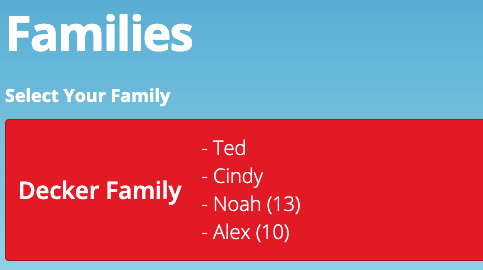
To modify the search results display, navigate to Admin Settings -> Check-in -> Check-in Configuration. Choose the Check-in Configuration that you'd like to modify and select "Edit" in the configuration block.
Under "Display Settings" there are 3 areas to choose from. (Before changing any of these I recommend making a backup copy!!) To modify the search results we'll be adding some lava the Family Select Template.
Our check-in teams found it very helpful to display ages next to children's names, helping them quickly identify the kids and address them by name.
In the Family Select Template replace all text with this code:
<a class='btn btn-primary btn-large btn-block btn-checkin-select'>
<div class="row">
    {{ Family.Group.Name }}
    <span class='checkin-sub-title'>
      {% assign familyGroupArray = Family.Group.Id | GroupById %}
      {% assign familyGroup = familyGroupArray.Members | OrderBy:'Person.AgeClassification asc,Person.Age desc' %}
      {% for familyGroupMember in familyGroup %}
        <div style="text-align:left">
          {% if familyGroupMember.Person.Age > 18 and familyGroupMember.Person.IsDeceased == false %}
            - {{ familyGroupMember.Person.NickName }}
          {% elseif familyGroupMember.Person.AgeClassification == 'Child' and familyGroupMember.Person.IsDeceased == false %}
            {% if familyGroupMember.Person.AgePrecise < 1 %}
              {% assign now = 'Now' | Date %}
              {% capture DateDifference %}{{ familyGroupMember.Person.BirthDate | AsDateTime | DateDiff:now,"M" }}{% endcapture %}
              {% assign LengthMonths = DateDifference | AsInteger %}
                - {{ familyGroupMember.Person.NickName }} ({{ LengthMonths }} Months)
            {% elseif familyGroupMember.Person.Age >= 1 and familyGroupMember.Person.Age <= 18 %}
                - {{ familyGroupMember.Person.NickName }} ({{ familyGroupMember.Person.Age }})
            {% else %}
                - {{ familyGroupMember.Person.NickName }} (Age Unknown)
            {% endif %}
          {% endif %}
        </div>
      {% endfor %}
    </span>
</div>
</a>
This will add a child's age in parenthesis after their name, but will not display anything for anyone over 18. You can adjust to list everyone with an unknown age to display first by checking for != null for Person.Age.
Adding symbols as check-in indicators
With a few adjustments we also added symbols to designate those who are already participants in our student and children ministry's groups, as well as to quickly identify volunteers who were eligible for check-in based on valid group membership and background check status. You could also use symbols to indicate first time guests, people in certain dataviews, birthdays, special needs or allergies!
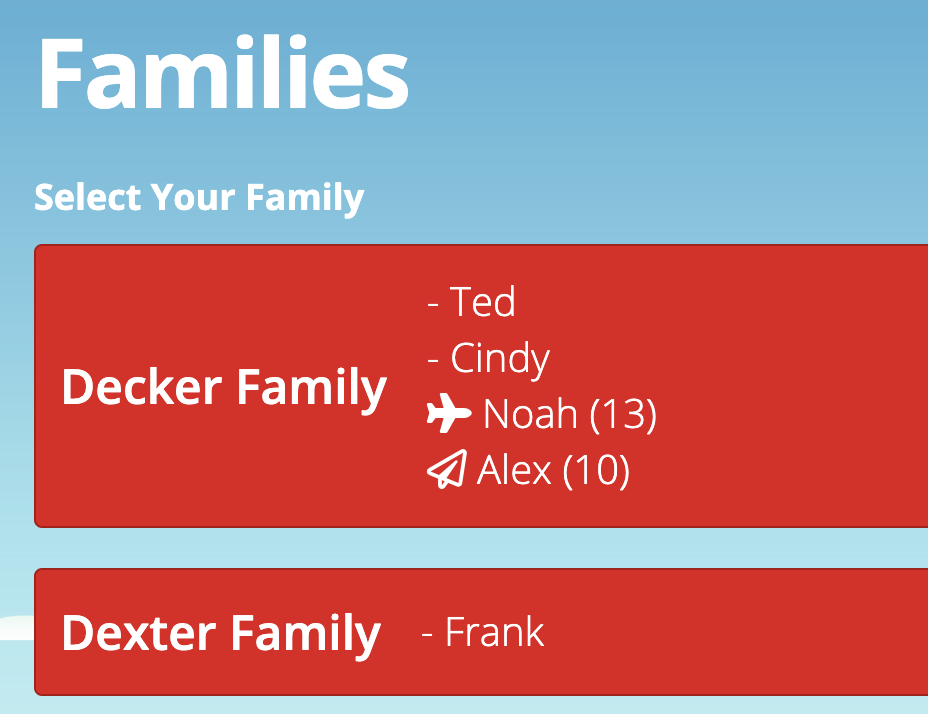
In the same Display Settings area under a Check-in Configuration, replace the Family Select Template with the following code to display an icon for anyone who is a member of a high school, middle school, elementary or infant group on the Rock RMS demo server. You'll need to adjust the group ID's for your configuration, but remember that conditionals can also be other things besides groups!
<a class='btn btn-primary btn-large btn-block btn-checkin-select'>
            <div class="row">
                {{ Family.Group.Name }}
                <span class='checkin-sub-title'>
                  {% assign familyGroupArray = Family.Group.Id | GroupById %}
                  {% assign familyGroup = familyGroupArray.Members | OrderBy:'Person.AgeClassification asc,Person.Age desc' %}
                  {% for familyGroupMember in familyGroup %}
                    <div style="text-align:left">
                      {% if familyGroupMember.Person.Age > 18 and familyGroupMember.Person.IsDeceased == false %}
                        - {{ familyGroupMember.Person.NickName }}
                      {% elseif familyGroupMember.Person.AgeClassification == 'Child' and familyGroupMember.Person.IsDeceased == false %}
                        {% assign infant = familyGroupMember.Person | Groups: "19",'Active' | Size %}
                        {% assign elem = familyGroupMember.Person | Groups: "20",'Active' | Size %}
                        {% assign ms = familyGroupMember.Person | Groups: "21",'Active' | Size %}
                        {% assign hs = familyGroupMember.Person | Groups: "22",'Active' | Size %}
                        {% if hs > 0 %}
                        <i class="fas fa-fighter-jet"></i>
                        {% elseif ms > 0 %}
                        <i class="fas fa-plane"></i>
                        {% elseif elem > 0 %}
                        <i class="far fa-paper-plane"></i>
                        {% elseif infant > 0 %}
                        <i class="fas fa-baby"></i>
                        {% endif %}
                        {% if familyGroupMember.Person.AgePrecise < 1 %}
                          {% assign now = 'Now' | Date %}
                          {% capture DateDifference %}{{ familyGroupMember.Person.BirthDate | AsDateTime | DateDiff:now,"M" }}{% endcapture %}
                          {% assign LengthMonths = DateDifference | AsInteger %}
                            {{ familyGroupMember.Person.NickName }} ({{ LengthMonths }} Months)
                        {% elseif familyGroupMember.Person.Age >= 1 and familyGroupMember.Person.Age <= 18 %}
                            {{ familyGroupMember.Person.NickName }} ({{ familyGroupMember.Person.Age }})
                        {% else %}
                            {{ familyGroupMember.Person.NickName }} (Age Unknown)
                        {% endif %}
                      {% endif %}
                    </div>
                  {% endfor %}
                </span>
            </div>
            </a>
Screenshots
- /GetImage.ashx?guid=ee0db5ad-41df-4b74-a068-410f0b08f6e0