Recipe - Countdown to next Online Service
Skill level: Intermediate
Organization: ONE&ALL Church
Requires Rock: 1.9.0
{# strip images & classes from the HTML but otherwise leave structure #}
For those of us who want a countdown timer to your next live service and don't use version 3 of Life Church's Church Online Platform. I have modified their code to use Rock schedules.
What you will need:
- A schedule Category with all your services underneath. Get the CategoryID from the url (https://admin.oneandall.church/page/180?CategoryId=539&ExpandedIds=C539%2cC50)
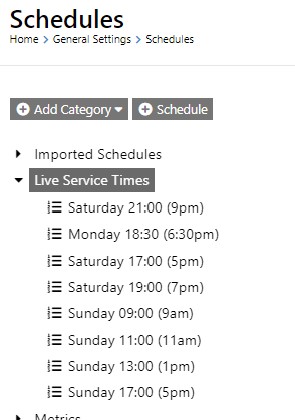
- Create an html block where you want the live notification.
- Add the code below
- modify the
{%- assign scheduleid = 539 -%} for your Category from step 1
The Code
CSS
.counter {
  display: inline-block;
  min-width: 150px;
  padding: 0;
  font-weight: 400;
  border-radius: 8px
}
.counter div {
  position: relative;
  display: inline-block;
  margin-right: 2px;
  margin-left: 2px;
  width: 26px
}
.counter.days, .counter.hours, .counter.minutes, .counter.seconds {
  position: relative;
  display: inline-block;
  margin-right: 5px;
  text-align: center
}
.counter.days .value, .counter.hours .value, .counter.minutes .value, .counter.seconds .value {
  display: block;
  width: 100%
}
.counter.days .span, .counter.hours .span, .counter.minutes .span, .counter.seconds .span {
  display: block;
  width: 100%;
  font-size: 8pt;
  opacity: 0.8
}
.counter .hours::before, .counter .minutes::before, .counter .seconds::before {
  position: absolute;
  top: -3px;
  left: -7px;
  font-size: 20pt;
  content: ":";
  opacity: 0.7;
  animation: blink 1s ease-in-out infinite
}
#liveBar {
  position: relative;
  z-index: 999
}
.live-btn {
  padding: 0 7px;
  font-size: 16px;
  font-weight: 400;
  line-height: 25px;
  letter-spacing: 3px;
  vertical-align: 3px;
  border: 1px solid;
  border-radius: 5px
}
.live-btn i {
  font-size: 8px;
  vertical-align: 3px
}
.live-btn .not-live {
  color: red
}
.live-btn .is-live {
  color: #00d000
}
.centerIt {
  position: absolute;
  top: 40%;
  left: 50%;
  transform: translateX(-50%) translateY(-50%)
}
@keyframes blink {
  0% {
    opacity: 1
  }
  50% {
    opacity: 0.5
  }
  100% {
    opacity: 1
  }
}
#churchonline_counter a {
  color: #000
}
#churchonline_counter {
  overflow: auto;
  width: 300px;
  padding: 10px;
  display: none
}
#churchonline_counter .description, #churchonline_counter .time li .label {
  font-size: 0.8em
}
#churchonline_counter .time {
  list-style: none;
  padding: 0;
  margin: 10px 0 0 0
}
#churchonline_counter .time li {
  float: left;
  padding: 0 10px;
  text-align: center
}
#churchonline_counter .time li:first-child {
  padding-left: 0
}
#churchonline_counter .time li span {
  font-size: 1.2em
}
#churchonline_counter .no-live {
  display: inline-block;
  font-weight: 400
}
#churchonline_counter .live {
  display: none;
  font-weight: 400
}
html
{%- assign scheduleid = 539 -%}
<div id="liveBar" class="bg-yellow pt-2 pb-2">
	<div class="container">
  		<div class="row d-md-flex flex-center">
  			<div class="col-md-5 col-xs-12 text-sm-right text-center">
  				<h6 id="churchonline_counter" class="mt-0 mb-0">
  					<div class="d-inline-block live-btn font-primary-medium mr-2">
  						<a href="https://live.oneandall.church/">
  							<div class="no-live color-black">LIVE IN</div>
  							<div class="live color-black">LIVE NOW</div>
  							<span>
  								<i class="fas fa-circle not-live"></i>
  							</span>
		   				</a>
  					</div>
   				<a class="time" href="https://live.oneandall.church/">
  						<span class="counter h4 font-w-400 mt-0 mb-0">
   						<div class="days d-inline-block">
  								<div class="value"></div>
  							</div>
  							<div class="hours d-inline-block">
  								<div class="value"></div>
  							</div>
							<div class="minutes d-inline-block">
  								<div class="value"></div>
							</div>
  							<div class="seconds d-inline-block">
  								<div class="value"></div>
							</div>
						</span>
  					</a>
  				</h6>
			</div>
  		</div>
	</div>
</div>

<script type="text/javascript">
	jQuery(function() {
   	var days, goLive, hours, intervalId, minutes, seconds;
		goLive = function() {
      		$("#churchonline_counter .time").hide();
	      	$("#churchonline_counter .not-live").hide();
			$("#churchonline_counter .no-live").hide();
      		$("#churchonline_counter .live").show();
      		$("#churchonline_counter").show();
		};

        loadCountdown = function(data){
            var seconds_till;
      		if (data=='islive') {
      			return goLive();
      		} else {
      			dateString = data;
      			seconds_till = Math.abs((new Date(dateString)) - (new Date())) / 1000;
      			days = Math.floor(seconds_till / 86400);
      			hours = Math.floor((seconds_till % 86400) / 3600);
      			minutes = Math.floor((seconds_till % 3600) / 60);
      			seconds = Math.floor(seconds_till % 60);
      			return intervalId = setInterval(function() {
      				if (--seconds < 0) {
      					seconds = 59;
      					if (--minutes < 0) {
      						minutes = 59;
      						if (--hours < 0) {
      							hours = 23;
      							if (--days < 0) {
      								days = 0;
      							}
      						}
      					}
      				}
					$("#churchonline_counter .days").html((days.toString().length < 2) ? "0" + days : days);
					$("#churchonline_counter .hours").html((hours.toString().length < 2 ? "0" + hours : hours));
					$("#churchonline_counter .minutes").html((minutes.toString().length < 2 ? "0" + minutes : minutes));
					$("#churchonline_counter .seconds").html((seconds.toString().length < 2 ? "0" + seconds : seconds));
					if (seconds === 0 && minutes === 0 && hours === 0 && days === 0) {
						goLive();
						return clearInterval(intervalId);
					}
					$("#churchonline_counter").show();
      			}, 1000);
			}
		}
		days = void 0;
		hours = void 0;
		minutes = void 0;
		seconds = void 0;
		intervalId = void 0;
		data = "{[ scheduledcontent schedulecategoryid:'{{scheduleid}}' showwhen:'notlive'  ]}{{ NextOccurrenceDateTime | Date: 'yyyy/MM/dd HH:mm:ss' }}{[ endscheduledcontent ]}{[ scheduledcontent schedulecategoryid:'{{scheduleid}}' showwhen:'live'  ]}islive{[ endscheduledcontent ]}";
		loadCountdown(data);
	});
</script>
Screenshots
- /GetImage.ashx?guid=d1afb540-9fb1-49ff-a5ce-285896fb7cdf
- /GetImage.ashx?guid=099e1d0a-aa3b-4f3f-a620-7b57a7f32db3