Recipe - Add an Alert Banner to Your Site
Skill level: Intermediate
Organization: Emmanuel Church
Requires Rock: 1.9.0
{# strip images & classes from the HTML but otherwise leave structure #}
This banner has many uses of course. But we are currently using it to update our members about the COVID-19 outbreak. I have made the instructions as simple as possible, but there are requirements. You need to be confortable with some coding. You will need to create a lava file. Optional: Access and edit your Site.Master file on your Rock server to add a new Zone. More on that below.
First, here is a link to our site: https://eclife.org
#1. Optional. Access your Site.Master file on your server. Located here: inetpub > wwwroot > Themes > SiteTheme > Layouts
#2. Optional. Add a zone to the file
You will want to place the zone in the header area of your Site.Master file.
<div class="navbar-header">
    <button class="navbar-toggle" type="button" data-toggle="collapse" data-target=".navbar-collapse">
        <i class="fa fa-bars"></i>
    </button>
    <!-- Alert Bar -->
    <Rock:Zone Name="Alert Bar" runat="server" />
    <Rock:Zone Name="Header" runat="server" />
</div>
#3. Go into Rock and add a block to your new zone/Add a block to an existing zone
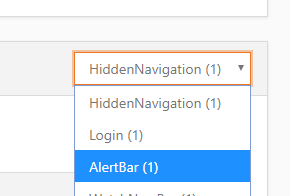
Choose your new zone or an existing zone. Ex: Header.
Make sure you choose the following options:
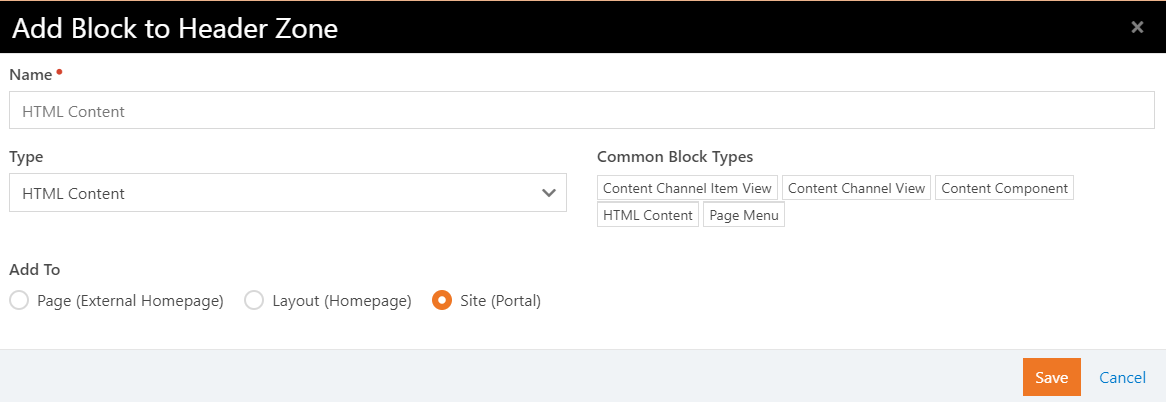
#4. Click the Edit HTML button and paste the following HTML code
<div class="row" style="background-color:red">
    <div class="col-sm-12 text-center">
        <div class="page-header">
            <h3><a style="color:#fff; text-decoration: none;" href="add-a-link-here">Your Church Name COVID-19 update.</a></h3>
        </div>
    </div>
</div>
#5. Don't forget to add a link to your alert page
This is all done using the default Bootstrap framework and styling. If you use a different framework, you will need to change the classes.
Questions or suggestions? Let me know in the comments below!
Screenshots
- /GetImage.ashx?guid=8d87b277-8b35-4fe1-8892-7b7b9bc8c083