Recipe - File Metadata Shortcodes
Skill level: Intermediate
Organization: The Well Community Church
{# strip images & classes from the HTML but otherwise leave structure #}
Description
I recently set up a page of downloadable resources for our staff and ended up creating a couple of re-usable Lava Shortcodes for displaying file metadata.
filesize takes a numeric size in bytes, converts it to the most human readable unit of measurement, and then outputs it in a clean format. For example, 100000 bytes becomes '97KB', 10000000 bytes becomes '9.5MB' and so on.filetypeicon takes a file extension and outputs HTML for the appropriate FontAwesome icon.
How To
Set up is pretty simple. Just go to Admin Tools > CMS Configuration > Lava Shortcodes, click the plus icon at the top right, and then copy the following settings in for each of the shortcodes.
Friendly File Size
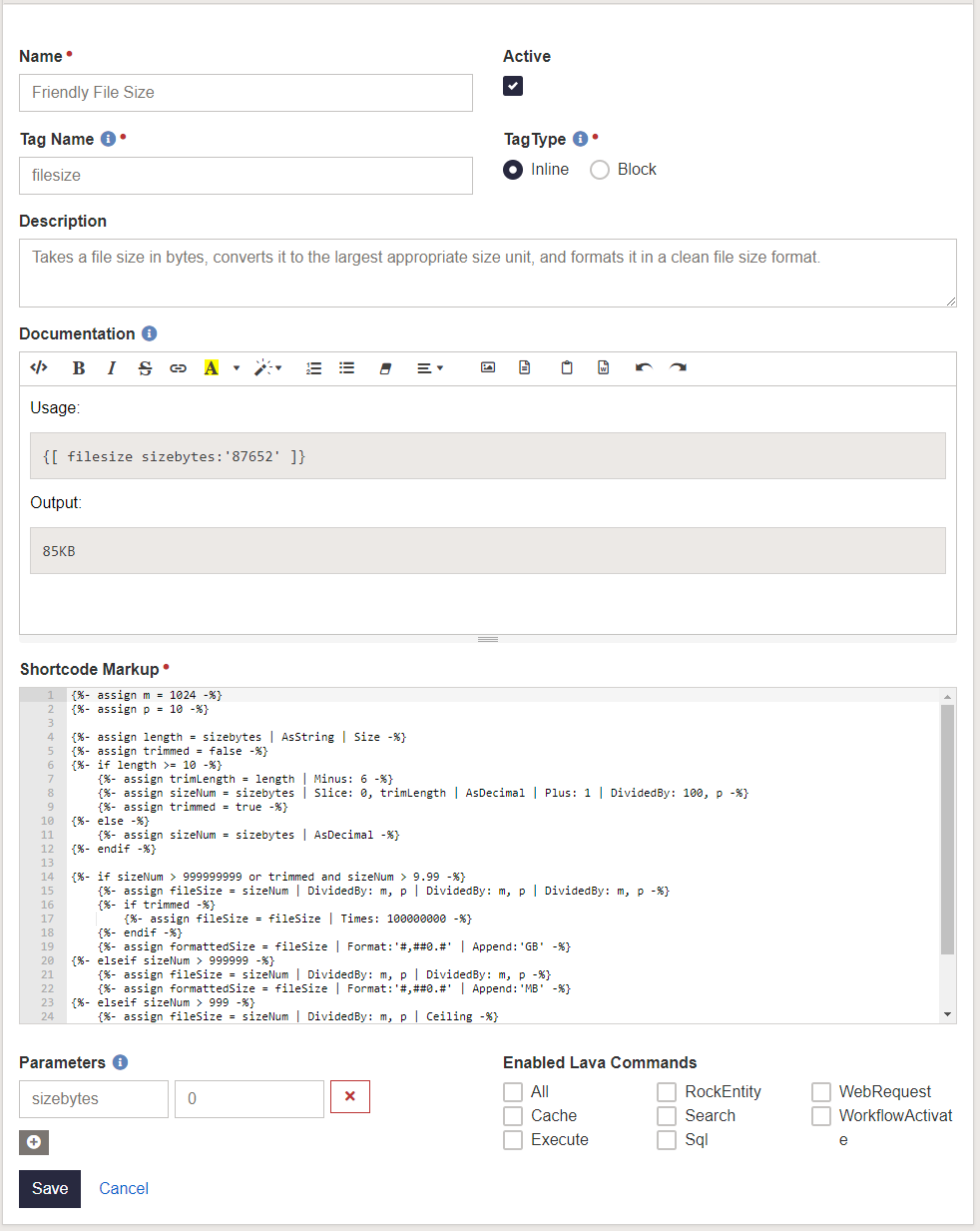
Here's the shortcode markup:
{%- assign m = 1024 -%}
{%- assign p = 10 -%}

{%- assign length = sizebytes | AsString | Size -%}
{%- assign trimmed = false -%}
{%- if length >= 10 -%}
    {%- assign trimLength = length | Minus: 6 -%}
    {%- assign sizeNum = sizebytes | Slice: 0, trimLength | AsDecimal | Plus: 1 | DividedBy: 100, p -%}
    {%- assign trimmed = true -%}
{%- else -%}
    {%- assign sizeNum = sizebytes | AsDecimal -%}
{%- endif -%}

{%- if sizeNum > 999999999 or trimmed and sizeNum > 9.99 -%}
    {%- assign fileSize = sizeNum | DividedBy: m, p | DividedBy: m, p | DividedBy: m, p -%}
    {%- if trimmed -%}
        {%- assign fileSize = fileSize | Times: 100000000 -%}
    {%- endif -%}
    {%- assign formattedSize = fileSize | Format:'#,##0.#' | Append:'GB' -%}
{%- elseif sizeNum > 999999 -%}
    {%- assign fileSize = sizeNum | DividedBy: m, p | DividedBy: m, p -%}
    {%- assign formattedSize = fileSize | Format:'#,##0.#' | Append:'MB' -%}
{%- elseif sizeNum > 999 -%}
    {%- assign fileSize = sizeNum | DividedBy: m, p | Ceiling -%}
    {%- assign formattedSize = fileSize | Format:'#,##0' | Append:'KB' -%}
{%- else -%}
    {%- assign formattedSize = sizeNum | Format:'#,##0' | Append:'B' -%}
{%- endif -%}
{{ formattedSize }}
File Type Icons
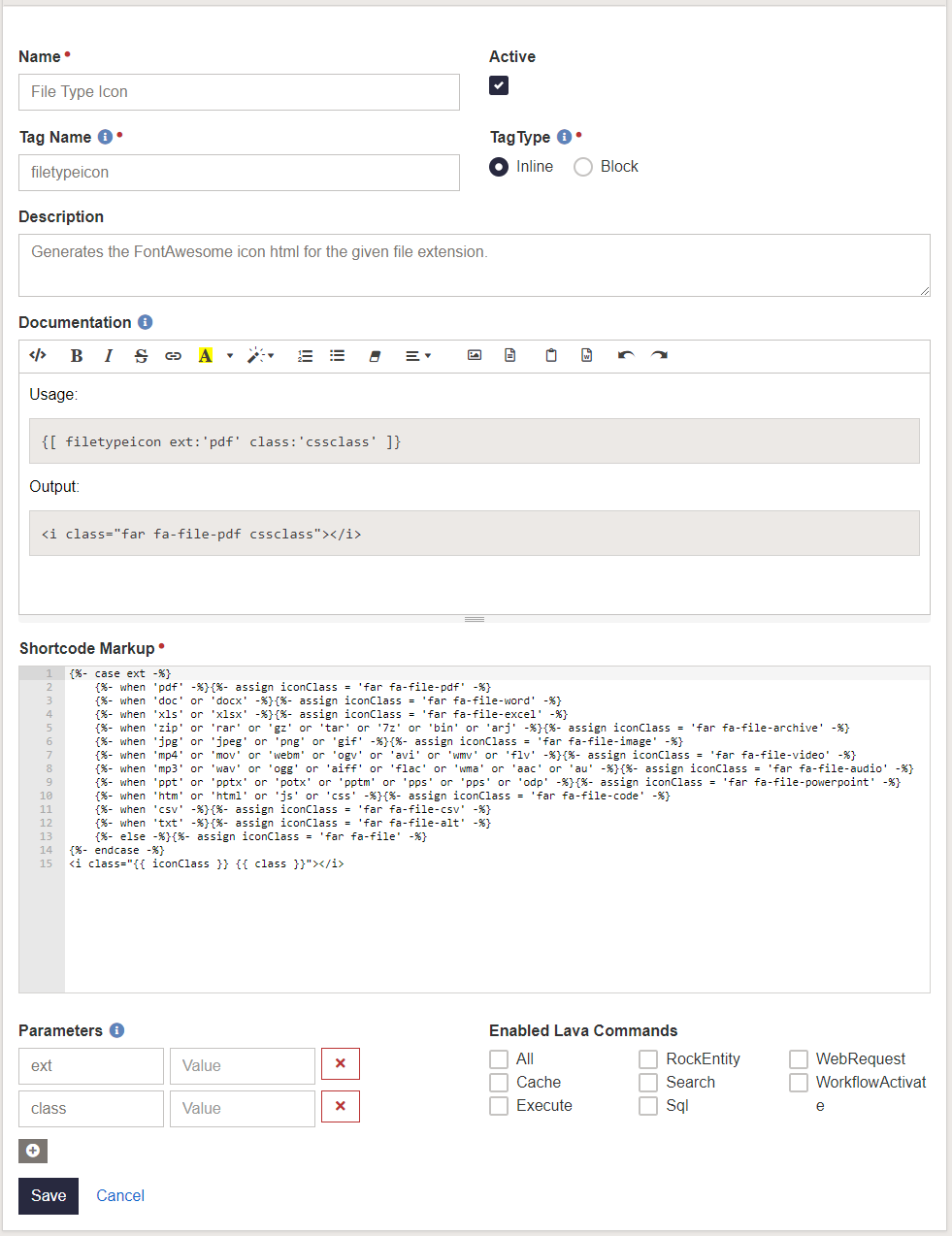
Here's the shortcode markup:
{%- case ext -%}
    {%- when 'pdf' -%}{%- assign iconClass = 'far fa-file-pdf' -%}
    {%- when 'doc' or 'docx' -%}{%- assign iconClass = 'far fa-file-word' -%}
    {%- when 'xls' or 'xlsx' -%}{%- assign iconClass = 'far fa-file-excel' -%}
    {%- when 'zip' or 'rar' or 'gz' or 'tar' or '7z' or 'bin' or 'arj' -%}{%- assign iconClass = 'far fa-file-archive' -%}
    {%- when 'jpg' or 'jpeg' or 'png' or 'gif' -%}{%- assign iconClass = 'far fa-file-image' -%}
    {%- when 'mp4' or 'mov' or 'webm' or 'ogv' or 'avi' or 'wmv' or 'flv' -%}{%- assign iconClass = 'far fa-file-video' -%}
    {%- when 'mp3' or 'wav' or 'ogg' or 'aiff' or 'flac' or 'wma' or 'aac' or 'au' -%}{%- assign iconClass = 'far fa-file-audio' -%}
    {%- when 'ppt' or 'pptx' or 'potx' or 'pptm' or 'pps' or 'pps' or 'odp' -%}{%- assign iconClass = 'far fa-file-powerpoint' -%}
    {%- when 'htm' or 'html' or 'js' or 'css' -%}{%- assign iconClass = 'far fa-file-code' -%}
    {%- when 'csv' -%}{%- assign iconClass = 'far fa-file-csv' -%}
    {%- when 'txt' -%}{%- assign iconClass = 'far fa-file-alt' -%}
    {%- else -%}{%- assign iconClass = 'far fa-file' -%}
{%- endcase -%}
The included extensions are just the ones I quickly thought of off the top of my head, so there are probably some missing ones that are a lot more relevant than what I included. Leave a comment if you think of some I missed.
Follow Up
Please don't hesitate to leave a comment or hit me up on Rock Chat (@JeffRichmond) if you have questions or find any issues with these shortcodes.
Change Log
- 2019-11-21 - Initial Version
Screenshots
- /GetImage.ashx?guid=71a6a28f-a92f-4d94-8eb8-1b830fc86b21
- /GetImage.ashx?guid=b398e3bf-6812-4f71-9a04-d8220d7152b2