Question - Guide for exposing RockRMS to internet
Hello,
Everyone, I am self-hosting on Azure and I have succesfully configured Rock with the Web Server.
I am trying to expose it to the internet. I have added our Internal Application Root to https://admin.dev.churchsite.org and have added an A record for this that points to the Public IP of my Web VM.
This isnt working.
Additionally, when I try to hit the public IP of the VM it just loads forever until it times out.
Any guidance you guys can provide?
Thanks,
Victor
Accepted Answer
When you installed Rock did you make the Internal URL and Public URL different?
The internal URL should be admin.dev.churchsite.org which would take you to the login/admin home page.
The public URL is the public facing site which you would set to a different url.
https://community.rockrms.com/documentation/bookcontent/1/#installingrock
If this wasn't setup properly you can try go to admin.dev.churchsite.org/admin
If this is the case, you will need to change the domains to the External and Internal sites to be different domains which you can find at admin.dev.churchsite.org/Sites
Other Answers
Do you have port 80 & 443 open for inbound traffic from all sources in the Network Security Group in Azure?
https://learn.microsoft.com/en-us/azure/virtual-network/network-security-groups-overview
Ok this worked. That port was not open.
Now that it works, when I go to admin.dev.churchsite.org - it takes me to the public facing site instead of the login page or the admin home page (if already signed in)
any guidance on this?
In General Settings -> Global Attributes I have the following:
Internal application root: http://admin.dev.churchsite.org
Public application root: www.churchsite.org
If I go to admin.dev.churchsite.org/admin - it directs to the right admin home page but I would like it to be just the top level domain, such as admin.dev.churchsite.org
Is this possible?
Thanks for your guidance.
Victor
Yes, Cameron is right. You will want to check your configuration for the External Website and the Rock RMS (admin site). Those domains configured there dictate which "site" the person is directed to (i.e., which site and default page is loaded).
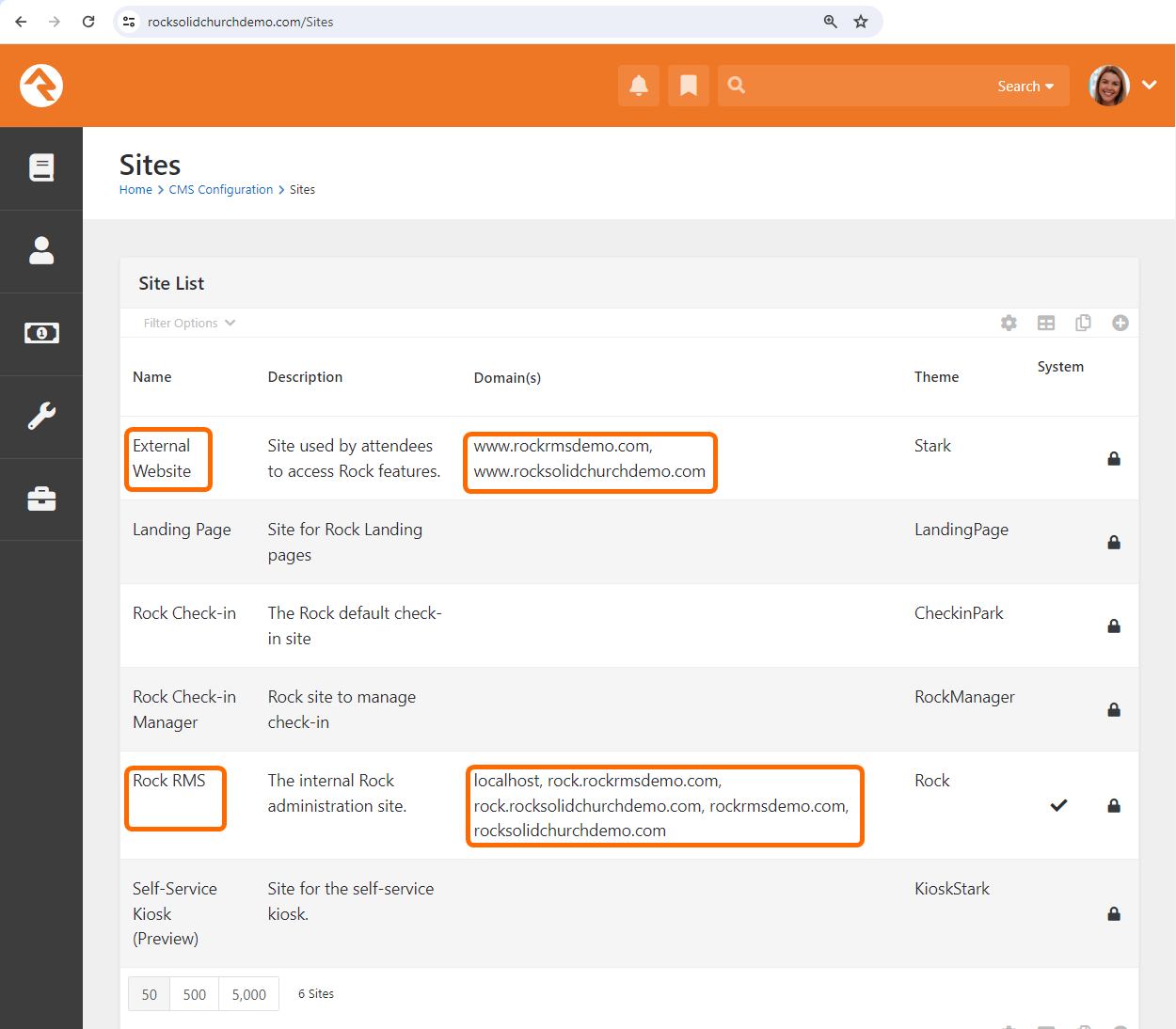
Got it - I was actually in the Global Attributes section. When I went to the sites subdomain I added admin.dev.churchsite.org and this now redirects me directly to the login page.
The guide should probably updated to reflect this. I am considering this answered.
Thanks!
Victor