Lava Shortcode - Sparkline Chart
Description
Render small inline charts to display compact data trends.
Documentation
Creating Sparklines with Lava is ridiculously easy with this shortcode. Basic examples for each type are shown below.
{[ sparkline type:'line' data:'5,6,7,9,9,5,3,2,2,4,6,7' ]}

{[ sparkline type:'bar' data:'5,6,7,2,0,-4,-2,4 ' ]}

{[ sparkline type:'tristate' data:'1,1,0,1,-1,-1,1,-1,0,0,1,1' ]}

{[ sparkline type:'discrete' data:'4,6,7,7,4,3,2,1,4,4' ]}

{[ sparkline type:'bullet' data:'10,12,12,9,7' ]}

{[ sparkline type:'pie' data:'1,1,2' ]}

{[ sparkline type:'box' data:'4,27,34,52,54,59,61,68,78,82,85,87,91,93,100' ]}
Common Options
- type - (line) - Type of chart to display. One of 'line' (default), 'bar', 'tristate', 'discrete', 'bullet', 'pie' or 'box'
- chartwidth - (auto) - Width of the chart - Defaults to 'auto' - May be any valid css width - 1.5em, 20px, etc (using a number without a unit specifier won't do what you want) - This option does nothing for bar and tristate chars (see barwidth)
- chartheight - (auto) - Height of the chart - Defaults to 'auto' (line height of the containing tag)
- primarycolor (#ee7625) - The primary color of the chart. This will set the colors for all markers and lines.
- yaxisminvalue - Specify the minimum value to use for the range of Y values of the chart - Defaults to the minimum value supplied
- yaxismaxvalue - Specify the maximum value to use for the range of Y values of the chart - Defaults to the maximum value supplied
Line Charts

Line charts are the default chart type, but to specify the type explicitly set an option called "type" to "line".
- primarycolor (#ee7625) - The color of the line.
- fillcolor (#f7bd97) - The fill color of the area below the line.
- linewidth (1px) - The width, in pixels, of the line.
- lastpointcolor (#f80) - The color of the last data point. Provide 'none' to not show on the chart.
- maxpointcolor (#f80) - The color of the largest value in the data points. Provide 'none' to not show on the chart.
- minpointcolor (#f80) - The color of the smallest value in the data points. Provide 'none' to not show on the chart.
- pointrollovercolor (#f7bd97) - The color of the markers when you rollover them.
- linerollovercolor (#f7bd97) - The color of the line when you rollover data points.
- pointradius (1.5px) - Radius in pixels of all spot markers on the chart
- xaxisminvalue (undefined) - Specifies the minimum value to use for the X value of the chart
- xaxismaxvalue (undefined) - Specifies the maximum value to use for the X value of the chart
- normalminvalue - Specify minimum threshold values between which to draw a bar to denote the "normal" or expected range of values.
- normalmaxvalue - Specify minimum threshold values between which to draw a bar to denote the "normal" or expected range of values.
- normalrangecolor - CSS color used
Bar Charts

Set the "type" option to "bar" to generate bar charts. Values can be omitted by using the "null" value instead of a number.
- primarycolor (#ee7625) - The color of the bar.
- negativecolor (#f44) - CSS color used for negative values
- zerocolor (undefined) - CSS color used for values equal to zero
- nullcolor (undefined) - CSS color used for values equal to null - By default null values are omitted entirely, but setting this adds a thin marker for the entry - This can be useful if your chart is pretty sparse; perhaps try setting it to a light grey or something equally unobtrusive
- barwidth (4px) - Width of each bar, in pixels
- barspacing (1px) - Space between each bar, in pixels
- zeroaxis (true) - Centers the y-axis at zero if true
Tristate Charts

Tri-state charts are useful to show win-lose-draw information, such as the SF Giants recent game results at the top of the page. You can also use the colorMap option to use different colours for different values, or for arbitrary positions in the chart.
- primarycolor (#ee7625) - CSS color for positive (win) values
- negativecolor (#f44) - CSS color for negative (lose) values
- zerocolor (undefined) - CSS color for zero (draw) values
- barwidth (4px) - Width of each bar, in pixels (integer)
- barspacing (1px) - Space between each bar, in pixels (integer)
Discrete Charts

Discrete charts provide a separated thin vertical line for each value.
- primarycolor (#ee7625) - CSS color of the line.
- lineheight (auto) - Height of each line in pixels - Defaults to 30% of the graph height
- thresholdvalue (0) - Values less than this value will be drawn using thresholdColor instead of lineColor
- thresholdcolor (undefined) - Color to use in combination with thresholdValue
Bullet Graphs

Bullet graphs serve as a replacement for dashboard gauges and meters. (Read more at Wikipedia)
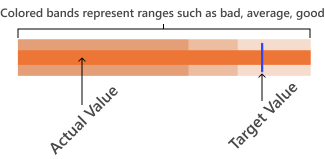
Supplied values must be in this order: target, performance, range1, range2, range3, ...
- primarycolor - The CSS color of the performance measure horizontal bar
- targetcolor (#33f) - The CSS color of the vertical target marker
- targetwidth (3px) - The width of the target marker in pixels (integer)
- rangecolors - Colors to use for each qualitative range background color - This must be a comma seperated list. eg red,green,#22f
Pie Charts

What could be better than a tiny piece of pie?
- fillcolor - An array of CSS colors to use for pie slices. (Comma seperated list. eg red,green,#22f)
- offset - Angle in degrees to orotate where the first slice will appear - Try -90 or +90
- borderwidth (0) - Width of the border to draw around the whole pie chart, in pixels. Defaults to 0 (no border)
- bordercolor - CSS color to use to draw the pie border. Defaults to #000
Box Plots

A box plot is a chart of statistical data based on the minimum, first quartile, median, third quartile, and maximum. (Read more at Wikipedia)
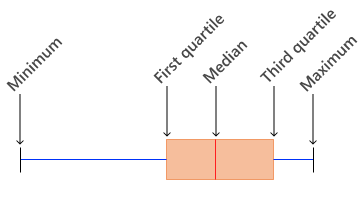
- primarycolor - CSS line color used to outline the box
- fillcolor - CSS fill color used for the box
- whiskercolor - CSS color used to draw the whiskers
- showoutliers (true) - Show or hide the outliers.
- outlierlinecolor - CSS color used to draw the outlier circles
- outlierfillcolor - CSS color used to fill the outlier circles
- pointradius - Radius in pixels to draw the outlier circles
- mediancolor - CSS color used to draw the median line
- target - If set to a value, then a small crosshair is drawn at that point to represent a target value
- targetcolor - CSS color used to draw the target crosshair, if set
- yaxisminvalue - If yaxisminvalue and yaxismaxvalue are set then the scale of the plot is fixed. By default yaxisminvalue and yaxismaxvalue are deduced from the values supplied
- yaxismaxvalue - See yaxisminvalue
Advanced Options
- cssclasstarget - Set value to create many of the same type of chart.
Example
{[ sparkline cssclasstarget:'sparkpie' type:'pie' ]}

<span class="sparkpie" data-values="2,5,10">Loading...</span>
<span class="sparkpie" data-values="5,10,20">Loading...</span>
...
Markup
{% javascript url:'/Scripts/sparkline/jquery-sparkline.min.js' id:'sparkline'%}{% endjavascript %}


{%- comment -%}{%- assign type = '' -%}{%- endcomment -%}

{% assign id = uniqueid %}
{%- assign renderChart = 'true' | AsBoolean -%}
{%- if cssclasstarget == '' -%}
  {%- assign class = 'sparkline-' | Append:id | Prepend:'.' -%}
  {%- assign data = data | Trim | Prepend:'[' | Append:']' -%}
{%- else -%}
  {%- assign data = '"html"' -%}
  {%- assign class = cssclasstarget | Trim -%}
  {%- assign renderChart = 'false' | AsBoolean -%}
{%- endif -%}


{%- if class != '' -%}
<span class="sparkline sparkline-{{ id }}">Loading...</span>
{%- endif -%}

{%- if fillcolor == '' -%}
{%- assign fillcolor = primarycolor | Lighten:'25%' -%}
{%- endif -%}

{%- assign linewidth = linewidth | Remove:'px' -%}
{%- assign pointradius = pointradius | Remove:'px' -%}
{%- assign barwidth = barwidth | Remove:'px' -%}
{%- assign barspacing = barspacing | Remove:'px' -%}

{%- capture chartJs -%}
  {%- if type == 'line' -%}
  $("{{class}}").sparkline({{data}}, {
      type: 'line'
      , width: '{{chartwidth}}'
      , height: '{{chartheight}}'
      , lineColor: '{{primarycolor}}'
      , fillColor: '{{fillcolor}}'
      , lineWidth: {{linewidth}}
      , spotColor: '{{lastpointcolor}}'
      , minSpotColor: '{{minpointcolor}}'
      , maxSpotColor: '{{maxpointcolor}}'
      , highlightSpotColor: '{{highlightpointcolor}}'
      , highlightLineColor: '{{highlightlinecolor}}'
      , spotRadius: {{pointradius}}
      , chartRangeMin: {{yaxisminvalue}}
      , chartRangeMax: {{yaxismaxvalue}}
      , chartRangeMinX: {{xaxisminvalue}}
      , chartRangeMaxX: {{xaxismaxvalue}}
      , normalRangeMin: {{normalminvalue}}
      , normalRangeMax: {{normalmaxvalue}}
      , normalRangeColor: '{{normalrangecolor}}'
    });
  {% elseif type == 'bar' %}
    {%- if stackedbarcolor != '' -%}
      {%- assign stackedbarcolor = stackedbarcolor | Prepend:'[' | Append:']' %}
    {%- endif -%}

    $("{{class}}").sparkline({{data}}, {
      type: 'bar'
      , height: '{{chartheight}}'
      , barWidth: {{barwidth}}
      , barSpacing: {{barspacing}}
      , barColor: '{{primarycolor}}'
      {%- if negativecolor != 'undefined' -%}, negBarColor: '{{negativecolor}}'{%- endif -%}
      {%- if zerocolor != 'undefined' -%}, zeroColor: '{{zerocolor}}'{%- endif -%}
      {%- if nullcolor != 'undefined' -%}, nullColor: '{{nullcolor}}'{%- endif -%}
      , zeroAxis: {{zeroaxis}}
    });
  {%- elseif type == 'tristate' -%}
    $("{{class}}").sparkline({{data}}, {
      type: 'tristate'
      , height: '{{chartheight}}'
      , posBarColor: '{{primarycolor}}'
      {%- if negativecolor != 'undefined' -%}, negBarColor: '{{negativecolor}}'{%- endif -%}
      {%- if zerocolor != 'undefined' -%}, zeroBarColor: '{{zerocolor}}'{%- endif -%}
      , barWidth: {{barwidth}}
      , barSpacing: {{barspacing}}
      , zeroAxis: {{zeroaxis}}
    });
  {%- elseif type == 'discrete' -%}
    $("{{class}}").sparkline({{data}}, {
      type: 'discrete'
      , width: '{{chartwidth}}'
      , height: '{{chartheight}}'
      , lineColor: '{{primarycolor}}'
      , lineHeight: '{{lineheight}}'
      , thresholdValue: {{thresholdvalue}}
      {%- if thresholdcolor != 'undefined' -%}, thresholdColor: '{{thresholdcolor}}'{%- endif -%}
    });
  {% elseif type == 'bullet' %}
    {%- if rangecolors != '' -%}
      {%- assign rangecolors = rangecolors | Split:',' | Join:'", "' | Prepend:'["' | Append:'"]' %}
    {% else %}
      {%- assign color = primarycolor | Lighten:'45%' -%}
      {% for num in (1..3) %}
        {%- assign color = color | Darken:'10%' -%}
        {%- assign rangecolors = rangecolors | Append:color | Append:',' %}
      {% endfor %}
      {%- assign rangecolors = rangecolors | Split:',' | Join:'", "' | Prepend:'["' | Append:'"]' %}
    {%- endif -%}

    $("{{class}}").sparkline({{data}}, {
      type: 'bullet'
      , height: '{{chartheight}}'
      , width: '{{chartwidth}}'
      , targetColor: '{{targetcolor}}'
      , performanceColor: '{{primarycolor}}'
      , targetWidth: {{targetwidth}}
      , rangeColors: {{rangecolors}}
    });
  {%- elseif type == 'pie' -%}
    {%- assign colorCount = fillcolor | Split:',' | Size -%}
    {%- assign slicecolors = '' -%}
    {%- if colorCount > 1 -%}
      {%- assign slicecolors = fillcolor | Split:',' | Join:'", "' | Prepend:'["' | Append:'"]' %}
    {%- endif -%}

    $("{{class}}").sparkline({{data}}, {
      type: 'pie'
      , width: '{{chartwidth}}'
      , height: '{{chartheight}}'
      {%- if slicecolors != '' -%}, sliceColors: {{slicecolors}}{%- endif -%}
      , offset: {{offset}}
      , borderWidth: {{borderwidth}}
      , borderColor: '{{bordercolor}}'
    });
  {%- elseif type == 'box' -%}
    $("{{class}}").sparkline({{data}}, {
      type: 'box'
      , width: '{{chartwidth}}'
      , height: '{{chartheight}}'
      {%- if target != 'undefined' -%}, target: '{{target}}'{%- endif -%}
      {%- if yaxisminvalue != 'undefined' -%}, chartRangeMin: {{yaxisminvalue}}{%- endif -%}
      {%- if yaxismaxvalue != 'undefined' -%}, chartRangeMax: {{yaxismaxvalue}}{%- endif -%}
      , boxLineColor: '{{primarycolor}}'
      , boxFillColor: '{{fillcolor}}'
      , whiskerColor: '{{whiskercolor}}'
      , showOutliers: {{showoutliers}}
      , outlierLineColor: '{{outlierlinecolor}}'
      , outlierFillColor: '{{outlierfillcolor}}'
      , medianColor: '{{mediancolor}}'
      , spotRadius: {{pointradius}}
      {%- if target != 'undefined' -%}, target: '{{target}}'{%- endif -%}
      , targetColor: '{{targetcolor}}'
      , chartRangeMin: {{yaxisminvalue}}
      , chartRangeMax: {{yaxismaxvalue}}
    });
  {%- endif -%}
{%- endcapture -%}

{%- if renderChart -%}
  <script>
  {{ chartJs }}
  </script>
{% else %}
  {%- javascript id:class -%}
  {{ chartJs }}
  {%- endjavascript -%}
{%- endif -%}