Blog - Ending Support for Legacy Lava
Published: Feb 17, 2023
If your Rock instance Lava Support Level Global Attribute is already
set to the "No Legacy" mode, then you can skip this article.
Over eight years ago we first announced that there was a new, far more performant way
of getting attributes using Lava. We called the old way "Legacy Lava" and we kept it
around to ensure we didn't break anything by taking it away while it was still in use.
We wanted to give people time to make the needed updates.
Now, as of Rock v16, we're removing support for Legacy Lava.
To prepare for this upgrade, you should check your
Lava Support Level Global Attribute
(Admin Tools > General Settings > Global Attributes)
and see if it's still set to
"Legacy With Warning".
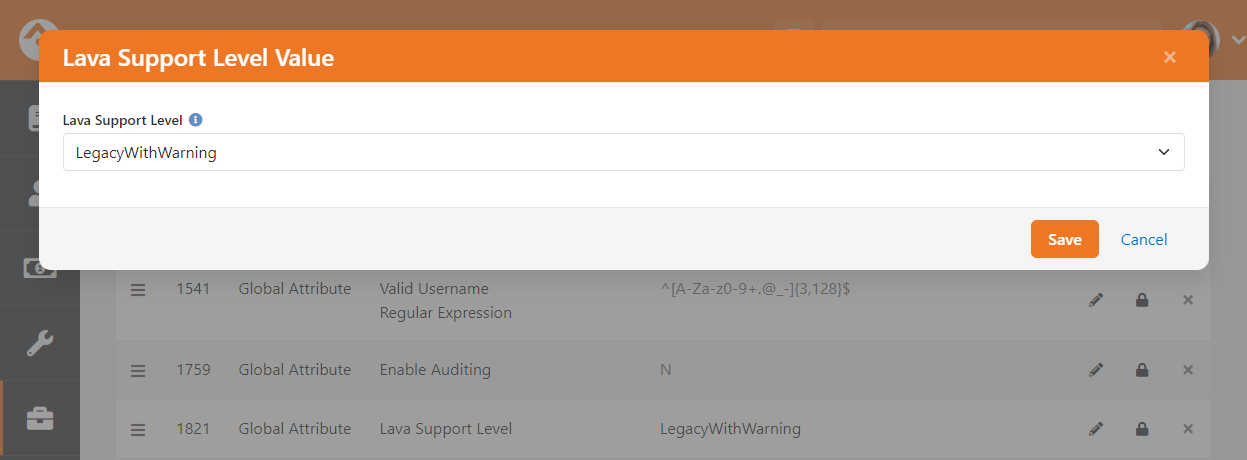
If it's still set to
"Legacy With Warning", you'll want to review your system exceptions
(Admin Tools > System Settings > Exception List)
to look for places in Rock where you might be using Legacy Lava syntax.
If you find Legacy Lava exceptions, track them down and update them
to use the proper Lava syntax (e.g. {{ Person | Attribute:'AttributeKey' }}). You may find
this community recipe
helpful for that task.
If you find no Legacy Lava exceptions, or if you've resolved them all, change the Lava
Support Level Global Attribute to "No Legacy".
Once you've switched over to "No Legacy" you'll be all set for the arrival of Rock v16.